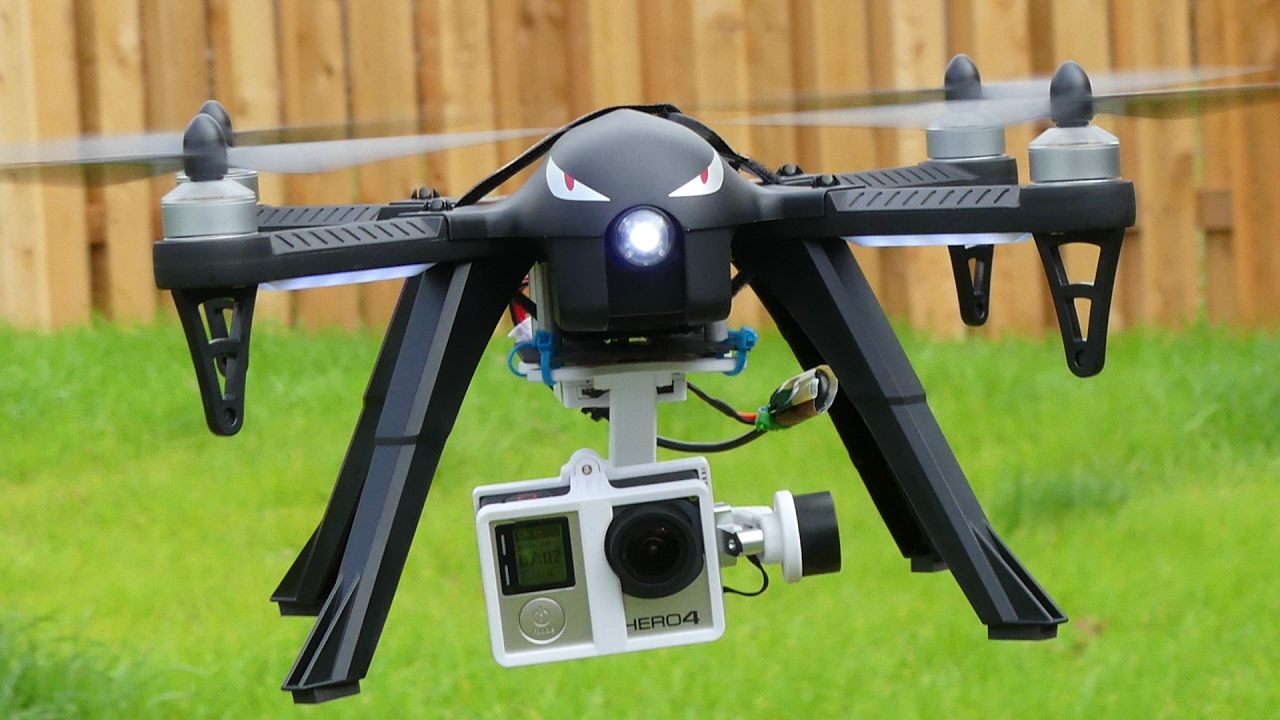
A drone gimbal is a motorized stabilizing mount that holds the camera and keeps it level while the aircraft pitches, rolls, or yaws, using sensors and motors to counteract movement in real time. Understanding what is gimbal on a drone is essential for capturing smooth, professional-grade footage, as this subsystem isolates the camera from the drone's vibrations and lets it point independently for panning, tilting, and tracking shots.
What is a gimbal on a drone?
A gimbal is the part that lets the camera tilt and stay stabilized while the drone pitches, rolls, or yaws. DJI separates gimbal settings from the rest of aircraft controls, which shows it is a camera-stability subsystem rather than a flight mode.
How a drone gimbal works
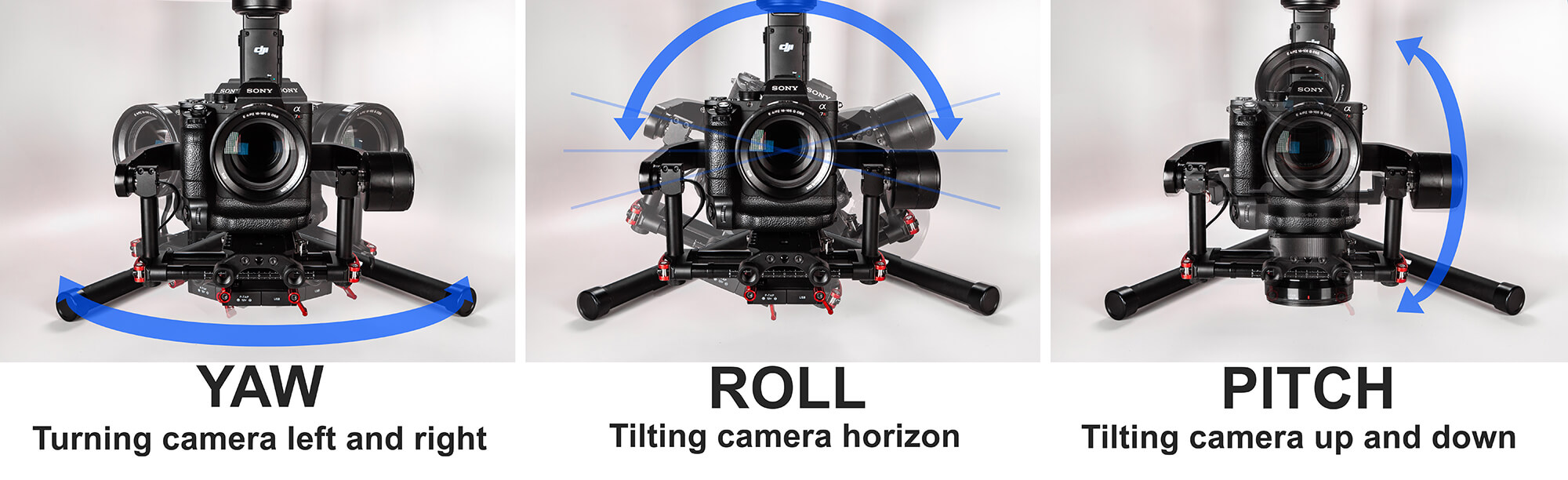
The gimbal uses a three-axis system, roll, pitch, and yaw, to maintain the camera's orientation. Sensors detect any movement or deviation from the desired position, and motors react quickly to counteract those movements, keeping the camera level and steady. Algorithms interpret the sensor data and instruct the motors on how to react, a process that is incredibly fast and accurate. This allows the gimbal to compensate for even the smallest vibrations or movements of the drone, producing smooth footage even in wind or during sudden maneuvers.
Why a gimbal matters for your footage
The gimbal is important because it smooths footage and lets the camera point independently of the drone's motion. It eliminates the effects of camera shake caused by turbulence and vibrations, resulting in clear, steady shots. The gimbal also provides smooth and fluid camera movements, allowing the camera to smoothly pan, tilt, and rotate in any direction, which is especially valuable for aerial videography where capturing cinematic shots is highly desirable. It improves overall image and video quality by reducing blurriness and distortion, and enhances the pilot's control by allowing them to adjust the camera's position remotely.
How to calibrate a drone gimbal
DJI’s troubleshooting guidance treats calibration and fine-tuning as the main documented fixes when the gimbal shakes or drifts. DJI's Aircraft Gimbal Calibration Guide says to calibrate through DJI Fly after powering on the aircraft and remote controller and entering camera view. The steps are performed in the flight app.
In DJI Fly
- Open camera view.
- Tap the System Settings icon (···) in the upper-right corner.
- Go to Control > Gimbal Calibration > Auto.
- For manual fine-tuning, use System Settings (···) > Control > Gimbal Calibration > Manual.
In DJI GO 4
- Open camera view.
- Tap System Settings (···).
- Go to Gimbal Settings (camera icon) > Gimbal Auto Calibration.
- For fine-tuning, go to System Settings (···) > Gimbal Settings (camera icon) > Adjust Gimbal.
Using the remote controller and goggles
The gimbal tilt angle can also be controlled by toggling the Gimbal Dial on the upper left corner of the remote controller. For DJI Avata Series and DJI FPV models, use the Goggles for calibration, not the app menu. Litchi Magic Leash is only supported on Android, and in-app Pano stitching is only supported on iOS. Maven app requires iOS 15.6 or later on iPhone. Another DJI-related app requires iOS 15.0 or later on iPhone.
When to calibrate or fine-tune your gimbal
Calibration and fine-tuning are the main fixes when the gimbal shakes, drifts, or the horizon is tilted. This is a camera-stability function, not a flight mode. DJI’s support pages describe gimbal control as a camera-view function in the flight app, and they document calibration, fine-tuning, and shake troubleshooting paths. If you use DJI gimbal accessories or want to explore how to use DJI gimbal features for virtual reality and accessories, the calibration process remains the same: it is always performed through the flight app or the Goggles for supported models.
Frequently Asked Questions
What is a gimbal on a drone?
How does a drone gimbal work?
It uses motors and sensors to detect the drone's movements in real time. The sensors measure pitch, roll, and yaw, and the motors adjust the camera angle to counteract those movements, maintaining a stable and level camera throughout the flight.
Why is a gimbal important for drone photography and videography?
It eliminates unwanted camera movements caused by the drone's flight, providing stabilization that results in professional-quality footage and images free from blurring or shaking.
How do I fix a shaky gimbal?
DJI’s documented fix is to perform a gimbal calibration or fine-tuning through the flight app. In DJI Fly, use System Settings (···) > Control > Gimbal Calibration > Auto. In DJI GO 4, use System Settings (···) > Gimbal Settings > Gimbal Auto Calibration.
Can I use any gimbal with my drone?
Not all gimbals are compatible with every drone. Check if the gimbal is specifically designed for your drone model and if it can handle the weight and size of your camera or payload.
Related reading: How To Use A Gimbal.