To use your phone on a cruise without huge bills, you have two main paths: connect to the ship’s Wi‑Fi for all communication, or buy a cruise-specific pass from your carrier for cellular service at sea. Before you do either, the critical first step is to turn off Data Roaming in your phone’s settings, unless your carrier’s cruise plan requires it, so your phone doesn’t accidentally connect to expensive maritime cellular networks.
How to use your phone on a cruise: the 2 best ways
The two best ways to use your phone on a cruise are to rely on the ship’s Wi‑Fi network or to add a carrier’s cruise-specific plan like Verizon’s Cruise Daily Pass. Both options let you call, text, and use data without incurring standard international roaming charges. The one setting to change before you board applies to both paths: turn off Data Roaming unless your carrier explicitly tells you to leave it on for their cruise plan.
The one setting to change before you board
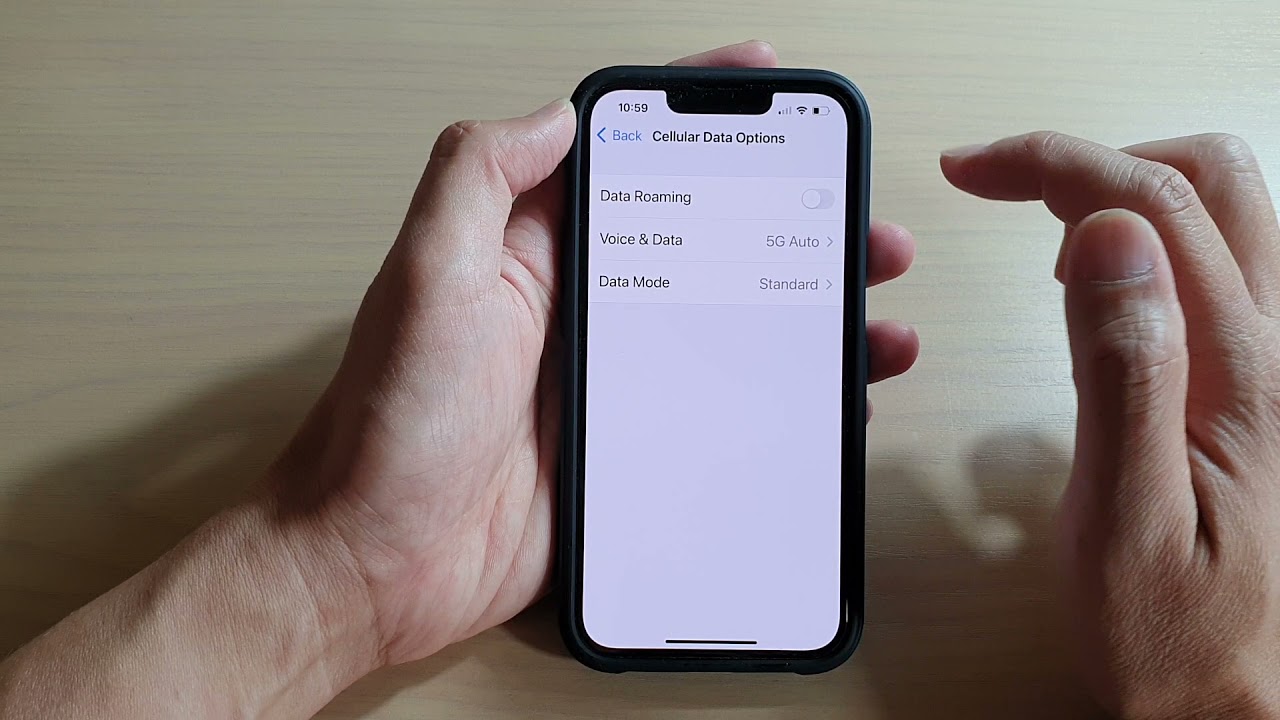
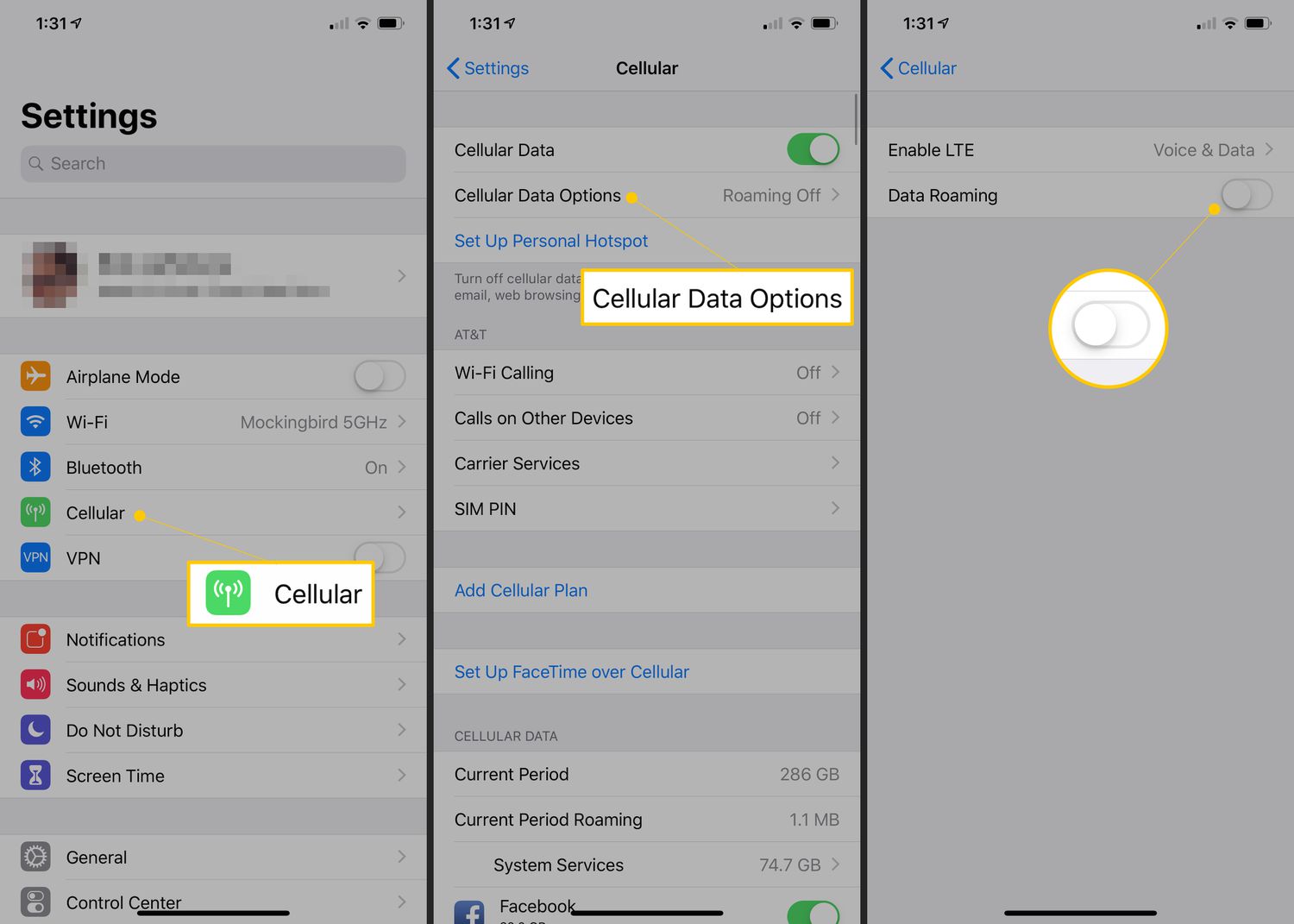
Before you step onto the ship, turn off Data Roaming to prevent your phone from connecting to cellular networks at sea that can trigger roaming charges. The exact menu path depends on your device:
- iPhone: Open Settings > Cellular or Cellular Data > Cellular Data Options. Turn Data Roaming off. If you use Dual SIM or Dual eSIM, tap the number you want to modify, then tap Cellular Data Options and change Data Roaming there. Apple says the exact roaming settings depend on whether the device has a single SIM, eSIM, Dual SIM, or Dual eSIM. Apple documents roaming controls on iPhone and iPad.
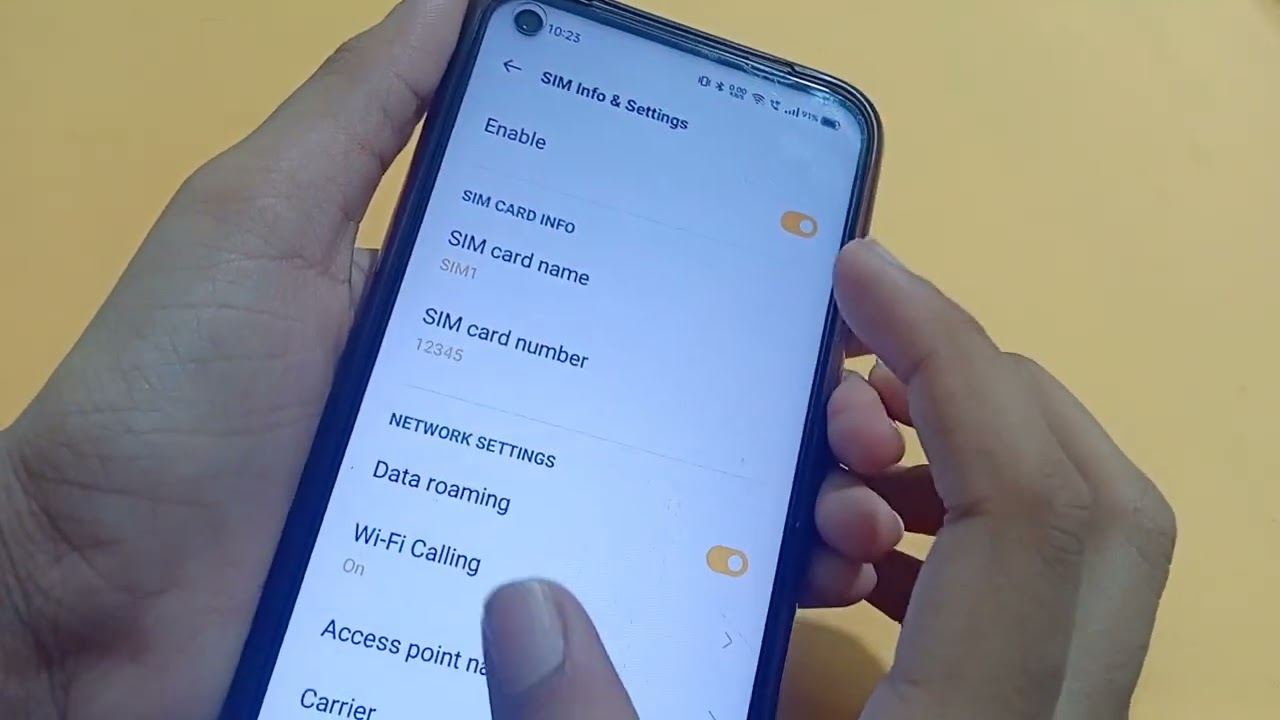
- Android / Pixel: Open Settings > Network & internet > SIMs > choose the SIM > Roaming > turn Roaming off, then confirm with OK. The exact menu path varies by carrier and Pixel model, but this is the documented route for AT&T devices. AT&T also documents Preferred network type on the same screen after roaming is enabled.
If your carrier’s cruise plan requires Data Roaming to be on, follow their instructions instead. Otherwise, keeping it off is your best defense against surprise charges.
Option 1: Connect to the cruise ship’s Wi‑Fi
Using the ship’s Wi‑Fi is the most common way to use your phone on a cruise without cellular charges. Once you board, connect your phone to the ship’s Wi‑Fi network, you may need to enter a password or agree to terms. After connecting, enable Wi‑Fi Calling if your carrier supports it and your device is compatible. This lets you make and receive calls and texts over the ship’s internet, bypassing cellular networks entirely. Be careful to avoid connecting to any cellular network at sea; with Data Roaming off, your phone will not automatically latch onto maritime towers, and all communication will go through Wi‑Fi. Keep in mind that ship Wi‑Fi is satellite-based and can be slower and more expensive than land-based internet, so avoid data-heavy activities like streaming video.
Option 2: Add a cruise pass from your carrier
If you want cellular service at sea, for example, to make calls or send texts when Wi‑Fi is unavailable, add a cruise-specific plan from your carrier. Verizon’s Cruise Daily Pass is one documented example: it provides unlimited text and unlimited calls to the US, plus 0.5 GB of high-speed data per day. After you use the 0.5 GB, data continues at 3G speeds. Verizon documents Cruise Daily Pass for compatible phones on select cruise lines. The pass applies on select cruise lines and is for use on board at sea. It activates automatically when you use your phone at sea, so you do not need to do anything special once you board, just make sure Data Roaming is on if the plan requires it. Verizon says the pass starts when you use your phone at sea; the exact triggering behavior varies from TravelPass and is carrier-specific. Check with your carrier before departure to confirm your phone is compatible and that your plan includes a cruise add-on. This option is ideal if you need reliable cellular coverage and are willing to pay a daily fee for a set amount of data.
What to do before you leave home
Take these practical steps before you board to ensure a smooth experience:
- Confirm your plan with your carrier. Call or check online to see whether your plan includes international roaming or a cruise add-on. Ask about international calling and plans that might apply to your cruise destination. Apple says carriers might include international roaming on select data plans without additional fees. Some carriers include international roaming on select data plans without additional fees, but cruise-specific passes like Verizon’s Cruise Daily Pass are separate.
- Download offline maps and entertainment. Before you lose cellular access, download offline maps of your ports of call and any movies, music, or podcasts you want to enjoy without using data. This saves you from relying on ship Wi‑Fi for navigation or entertainment.
- Verify Wi‑Fi Calling is enabled. If you plan to use the ship’s Wi‑Fi for calls and texts, make sure Wi‑Fi Calling is turned on in your phone’s settings and that your carrier supports it.
Frequently Asked Questions
Can I use my phone on a cruise without a plan?
Yes, you can use your phone on a cruise without a plan by connecting to the ship’s Wi‑Fi and using apps like WhatsApp or FaceTime for calls and messages. Just keep Data Roaming off to avoid accidental charges.
Will airplane mode prevent roaming charges on a cruise?
Yes, turning on airplane mode disables all cellular connections, which prevents your phone from connecting to maritime networks that cause roaming charges. You can then manually re-enable Wi‑Fi to use the ship’s internet.
How much does cruise ship Wi‑Fi cost?
Cruise ship Wi‑Fi pricing varies widely by cruise line and package, ranging from per-minute fees to unlimited daily or weekly plans. Check with your cruise line before sailing for exact options and costs.
Can I use a local SIM card from a port of call on the ship?
No, a local SIM card from a port of call works only when you are within range of that country’s cellular network on land. Once the ship is at sea, the local SIM will not connect, and you would need the ship’s Wi‑Fi or a carrier cruise plan.
What should I do if I have a phone issue while on the cruise?
If you have a phone issue on the cruise, first restart your phone and check that Data Roaming and Wi‑Fi settings are correct. If the problem persists, contact your carrier’s support or the ship’s technical help desk for assistance.
Related reading: How To Use Phone In Italy and How To Use LG Android Phone.