






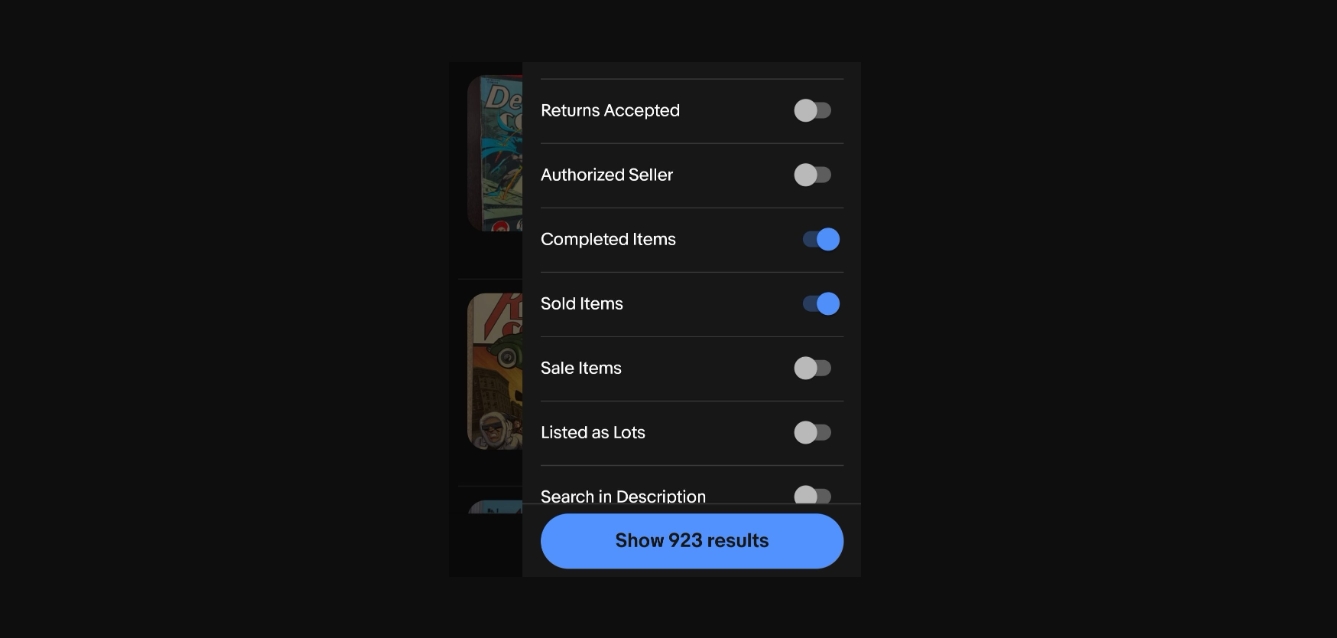
To see sold items on eBay mobile, open the eBay app, search for your item, tap "Filter," and select "Sold items" under the "Show only" section. This shows you completed sale prices so you can research an item's market value before buying or listing.
How to see sold items on eBay mobile: The 3-step app method
- Open the eBay app and tap the search bar. Type the item you are researching and tap the search icon.
- On the search results page, tap the "Filter" button.
- Under "Show only," tap "Sold items," then tap "Apply." The results now show only completed sales.
Tap any listing to view the final selling price, shipping details, and seller feedback.
What sold data actually shows you
Publicly viewable sold listings on eBay typically show data for approximately the last 90 days. Each listing displays the final selling price, shipping information, and any feedback left by the buyer and seller. This 90-day window gives you a current snapshot of market value.
How to unlock the 'Sold items' filter if it's hidden
If you do not see "Sold items" in the filter menu, you may need to tap "Show More" to reveal the "Sold items" filter option. The filter is sometimes tucked away under additional choices, so scrolling and tapping "Show More" is the verified way to access it.
How sellers can see 3 years of sold data
For sellers, the "Product Research" tool (formerly Terapeak), available in the eBay app, provides up to three years of sold listings data. This deeper history helps you spot long-term pricing trends and demand patterns that the public 90-day view cannot show.
How to filter sold items from an image search
There is a workaround for image searches: enable "Lockable Filters" in the Filter Customize menu from your search results, perform a keyword search, select "Sold" items in the Filter menu, tap the padlock icon to lock it, then perform an image search. This keeps the sold filter active while you search by photo, which is useful for items like electronics where you might rely on location tracking and NFC guides to verify model specifics.
Frequently Asked Questions
Can I see sold items on eBay without using the mobile app?
Yes, you can view sold items on the eBay mobile website by following the same steps: search, tap the filter icon, and select "Sold items." The process works on any mobile browser.
Why does sold data matter for buyers and sellers?
Seeing sold items gives buyers the actual market value of an item before they bid or buy, and helps sellers analyze competition and set realistic prices. It removes guesswork from both sides of a transaction.
Can I see the final selling price of an item on eBay mobile?
Yes, once you tap on a sold listing, you will see the final selling price along with shipping information and feedback. The price shown is the amount the item actually sold for.
How far back does eBay's sold data go?
Publicly viewable sold listings show approximately the last 90 days of sales. Sellers using the Product Research tool can access up to three years of sold data within the eBay app.















