When evaluating a stock trading app, focus on five core features that separate effective platforms from frustrating ones: a user-friendly interface, performance analytics, real-time market updates, robust security controls, and broad device compatibility. These five elements form a practical checklist for choosing a stock trading app that helps you trade efficiently, track your progress, and protect your investments.
What are the top features of a good stock trading app?
The best stock trading apps combine speed, clarity, and safety. Use this checklist to compare any app against the five essential features below. Each one addresses a specific need that traders and investors encounter daily, from executing a quick trade to reviewing portfolio performance.
1. A user-friendly interface for intuitive navigation
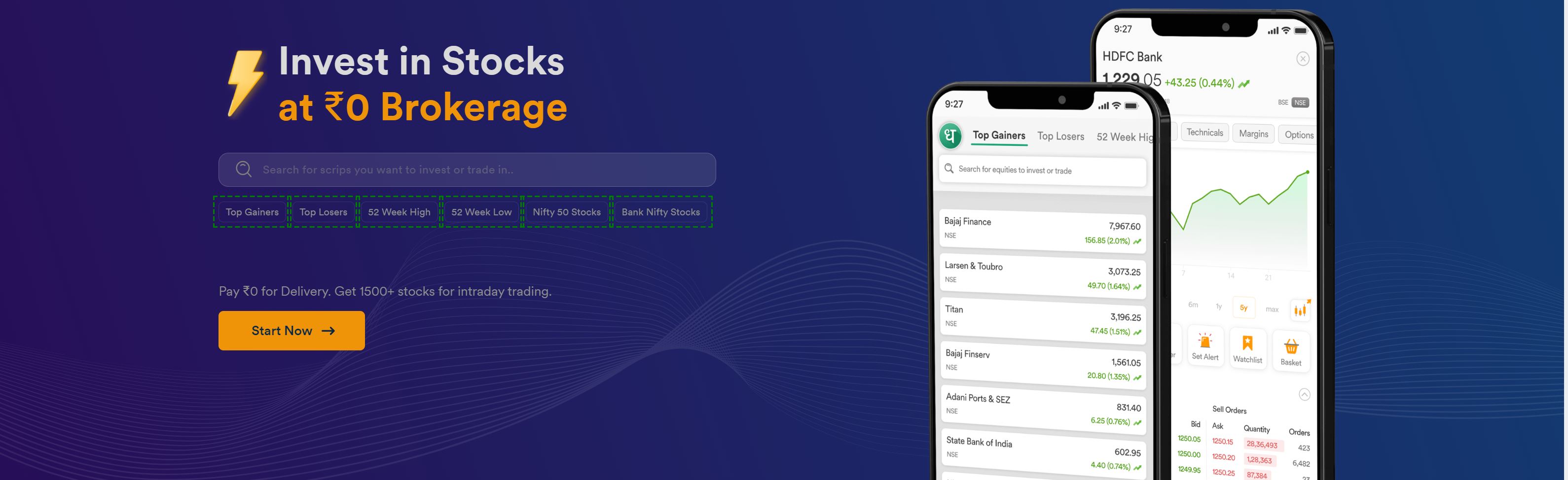
A clean, logical layout lets you find key features without digging through menus. When seconds matter during market moves, an interface that places buy/sell buttons, watchlists, and account balances in predictable locations helps you avoid costly mistakes. Beginners especially benefit from apps that avoid clutter while keeping essential tools visible. A well-designed stock trading app reduces the learning curve so you can focus on your trades rather than figuring out where everything is.
2. Performance analytics to track and improve your portfolio
Performance analytics give you the data needed to refine your strategy. Look for apps that show profit and loss tracking, portfolio diversification views, and historical performance charts. These tools help you identify which positions are working, where you are overexposed, and how your strategy has performed over time. Without these analytics, you are making decisions without understanding your actual results. The best apps present this information in clear visuals that support informed decisions rather than guesswork.
3. Real-time market updates and customizable alerts
Live price quotes and charts are non-negotiable for active traders. Investing.com’s mobile app offers real-time updates for over 30,000 financial instruments traded on over 100 exchanges worldwide. Yahoo Finance’s Android app lets you set custom price triggers and news notifications for your watchlists. These real-time capabilities mean you never miss a price movement or breaking news that affects your holdings. Customizable alerts transform raw data into actionable signals, notifying you exactly when your target conditions are met.
4. Robust security and privacy controls you can verify
Security starts with features you can check yourself. Essential measures include two-factor authentication and biometric login, such as fingerprint or face recognition, as well as encryption protocols that protect data in transit and at rest. You can verify app permissions directly on your device: on Android, go to Settings > Apps > [Select the Trading App] > Permissions; on iPhone, go to Settings > [Select the Trading App]. Reviewing these settings ensures the app only accesses what it needs, protecting your private data and building trust in the platform.
5. Broad compatibility with Android and iOS devices
A good stock trading app must work seamlessly on both major operating systems so you can trade from any device you own. Investing.com provides mobile apps for both Android and iOS, ensuring consistent functionality whether you are on a phone or tablet. This cross-platform support means you are not locked into one ecosystem and can monitor positions, execute trades, and review analytics on the go without compatibility issues. The app should perform reliably across a wide range of device models, not just the latest flagships.
Choosing the right stock trading app for you
Use these five features as your practical framework for making a confident choice. The best stock trading app balances a clean interface, robust performance analytics, real-time market data, verifiable security controls, and broad device support. When an app delivers on all five, you can trade with speed, insight, and peace of mind. Reviewing these elements before committing to a platform ensures you pick a tool that supports your goals rather than one that creates friction.
Frequently Asked Questions
What is the most important feature in a stock trading app for beginners?
A user-friendly interface is typically most important for beginners because it reduces the chance of costly errors and makes the learning process smoother. Look for apps that offer demo or paper trading modes to practice without risking real money.
Can I trust free stock trading apps with my personal information?
Free apps can be trustworthy if they implement strong security measures like two-factor authentication and biometric login. Always review app permissions on your device and check the app's privacy policy to understand how your data is handled.
Do stock trading apps work on tablets as well as phones?
Most major stock trading apps designed for Android and iOS also run on tablets, though the interface may scale differently. Check the app's description in the app store for tablet compatibility details.
How often do real-time market updates refresh in a trading app?
Real-time updates typically refresh within seconds during market hours, though the exact frequency varies by app and data source. Apps like Investing.com provide live data for over 100 exchanges, while others may have slight delays depending on your subscription level.
What should I do if my trading app stops showing real-time prices?
First check your internet connection, then verify that the app has permission to access network data. If the issue persists, close and reopen the app or check for updates in your device's app store. Contact the app's support team if the problem continues.
For the wider topic, see mobile app guides.
Related reading: How To Use Duo Mobile App and How Much Does Screen Protector Cost.