Data charging is when your phone uses cellular data from your mobile plan, counting against your allowance or triggering extra fees if you go over. The term appears in your phone settings because it controls whether apps and system services can use your carrier's network, directly impacting what you pay.
What is data charging on your phone?
Data charging is the use of a mobile carrier's cellular data network for internet access, and the practical issue is controlling when phones use cellular data, roaming, and low-data settings. In your phone settings, "data charging" refers to the tools that let you monitor and limit this usage so you don't exceed your plan's included data or incur unexpected overage fees.
How to control data charging on iPhone
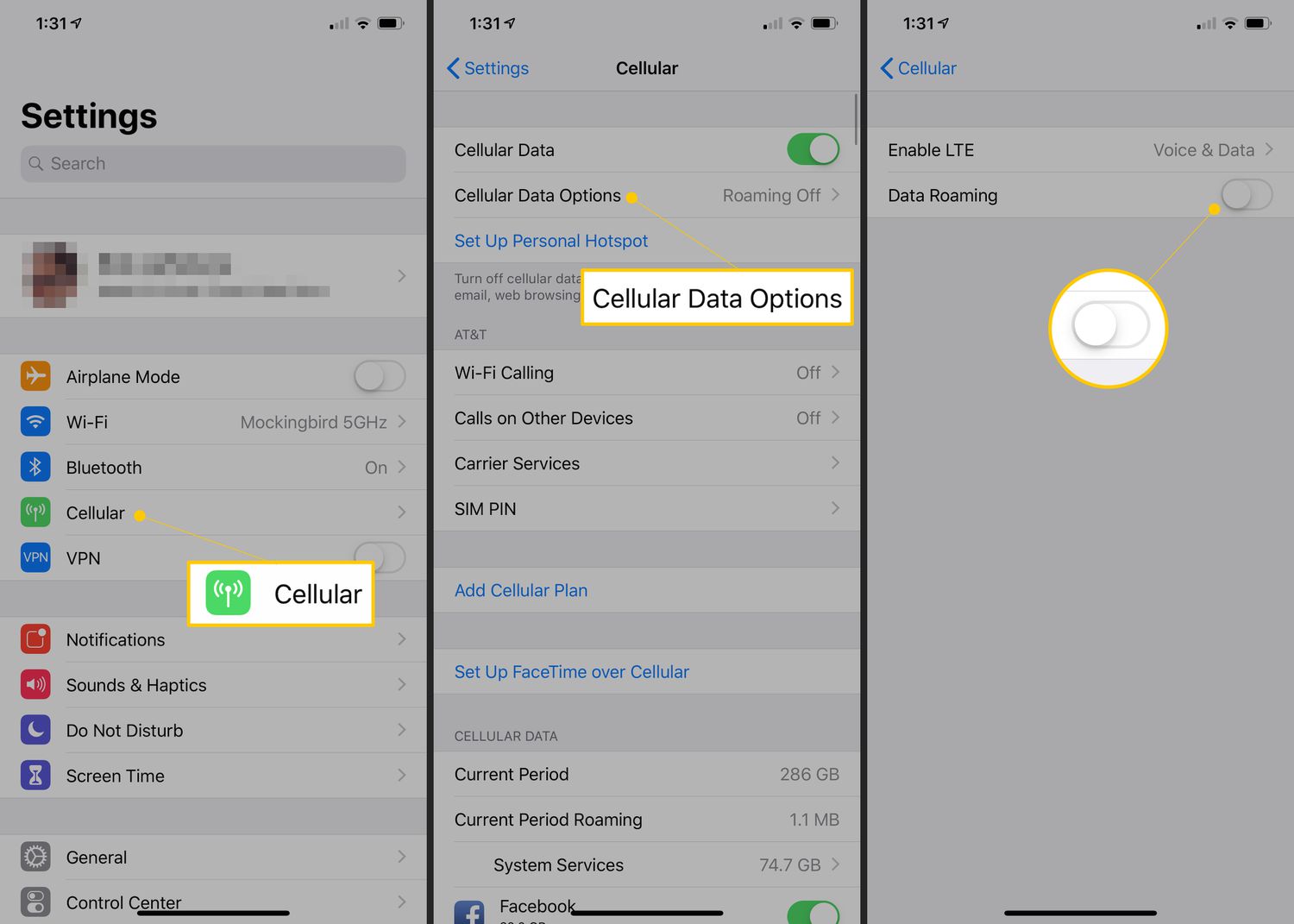
- Open Settings > Cellular.
- To turn cellular data on or off, tap Cellular Data.
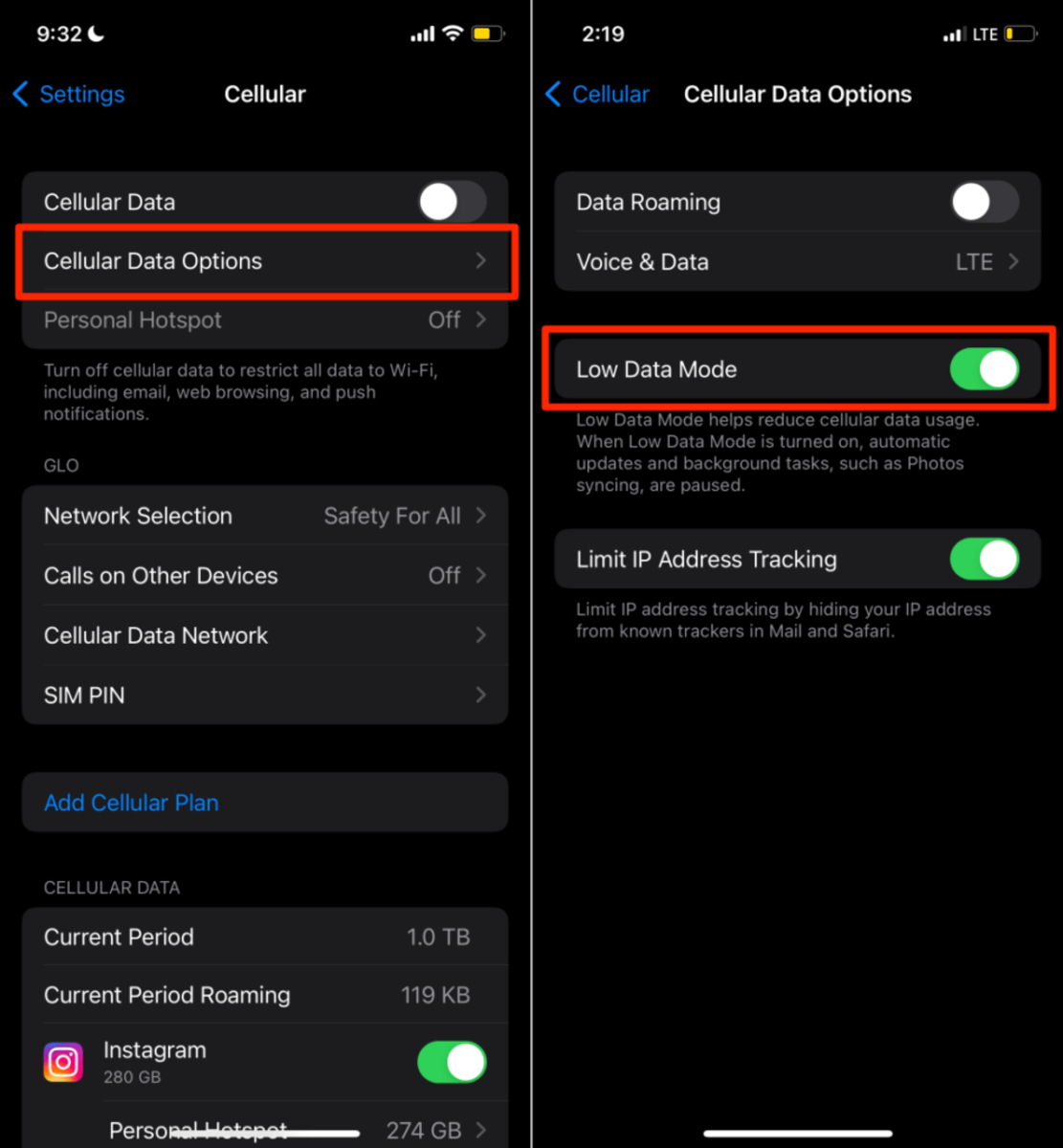
- To change data behavior, go to Settings > Cellular > Cellular Data Options.
- Under Cellular Data Options, use Data Roaming for use outside your carrier's network and Data Mode > Low Data Mode to reduce usage.
- Scroll down the Cellular screen to see a list of apps. You can turn cellular data on or off for individual apps and services from here.
- Data used by each app appears under the app after tapping Show All.
- You can see usage for System Services, but cellular data cannot be turned on or off for individual system services.
- If your iPhone has Dual SIM, the usage shown is for the selected cellular data number.
- At the bottom of the Cellular screen, tap Reset Statistics to start tracking from zero.
How to control data charging on Android (Pixel)
- Open Settings > Network & internet > SIMs to access mobile data controls.
- To reduce background data usage, go to Settings > Network & internet > Data Saver and turn it on.
- To check your plan status or buy more data, open Settings > Google > Device plans. The top shows your current plan status, and Buy data offers appear below if supported by your carrier. This feature requires an existing carrier plan and a valid payment method with the carrier; if the account is prepaid, the carrier balance must be sufficient.
- If more than one SIM is installed, set the SIM needing more data as the default.
Carrier-specific data charging controls: AT&T on Pixel
- Open Settings > Network & Internet > Mobile network (or Settings > Network & internet > SIMs, depending on model) to find AT&T's carrier-specific controls.
- Tap Data warning & limit to set usage alerts and caps.
- Turn Set data warning on, then set a warning amount in Set data usage warning.
- To cap your data, go to Data limit > Set data usage limit.
- Change the Mobile data usage cycle and save it with Set.
- You can also use the quick-settings path to the Mobile data toggle and tap Turn on.
Why controlling data charging matters
The documented importance is avoiding unexpected usage, especially roaming or over-limit charges, and keeping app, system, and plan data use under control. Without these controls, background app refreshes, system services, and accidental roaming can quickly eat through your allowance. Understanding data charging also helps you choose the right plan for your habits, whether that means enabling Low Data Mode to stretch a limited plan or setting a hard cap to prevent surprise bills. For example, knowing how to manage data charging is as essential as understanding batteries and charging basics for keeping your device running smoothly without unexpected costs.
Frequently Asked Questions
Does data charging apply to Wi-Fi usage?
No. Data charging only applies to cellular data usage through your mobile carrier. Wi-Fi connections do not count against your mobile data plan or incur carrier charges.
What happens if I turn off cellular data for an app?
The app will not be able to send or receive data over your carrier's network. It will still work when connected to Wi-Fi, but any features that require a mobile connection will be unavailable until you re-enable cellular data for that app.
Can I see which apps use the most data?
Yes. On iPhone, data used by each app appears under the app list in Settings > Cellular after tapping Show All. On Pixel, you can view per-app data usage under Settings > Network & internet > Data usage.
Will resetting statistics affect my bill?
No. Resetting statistics only clears the usage counters on your phone. It does not change your carrier's billing records or reset your data cycle with your provider.
What is the difference between data roaming and data charging?
Data roaming is a specific setting that allows your phone to use cellular data when outside your carrier's home network. Data charging is the broader concept of how that usage is counted and billed. Roaming often incurs higher rates, which is why controlling it is a key part of managing data charging.
Related reading: In-Depth Guide: What Is Cellular Data & How Does It Work? and How Long Does 100 Gb Of Hotspot Last.