You can use iOSGods to download and install tweaked games and apps on your iPhone or iPad without a jailbreak, and the entire process is handled on-device with no computer needed. This makes iOSGods download install a straightforward way to access modified versions of popular apps directly from your device.
What is iOSGods and how does it work?
iOSGods is a third-party platform that provides a library of tweaked iOS and Android apps and games through an app store-style interface. It allows users to install modified versions of apps without jailbreaking their iOS device. The service works by offering its own app that you add to your home screen, from which you can browse and install content directly. The platform offers apps from Android's ecosystem that you cannot download through the App Store.
How to download and install iOSGods on iPhone or iPad
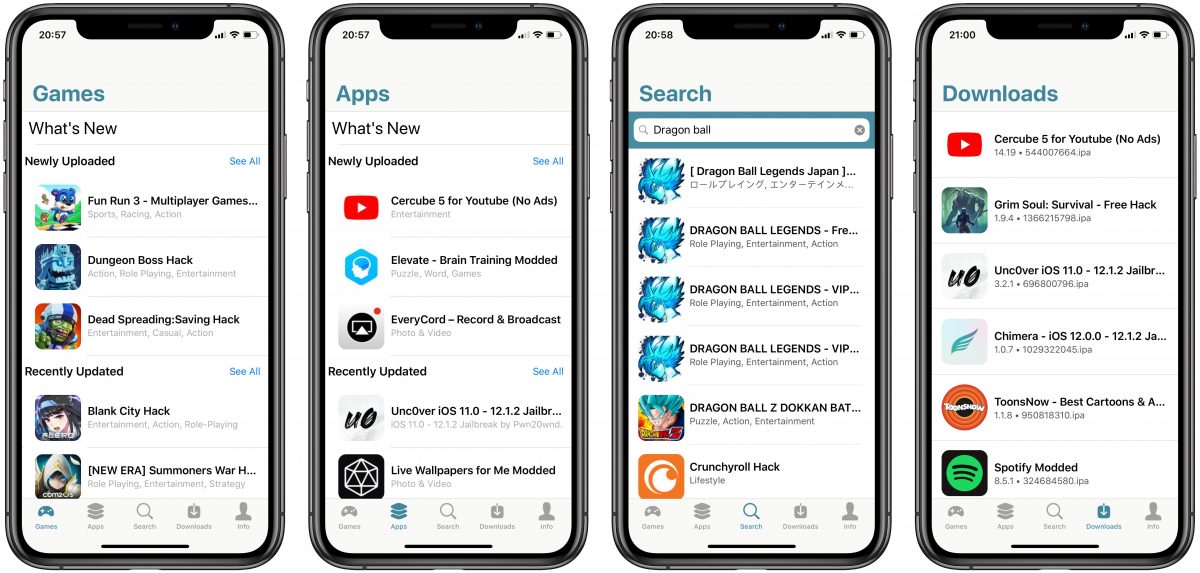
- Open Safari on your iPhone or iPad.
- Go to app.iosgods.com.
- Tap the Share button, then tap “Add to Home Screen.”
- Launch the app from your home screen.
- Browse and install apps and games from inside the app.
How to download and install iOSGods on Android
- Open Chrome or another browser on your Android device.
- Go to app.iosgods.com.
- Tap the browser menu, then tap “Add to Home Screen.”
- Launch the app from your home screen.
How to install modded games and apps from iOSGods
Once the iOSGods app is on your home screen, launch it and browse the library of tweaked apps and games. When you find what you want, tap to install your chosen content directly from within the app. The library includes many titles you might find in the popular mobile game recommendations section, giving you access to modified versions of fan favorites. When installing modded games via MacBook, you must sign in to your iOSGods Account after clicking INSTALL. When installing modded games via iPhone or iPad using App+, you must sign in to your iOSGods Account before browsing.
What is iOSGods App+ and how does it differ?
iOSGods App+ offers additional signing options for installing apps on-device without a computer. These options include enterprise certificates, iOSGods App+ signing, or your own personal Apple Developer certificate. The standard iOSGods app provides the basic installation method, while App+ gives you more flexibility in how apps are signed and installed on your device. The free iOSGods App+ subscription costs $2/month or $24/year for one device. To purchase App+, visit the subscription page, click Add To Cart, apply any promotional code, fill in billing details, and proceed via PayPal or credit card. After purchasing App+, look for an activation email with the subject 'Your iOSGods App+ Membership is Activated' and tap 'Tap Here To Install On Device'. During App+ installation on iPhone/iPad, you must navigate to Settings > Profile Downloaded, tap Install, enter your device passcode, and handle the 'Open this page in iTunes?' prompt. After installing App+, launch it and tap Activate, then when redirected to Install Profile, tap Cancel, go to Profiles & Device Management, tap iOSGods Activation, and install the activation profile.
Does iOSGods require a jailbreak or computer?
No jailbreak and no computer are required for the standard iOSGods app installation. The App+ page explicitly states “no jailbreak and no computer required,” and the main site also confirms “No Jailbreak, Cydia, Sileo, or PC needed!” This makes it accessible for users who want to avoid modifying their device’s operating system or using a desktop setup.
Getting help and support for iOSGods
The iOSGods community forums are the primary place to ask questions and get assistance with installation or app issues. Both beginners and experienced users can access support threads, post questions, and find answers from the community. This resource is helpful when you need guidance on specific apps or troubleshooting steps, such as finding the ultimate guide to the best mobile games to cure your boredom or locating the most essential mobile apps you must download in 2022.
Frequently Asked Questions
Is iOSGods free to use?
The official documentation does not fully document a free-versus-paid pricing breakdown for the core app, though the original article states the app is free to use with an optional paid App+ subscription. The verified official pages do not confirm a free status for the standard app.
Do I need an Apple ID to use iOSGods?
The original article claims no Apple ID is needed, but this detail is not confirmed in the verified official sources.
What iOS versions does iOSGods support?
The App+ page says it works on “the latest iOS,” but the retrieved official snippet does not list an exact minimum iOS version.
How do I trust the iOSGods certificate on my device?
The official pages do not show a full step-by-step Apple menu path for certificate trust. The installation process described for the standard app involves adding it to your home screen from Safari, after which you browse and install apps from within the app itself.
Can I install iOSGods on a Mac?
The standard installation method documented on the official site is for iPhone, iPad, and Android devices only. On Mac, download the iOSGods Jailed App from the website, double-click the 'iOSGodsApp.mobileconfig' file, then go to Apple logo > System Preferences > Profiles to install it. On Mac, after installing the profile, locate and launch the iOSGods App from the Dock.
Is my data secure with iOSGods?
The original article claims SSL encryption is integrated, but this detail is not confirmed in the verified official sources.
For the wider topic, see popular mobile game recommendations.