U-Haul mobile pickup, officially called Truck Share 24/7 or Self Pickup, lets you pick up a truck, cargo van, or pickup truck using only your mobile device without a counter agent present. This means you can complete the entire rental process through the U-Haul app or website, from reservation to driving away, entirely on your own schedule.
What is U-Haul mobile pickup (Truck Share 24/7)?
U-Haul's mobile pickup service is officially branded as Truck Share 24/7, also referred to as Self Pickup. It allows customers to pick up a rental truck, cargo van, or pickup truck using a mobile device without needing a representative at the location. The process is entirely self-service: you use the U-Haul app or uhaul.com to verify your identity, inspect the vehicle, and access the keys. This service is available at participating U-Haul locations, with one page stating it is available at "all 23,000-plus U-Haul locations."
How to reserve a U-Haul truck with mobile pickup
You can reserve a U-Haul truck through three methods: online via the U-Haul website, by phone with a customer service representative, or in person at a U-Haul center. Regardless of the method you choose, the critical step is selecting Mobile Pick Up during the reservation flow. This option appears when you are choosing how you want to collect your vehicle, and selecting it is what enables the self-service pickup process. After reserving, customers receive a confirmation email containing detailed instructions for the Mobile Pickup process.
Step-by-step: how the U-Haul mobile pickup process works
- Before your scheduled pickup time, complete online check-in by verifying personal details such as identification and payment information.
- Arrive at the pickup location at or before your scheduled time. You must be at the pickup location to start the self pickup process. U-Haul recommends arriving about 10 minutes early to avoid cutting into your rental time.
- Sign in to your U-Haul account in the U-Haul app or on uhaul.com.
- Select Pick Up My Truck in your reservation details, or select your reservation to begin pickup, to start the self pickup process.
- Complete the Live Verify step, which U-Haul describes as a patented process used at the location. This requires you to follow on-screen instructions to upload photos of yourself, your driver's license, the truck's fuel gauge, the odometer, and the vehicle's condition.
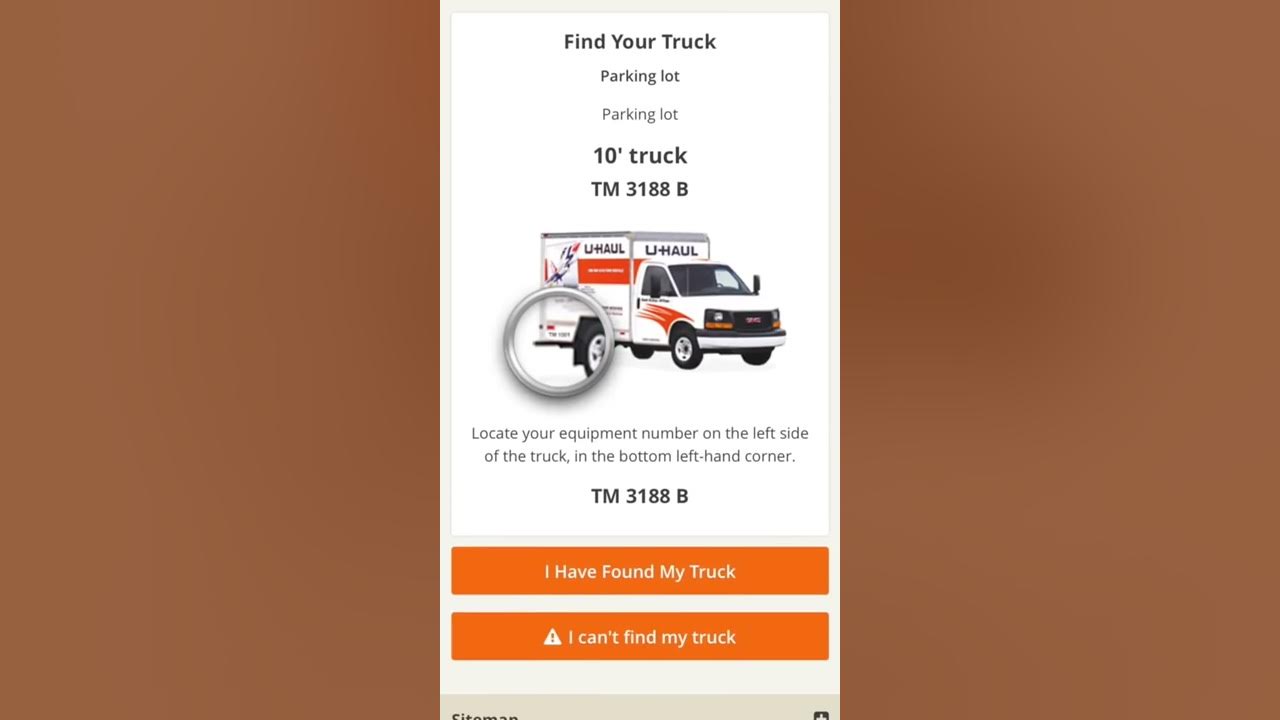
- Follow the on-screen instructions to locate the vehicle, which is stored in a designated Mobile Pickup area at the U-Haul location. Retrieve the access code received via email or text message, which serves as the key to unlocking the vehicle's designated storage area, and continue with the pickup process.
- Depart with the vehicle once you have completed the inspection and retrieved the keys.
Timing and requirements for self pickup
Your truck will be ready one hour before your scheduled pickup time. If the Pick Up My Truck button is grayed out, that means you have arrived too early. You need a mobile device with an internet connection and a camera to complete the process. The service is available at participating locations, and the app exists for both iPhone and Android devices as confirmed by their respective app store listings.
Tips for a smooth U-Haul mobile pickup experience
- Arrive about 10 minutes early to give yourself time to complete the process without rushing.
- Have your driver's license ready before you start, as you will need to photograph it during the Live Verify step.
- Conduct a thorough vehicle inspection using the photo uploads required for the fuel gauge, odometer, and vehicle condition. Document any existing damage to avoid disputes at return.
- If the app does not work or you encounter issues, contact U-Haul's 24/7 customer support for assistance.
- If you want to add equipment like moving supplies, furniture pads, or dolly rentals, you can do so during the online check-in process before picking up your rental.
While U-Haul's mobile pickup is not listed among the most essential mobile apps you must download in 2022 for general productivity, it is essential specifically for anyone renting a U-Haul vehicle. Similarly, while this process does not require an ultimate guide to choosing the best mobile accessories [Android & iPhone], having a working camera and internet connection on your phone is all you need. The pickup process is tied entirely to U-Haul's app and website, not to any specific mobile carrier's network, so you do not need any particular Boost Mobile services to use it.
Frequently Asked Questions
What devices are needed for U-Haul mobile pickup?
What do I need to use U-Haul mobile pickup?
A smartphone with internet access, a valid driver's license, and a method of payment.
Do all U-Haul rentals qualify for mobile pickup?
Mobile pickup is available for most truck, cargo van, and pickup truck rentals at participating locations. Certain vehicles or equipment may not be eligible, so check with your local U-Haul location for specific availability.
Can I add equipment during the online check-in?
Yes, you can add additional equipment or services such as moving supplies, furniture pads, and dolly rentals during the online check-in process before you pick up your rental.
What should I do if the app doesn't work during pickup?
If you encounter issues during the mobile pickup process, U-Haul provides 24/7 customer support. You can contact them for guidance and troubleshooting to ensure a smooth rental experience.
What happens if I arrive too early for my pickup?
If you arrive too early, the Pick Up My Truck button will be grayed out and you will not be able to start the self pickup process.