






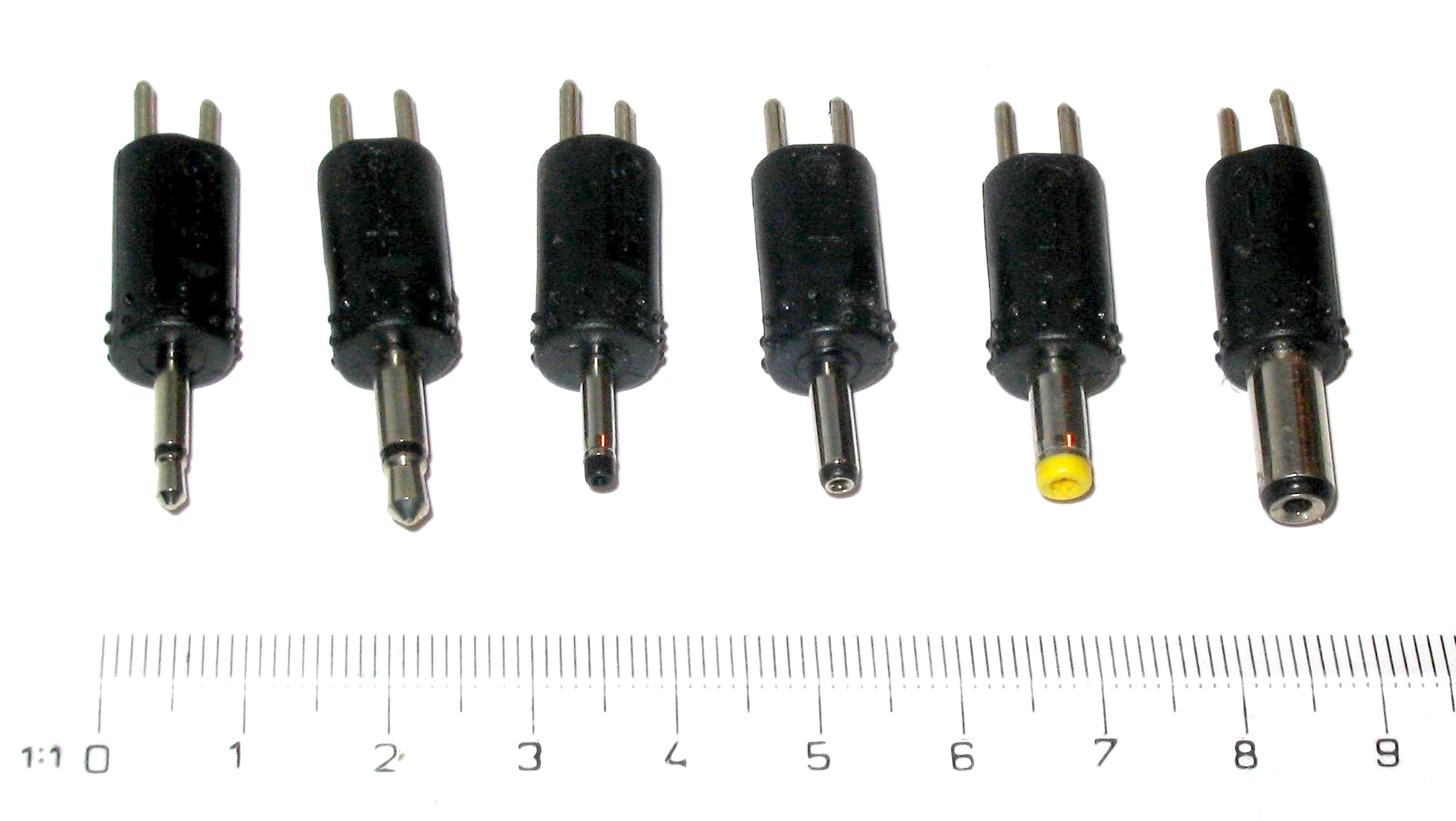
A barrel connector is a cylindrical DC power plug-and-jack standard used to deliver power from an adapter to a device. It consists of an outer sleeve and an inner pin, and it is designed solely for power delivery, not for data transfer.
What is a barrel connector?
A barrel connector, also known as a barrel jack or coaxial power connector, is a round, cylindrical plug-and-socket pair that connects a power adapter to an electronic device. The male plug has a metal outer sleeve and a center pin, while the female jack has corresponding contacts. When mated, the sleeve and pin complete a low-voltage DC circuit, allowing the device to receive power. Barrel connectors are not used for data; they are a dedicated power-only interface.
Where barrel connectors are used
Barrel connectors are common in devices that require a separate power adapter. Typical applications include laptop power adapters, security cameras, routers, LED lighting, and audio equipment. They also appear in legacy charging support scenarios, such as a USB-C to barrel-plug conversion, which allows a modern USB-C power source to charge older devices that originally used a barrel connector. In such conversions, the controller supports USB Power Delivery 3.0 and legacy protocols including BC 1.2, QC 2.0, AFC, and Apple charging at 5V and about 2.4A. A jumper setting can restrict support to BC 1.2 only. The negotiation order is USB-PD → BC 1.2 → AFC → QC 2.0 (Class B) → Apple → Type-C only.
Common barrel connector sizes and how to measure them
The most common barrel connector sizes are 5.5mm x 2.1mm and 5.5mm x 2.5mm. The first number is the outer diameter of the plug's metal sleeve, and the second number is the diameter of the inner pin. To measure an existing connector or receptacle, use a caliper to measure the outer diameter of the plug or the inner diameter of the jack. Matching these dimensions is critical for a secure fit and proper electrical contact.
Understanding barrel connector polarity
Barrel connectors have a defined polarity: either center-positive or center-negative. Center-positive means the inner pin carries the positive voltage and the outer sleeve is ground. Center-negative reverses those roles. The polarity symbol on an adapter or device is a diagram showing a dot (center) connected to a plus or minus sign, with the outer ring connected to the opposite sign. Using an adapter with reversed polarity can damage the device, so always check the symbol before connecting.
How to choose the right barrel connector
- Match the outer diameter and inner pin diameter of the plug to the device's jack.
- Confirm the polarity matches the device requirement (center-positive or center-negative).
- Check the voltage and current ratings of the adapter to ensure they match the device's specifications.
- Choose the connector type (straight or right-angle) that fits the physical space around the device's power input.
Barrel connectors vs. other charging connectors
Barrel connectors are distinct from modern phone charging standards like USB-C and Lightning. They are designed for DC power on larger devices such as laptops, routers, and cameras, not for smartphones. For a detailed comparison of phone charging standards, including USB-C and Lightning, see the guide on phone charger types and cables. If you need a compact reversible connector for a phone, you would look for a type C phone charger instead of a barrel connector.
Frequently Asked Questions
Can barrel connectors transfer data?
No. Barrel connectors have only two contacts (center pin and outer sleeve) and are designed solely for DC power delivery. They cannot transmit data signals.
What happens if I use the wrong size barrel connector?
Using a plug with the wrong outer or inner diameter will result in a loose or no connection. It may cause intermittent power, arcing, or physical damage to the jack. Always match the measured dimensions.
Are all barrel connectors the same polarity?
No. Polarity varies by device and adapter. Some are center-positive, others center-negative. Always verify the polarity symbol on both the adapter and the device before connecting.
How do I know if my device uses a barrel connector?
Look for a round, cylindrical power input port on the device, typically labeled "DC IN" or with a voltage rating. The plug from the power adapter will be a metal barrel shape with a center pin. If the port is rectangular or oval, it is likely a different connector type such as USB-C.

















