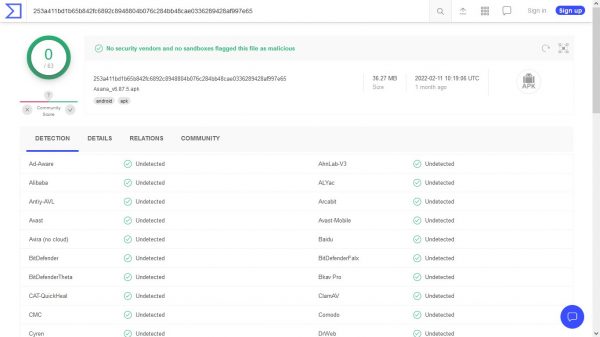
Yes, UpToDown is safe to use. The platform scans every file with VirusTotal and more than 70 antivirus engines before publishing, and makes each app's security report publicly available from the download page.
What is UpToDown?
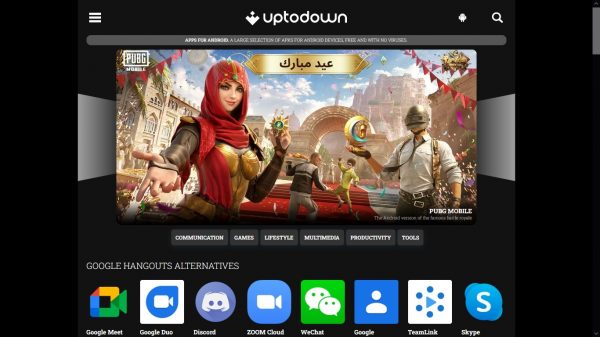
UpToDown is a third-party app marketplace that offers Android Package Files (APKs) as a direct browser-based alternative to the Google Play Store. Originally started in 2002 by two university students, it originally offered desktop applications for Windows and macOS systems before adopting Android in 2011 and now hosts millions of apps and builds. As of 2021, UpToDown hosts around four million different apps and builds. Unlike many APK sites, UpToDown works with developers and does not distribute cracked or pirated software, it funds itself through advertisements rather than subscriptions or fees.
How UpToDown's virus defense and security works
Every app submitted to UpToDown goes through both human review and automated analysis before publication. In-house editors select, use, and review each app to ensure a minimum quality standard, and each app page includes a professional review with original screenshots. The APK file is then analyzed by more than 70 antivirus engines through VirusTotal, which is owned by a subsidiary of Google. The full security report is accessible from the download page via the blue shield icon, showing the number of antivirus programs that flagged the file, the specific virus name if any, and additional details such as the APK's package name, Android permissions, file size, and SHA hash for version validation. If a result shows false positives, the report still lets you decide whether to proceed.
How to safely install the UpToDown app on Android
To install the official UpToDown app, you need to allow downloads from unknown sources. The steps are documented in UpToDown's help center:
- Open Android's Settings dashboard.
- Navigate to Security or Apps (depending on your device).
- Enable the option to allow downloads from unknown sources.
- Download the UpToDown App Store app from their website and install it.
This permission is required only for the official UpToDown app; you can also download individual APKs directly from the website without installing the app.
What iPhone users need to know about UpToDown
On iPhone, installing apps from alternative marketplaces or developer websites is controlled by Apple's permissions and regional availability. For an alternative app marketplace on a device with the latest iOS, open a web browser, tap the install link, then tap Settings in the prompt, tap Manage App Installation, tap Allow next to the marketplace, read the notice, tap Allow, and complete the onscreen steps. For apps from a developer's website in the EU, use a browser on a device with the latest iOS or iPadOS, tap the install link, tap Settings and Continue on the Settings message, tap Allow, then tap Install App and complete the prompts. You can block these installations entirely using Screen Time: go to Settings > Screen Time > Content & Privacy Restrictions > App Installations & Purchases, set App Marketplaces to Don't Allow, and optionally set Web to Don't Allow. Installation requests can also be dismissed by tapping Cancel.
Is UpToDown legal and trustworthy?
UpToDown describes itself as an open marketplace that respects developer rights. Its business model is ad-supported, it does not host cracked apps, cheats, or black-market software, and it works directly with developers and distributors to publish and update files. UpToDown does not have regional or country download restrictions. Companies such as Unity and Banco Santander have partnered with UpToDown, with Unity including it in their Unity Distribution Portal for multi-marketplace publishing. Trust is established through UpToDown's documented safety practices, transparent virus scanning, published security reports, and a commitment to avoiding unauthorized software, rather than through unverified legal opinions. Apple treats marketplace and web installs as permissions-based actions that users can block, which is separate from UpToDown's own practices.
Our verdict: should you use UpToDown?
UpToDown is a safe option for Android users who are comfortable with APKs, given its transparent security reports and human review process. If you want to compare app stores side-by-side with other download options like the official app store for your device, or if you are researching mobile tools for comparing carriers and plans, UpToDown itself is a legitimate secondary marketplace rather than a source of risk.
Frequently Asked Questions
Does UpToDown require an account to download apps?
No, UpToDown does not require you to sign up or create an account. You can download APKs directly from the website without any registration.
Can UpToDown apps update automatically?
Apps downloaded as individual APKs from UpToDown will not update automatically through the platform. You would need to check the website for newer versions and download them manually, or use the official UpToDown app if you want update notifications.
Is UpToDown the same as other APK sites like APKMirror or APKPure?
UpToDown differs from many APK sites because it includes human review, professional app descriptions, and published VirusTotal security reports. It also works directly with developers rather than scraping apps from the Play Store, which means it does not host cracked or modified versions.
What happens if an app on UpToDown has a virus alert?
If an app triggers a false positive during VirusTotal scanning, UpToDown displays how many antivirus engines flagged it and what virus was reported. You can view the full security report via the blue shield icon to decide whether to download it.
Does UpToDown work on Huawei devices without Google Play?
Yes, UpToDown is commonly used on Huawei devices that cannot access the Google Play Store. The APKs can be downloaded directly from the website and installed manually, bypassing the need for Google services.
For the wider topic, see carriers and plans.