TikTok gifts are virtual items purchased with Coins that let you support creators on videos and during LIVE streams. When you send a Gift, the Coin value is converted into Diamonds for the creator, which they can eventually exchange for real money.
What are TikTok gifts?
TikTok gifts are virtual items used to engage with content on TikTok, and they can be sent on videos and during LIVE streams. To use Gifts, you need to purchase Coins first. When a Gift is activated, TikTok deducts the listed Coin amount from your balance. Creators receive the value of those Gifts as Diamonds, which are the platform's earnings currency for them.

How much do TikTok gifts cost?
The cost of a Gift depends on its Coin price, which is shown below the Gift in the app. You buy Coins in bundles; the Coin amount needed to activate each Gift is displayed when you select it. TikTok does not publicly document the exact cash-out value of Diamonds, so the real-world worth a creator receives from a specific Gift is not officially listed.
How to buy TikTok gifts
You purchase Coins first, then use those Coins to send Gifts. Here is the process:


- Open the TikTok app and go to your profile.
- Tap the three-line icon, then select Settings and privacy.
- Choose Balance, then tap Recharge.
- Select a Coin bundle and complete the purchase through your app store or the on-screen payment flow.
You can also buy Coins on the website at www.tiktok.com/coin or from a LIVE by tapping Gift then Recharge. For a full breakdown of Coin bundle prices and how to manage your spending, check the TikTok Tips and Settings guide in the app.
How to send TikTok gifts on a video
To send a Gift on a standard TikTok video:
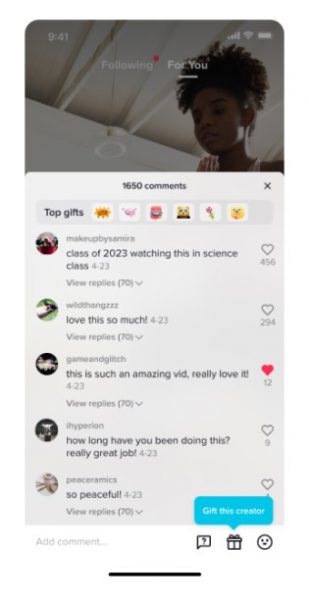
- Open the video you want to support.
- Tap Comments on the video.
- Tap Gift next to Add comment.
- Choose the Gift you want to send.
- If you need more Coins, tap Recharge and complete the purchase.
- Tap Send under the Gift.
If the video does not meet TikTok’s requirements for Gifts, the Gift button will not appear.
How to send TikTok gifts on a LIVE
To send a Gift during a LIVE stream:
- Tap Gift at the bottom of the LIVE.
- Choose the Gift you want to send.
- If needed, tap Recharge to buy more Coins.
- Tap Send under the Gift.
If you do not see Gift on a LIVE, gifting is not available for that LIVE.
Who can send and receive TikTok gifts?
To send Gifts, you must be at least 18 years old (19 in South Korea, 20 in Japan) and live in a region where the feature is supported. Gifting must be available for the specific LIVE or video; if it is not available, the Gift button will not appear.
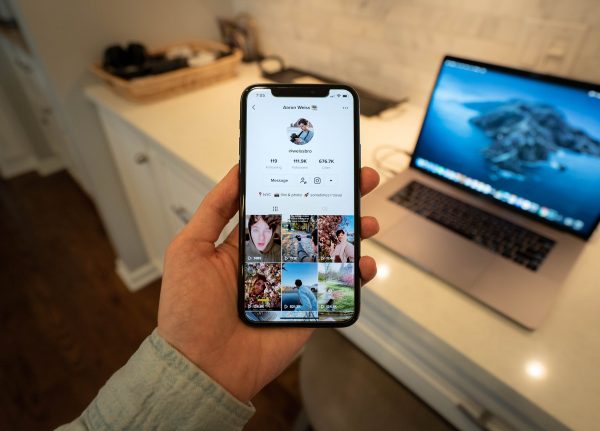
For receiving, you need at least 1,000 followers (this number can vary by location). Your account must be at least a month old and have posted a public video in the last 30 days. Your account must not be a Business Account. To receive Gifts, you need to join Creator Next, then go to Settings and privacy > Creator tools > Video Gifts and turn on Video Gifts. Duets, Stitch videos, sponsored TikTok videos, and promoted posts are not eligible to receive Gifts. The presence of the Gift button on your content indicates you are eligible to receive them.
How to cash out TikTok diamonds
Diamonds are the creator’s earnings from Gifts. The minimum withdrawal for Diamonds is $100. There is a $1,000 weekly withdrawal limit (max $4,000 monthly). You can only withdraw cash to a PayPal account, not a bank or other online wallet. Creators manage withdrawals within the app’s wallet, but specific steps are not publicly listed.
Frequently Asked Questions
Can I get a refund for unused TikTok Coins?
No. Once you purchase Coins, they cannot be refunded or traded back for real-world currency. Only Diamonds earned from Gifts are convertible to cash.
Why don't I see the Gift button on some videos?
The Gift button only appears when the video meets TikTok’s eligibility requirements. TikTok has not publicly documented the exact rules, but factors like video type (e.g., Duets, Stitch, or sponsored content) and account standing may affect availability.
How do creators know who sent them a Gift?
During a LIVE, the sender’s username is typically displayed when the Gift is sent. On videos, the sender’s name appears in the comments section alongside the Gift notification.
Is there a limit to how many Gifts I can send?
TikTok does not publicly document a specific limit on the number of Gifts you can send, but your ability to send is tied to your Coin balance. You can send as many Gifts as your available Coins allow.
Do TikTok Gifts expire?
Coins do not expire once purchased. Gifts themselves are virtual items that are sent instantly and do not have an expiration date after being sent to a creator.
Related reading: How to Block or Unblock Someone on TikTok: A Guide and TikTok's STEM Feed Doesn't Address The App's Biggest Issues.