






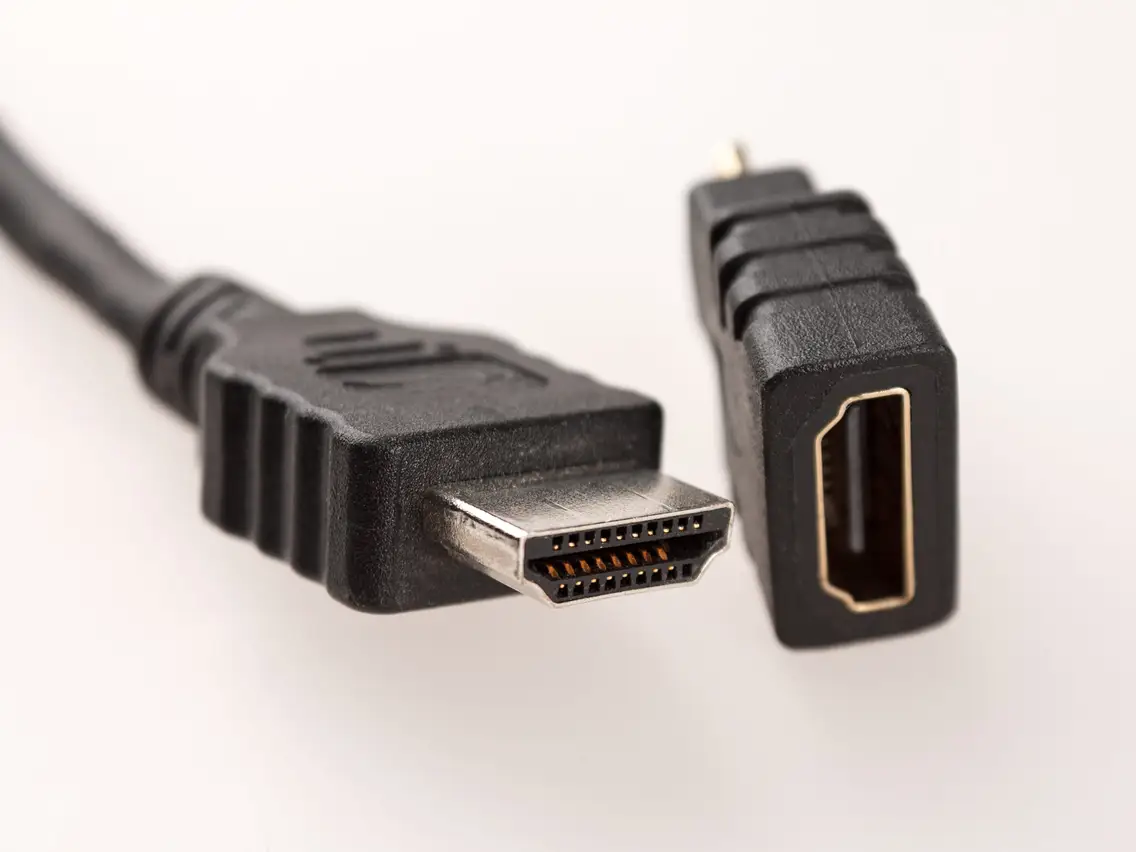
What an HDMI connector looks like in its most common form, known as Type A or Standard HDMI, is a 19-pin, trapezoidal-shaped plug with a dark plastic body and metal shielding. To identify it instantly, look for a rectangular connector that is slightly wider on one end, with 10 pins visible in the top row and 9 pins in the bottom row inside the metal housing.
What does an HDMI connector look like: the standard Type A
The standard HDMI Type A connector is the one you will find on nearly all TVs, computer monitors, game consoles, and desktop computers. Its body is made of dark plastic, encased in a metal shield that is slightly wider at the top. The connector has a distinct trapezoidal shape, it is not perfectly rectangular; one side is subtly tapered. Inside, you can see 19 pins arranged in two rows: 10 pins on the top row and 9 on the bottom. This design ensures you can only insert it one way, making it easy to plug in correctly by feel. HDMI connectors often feature gold-plated pins to enhance conductivity, reduce signal loss, and provide better resistance against corrosion.
The five types of HDMI connectors at a glance
The HDMI specification defines five connector types, each with a different physical size and pin count for specific uses:
- Type A (Standard HDMI): 19 pins, full-size connector used on TVs, monitors, projectors, and gaming consoles.
- Type B: A larger 29-pin connector intended for very high-resolution displays; it was never adopted in consumer products. HDMI Type B has 29 pins.
- Type C (Mini HDMI): 19 pins, smaller than Type A, used on portable devices like digital cameras and camcorders.
- Type D (Micro HDMI): 19 pins, the smallest HDMI connector, found on action cameras, GoPros, and the Raspberry Pi 4.
- Type E: A locking connector with a clip designed for automotive applications.
Mini HDMI (Type C): smaller, same 19 pins
The Mini HDMI connector, officially called Type C, is physically smaller than the standard Type A but still uses the same 19-pin configuration. You will commonly find Mini HDMI ports on portable devices such as digital cameras, camcorders, and some older tablets, allowing these smaller gadgets to output high-definition video to a TV or monitor.
Micro HDMI (Type D): the smallest HDMI connector
The Micro HDMI connector, designated Type D, is the smallest HDMI connector type available. It retains the same 19-pin layout as the Mini and Standard versions but in an even more compact form factor, approximately 6.4 mm wide by 2.8 mm tall. This connector is often found on action cameras, compact devices, Raspberry Pi 4, and GoPros, where space is extremely limited. Micro HDMI (Type D) is commonly used in smartphones. Despite its tiny size, it carries the same high-definition audio and video signals as its larger counterparts.
HDMI vs USB-C: how to tell them apart
USB-C ports can support HDMI functionality through "Alt Mode" or with specific adapters, but a USB-C connector is physically different from a dedicated HDMI connector. USB-C is oval-shaped and symmetrical, meaning it can be inserted either way up. In contrast, an HDMI connector is a tapered, rectangular shape with one flat side and a slight angle on the other, making it asymmetrical. If you see a port that looks like a small, rounded oval, it is USB-C, not HDMI.
How to identify an HDMI port on your device
To spot an HDMI port on your TV, monitor, laptop, or console, look for these clues:
- Check for the word "HDMI" printed directly beside or above the port, most manufacturers label it clearly.
- Look for the distinctive trapezoidal shape: the port opening is rectangular but slightly wider at the top edge than the bottom.
- On TVs and monitors, HDMI ports are usually located on the back or side panel, often grouped with other video inputs.
- On laptops, HDMI ports are typically found on the left or right edge of the chassis, near the USB ports.
- On game consoles, the HDMI port is usually on the rear of the device, often labeled with a small icon of a TV screen.
If you are setting up a home theater for TV casting and streaming apps, identifying the correct HDMI port ensures you connect your streaming device or game console to the right input for the best picture quality.
Frequently Asked Questions
Can I use an adapter to connect a Mini HDMI device to a standard HDMI TV?
Yes, you can use a Mini HDMI (Type C) to Standard HDMI (Type A) adapter or cable. These adapters are widely available and allow you to connect cameras, camcorders, or tablets with Mini HDMI ports directly to a TV or monitor. HDMI connectors are backward compatible, meaning you can use an adapter or cable to connect different types of HDMI devices.
Is there a difference between HDMI 1.4 and HDMI 2.1 connectors physically?
No, the physical shape and size of the HDMI connector (Type A) have remained identical across all HDMI versions. A cable labeled HDMI 2.1 will look exactly the same as an HDMI 1.4 cable, the difference is in the internal electronics and bandwidth capability, not the connector shape.
Why does my phone have a USB-C port instead of an HDMI port?
Most modern smartphones use USB-C because it is smaller and more versatile. However, many USB-C ports support HDMI Alt Mode, which lets you output video to a TV or monitor using a USB-C to HDMI cable or adapter. Check your phone’s specifications to confirm it supports this feature.
How can I tell if a port is HDMI or DisplayPort?
HDMI ports are trapezoidal with a flat top and slightly angled bottom, while DisplayPort connectors are rectangular with one corner clipped off at an angle. DisplayPort also typically has a small latch mechanism, whereas HDMI does not.
Do all devices have HDMI ports?
No, older devices or budget-oriented products may not have HDMI ports. Always check the specifications or product manual.

















