Delete Wrongly Sent WhatsApp Messages And Recover Deleted Messages
To delete wrongly sent WhatsApp messages, use the "Delete for Everyone" feature within 60 hours of sending, which removes the message from both your chat and the recipients' chats. If that window has passed or isn't available, you can only delete the message from your own view, and recovery of deleted messages requires restoring from a prior Google Drive or iCloud backup.
How to delete wrongly sent WhatsApp messages
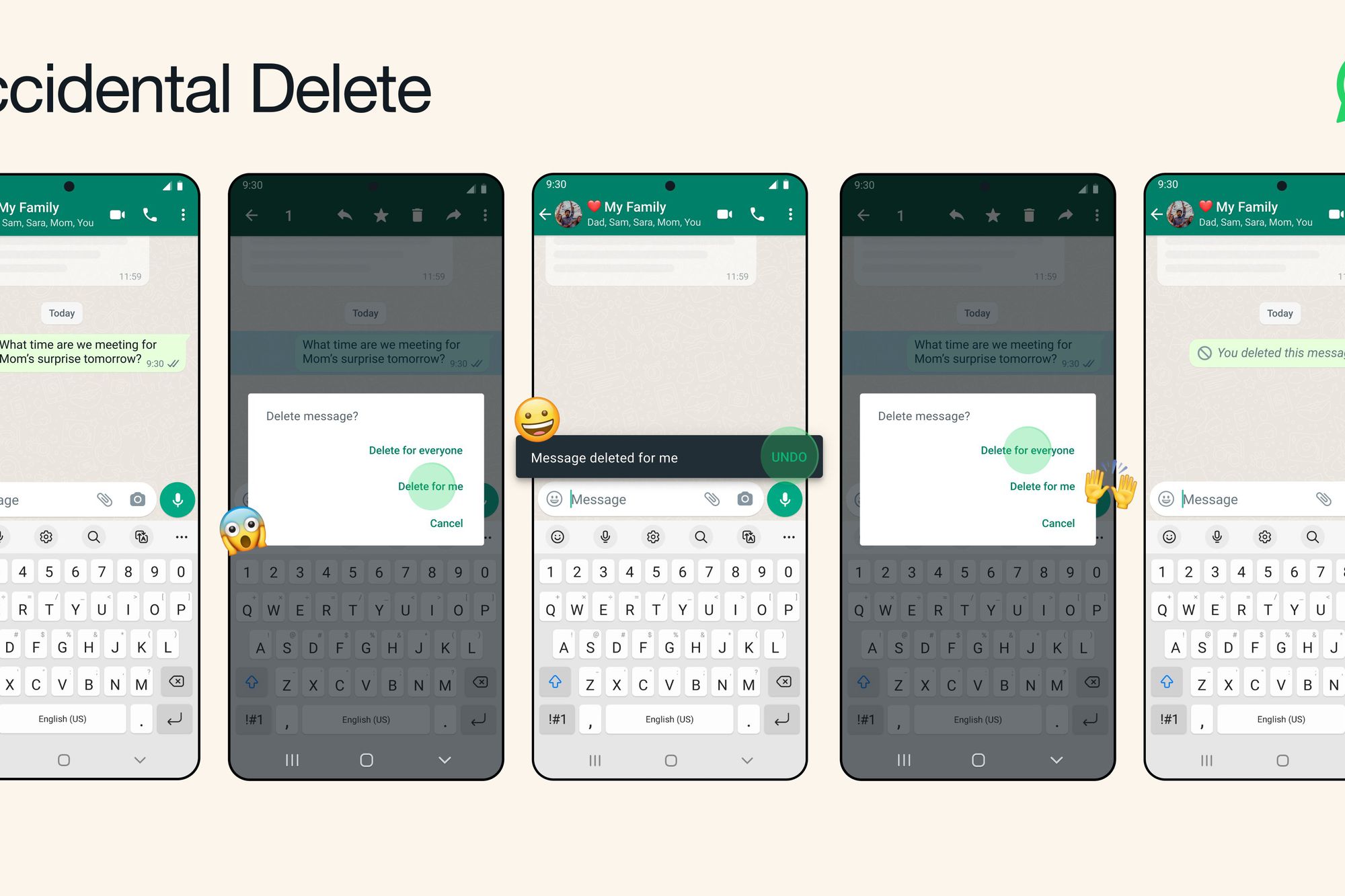
The "Delete for Everyone" feature is the primary tool for unsending a message you regret. It works on individual chats and group chats, and it removes the message from everyone's devices. To use it, tap and hold the message you sent, tap the trash can icon, then select "Delete for Everyone."
This feature has a strict time limit of 60 hours (2 days and 12 hours) from the moment the message was sent. After that, the option becomes unavailable. Additionally, both you and the message recipients must be using the latest version of WhatsApp for the deletion to succeed. If a recipient is running an older version, the deletion may fail on their device.
When the deletion is successful, the message is replaced with the placeholder text "This message was deleted" in the recipients' chats. This confirms that the content is no longer visible to them. Note that recipients using WhatsApp for iOS might still have media you sent saved to their Photos app, even after the message is deleted from the chat.
What to do when 'Delete for Everyone' isn't an option
If you miss the 60-hour window, or if the recipient doesn't have a compatible version of WhatsApp, you can still remove the message from your own device. This is done with the "Delete for Me" option. Tap and hold the message, tap the trash can icon, and select "Delete for Me." This will remove the message from your chat view, but the recipient will still see it on their end.
After choosing "Delete for Me," you have approximately 5 seconds to undo the action. A small "Undo" button appears at the bottom of the screen; tapping it restores the message to your chat. If you don't tap Undo in time, the message is permanently deleted from your device, and WhatsApp cannot retrieve it for you.
This method is useful for cleaning up your own chat history or hiding a message you no longer want to see, but it offers no control over what the other person sees. If you need the message gone from their device too, you must act within the 60-hour "Delete for Everyone" window. Alternatively, you can archive the chat to hide it from your main chat list without deleting the entire conversation.
How group admins can delete messages for everyone
Group admins have an additional power: they can delete messages sent by any other group member. This is useful for removing spam, inappropriate content, or messages that were sent by mistake. This works within the same 60-hour time limit as regular message deletion.
When an admin deletes a message sent by someone else, the chat displays "This message was deleted by admin [admin name]." This notice is visible to all group participants, so the original sender and everyone else will know the admin removed it. This feature is only available to group admins; regular members can only delete their own messages.
How to recover deleted WhatsApp messages
WhatsApp does not store your chat history on its servers, so there is no "server-side" recovery option. The only official way to retrieve deleted messages is to restore from a backup you created earlier. Backups can be stored locally on your device or in connected cloud storage. This works for both accidentally deleted messages and messages you deleted on purpose, provided the backup predates the deletion.
To restore from a backup, uninstall WhatsApp from your device, then reinstall it from your app store. When you open the app, verify your phone number, and WhatsApp will detect the existing backup. Tap "Restore" when prompted, and your chat history will be downloaded from Google Drive (Android) or iCloud (iPhone).
There are crucial caveats to this process. First, you must use the same phone number and the same Google Account or iCloud account that was used to create the backup. Second, any messages sent or received after the most recent backup cannot be restored, they are lost forever. Third, each new backup replaces the old one, so if a newer backup exists, you cannot go back to an older one. This means that if you deleted a message and then WhatsApp created a new backup, the deleted message is no longer in that backup.
For messages that were never backed up, recovery is essentially impossible through official means. WhatsApp is unable to recover messages that have been permanently deleted for you or deleted for everyone. The only way to retrieve deleted messages in phone memory is through the backup restoration method described above, and even then, you are limited to the most recent backup that contains the message. If other methods fail, you can contact WhatsApp Support via Settings > Help > Contact Us as a potential recovery option.
Frequently Asked Questions
Can I delete a message for everyone after 60 hours?
No. The "Delete for Everyone" option disappears after 60 hours from the time the message was sent. After that, you can only delete the message for yourself.
What happens to photos and videos I deleted for everyone on iPhone?
If you sent media on an iPhone and the recipient had auto-save enabled, the photo or video may still be saved in their Photos app even after you delete the message from the chat. The deletion only removes the message from WhatsApp, not from the recipient's camera roll.
Is it possible to recover messages if I don't have a backup?
No. Without a prior Google Drive or iCloud backup, there is no official way to recover deleted WhatsApp messages. WhatsApp does not store your chat history on its servers, and it cannot restore messages that were never backed up.
Does deleting a message for me also delete it for the other person?
No. "Delete for Me" only removes the message from your own device. The recipient will still see the message in their chat, and they can screenshot or forward it if they choose.