To downgrade iOS with SHSH2 blobs, you must have previously saved those blobs for the specific older iOS version you want to restore to, this unofficial process is the only way to install firmware that Apple is no longer signing, and it is not supported by Apple.
What you must know before you downgrade iOS with SHSH2 blobs
This is a critical warning: downgrading iOS with SHSH2 blobs is an unofficial, unsupported procedure. It only works if you saved the SHSH2 blobs for the target iOS version while Apple was still signing it for your exact device. If you do not have saved blobs for that version, you cannot downgrade. Apple does not provide any tool or method for this process, and it may fail if the SEP or baseband firmware is incompatible. Always back up your data before attempting the downgrade.
What are SHSH2 blobs?
SHSH2 blobs are Apple’s digital signatures that are required to restore iOS firmware. Every time Apple signs a firmware version for your device, it creates a unique signature (a blob) tied to your device’s ECID. When Apple stops signing a version, those blobs become the only way to restore that unsigned firmware. If you saved your blobs while the version was still signed, you can later use them to downgrade or restore to that version.
How to find your device's ECID and model identifier
You need both the ECID and the model identifier to save your SHSH2 blobs. Follow these steps:
- Connect your device to a computer and open iTunes.
- On the device’s information page in iTunes, locate the Serial Number field and click it repeatedly. Each click cycles through different identifiers. You must click until ECID appears, then click again until Model Identifier appears.
- Copy the ECID number that appears.
- Click the Serial Number field again until it shows the Model Identifier (e.g., iPhone10,6). Copy that number as well.
Alternatively, on the iPhone itself, go to Settings > General > About to find the serial number, EID, and IMEI, but the ECID is not displayed there, it is only visible through iTunes.
How to save your SHSH2 blobs
Once you have the ECID and model identifier, you must convert the ECID to hexadecimal. Use a free online converter: paste the ECID number into the value field, click Convert, and a hexadecimal string will appear. Save that hexadecimal value.
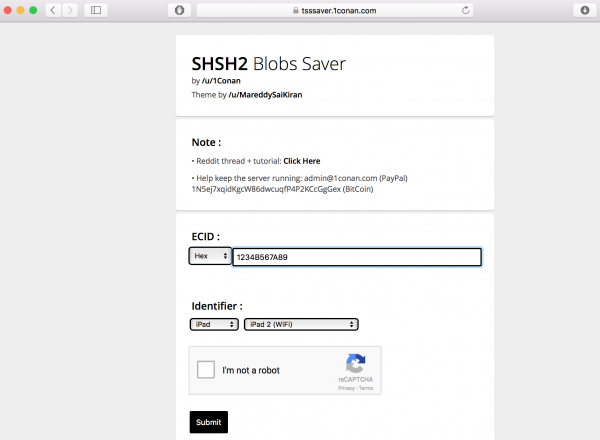
Then, visit a third-party blob-saving service (such as TSS Saver, the open-source utility created by Reddit user iConan). Enter the hexadecimal ECID into the provided field, select your device type and model identifier from the dropdown menus, complete the CAPTCHA, and submit. The service will save your SHSH2 blobs and provide a download link. Download the blob file and bookmark the link for future use. You will also need the correct IPSW file for the target iOS version, which you can download from ipsw.me.
How to use FutureRestore on Windows
FutureRestore is a command-line tool that restores unsigned iOS firmware using saved SHSH2 blobs. Alternative tools for restoring previous firmware include TinyUmbrella and TaigOne iOS Downloader. To perform the downgrade on Windows:
- Connect your device to the computer via USB.
- Create a folder on your desktop and place inside it: futurerestore.exe, your saved SHSH2 blob file, and the IPSW file for the target iOS version.
- Open a command prompt (cmd.exe).
- Drag the futurerestore.exe file into the command prompt window. This pastes its full path.
- Press the spacebar, then type
, t, and press the spacebar again. - Drag your SHSH2 blob file into the command prompt, then press the spacebar.
- Type
, latest-sep, latest-baseband, then press the spacebar. - Drag your IPSW file into the command prompt.
- Press Enter and wait for the restore process to complete. Do not disconnect the device until the tool finishes.
This process will attempt to downgrade your device to the unsigned version using your saved blobs. Note that updating iOS and operating systems through official channels is always simpler and safer, but this method is the only way to go back once a version is unsigned.
Frequently Asked Questions
Can I downgrade without SHSH2 blobs?
No. Without saved SHSH2 blobs for the target version, you cannot downgrade to an unsigned iOS version. Apple only allows restoring to the latest signed firmware.
Does jailbreaking my device help with downgrading?
You need to jailbreak your device in order to proceed with the downgrade. Jailbreaking is not required to use FutureRestore, but some older downgrade methods required a jailbroken device to set a nonce. Modern versions of FutureRestore can handle nonce setting automatically for many devices.
What happens if FutureRestore fails during the downgrade?
If the process fails, your device may enter recovery mode. You can exit recovery mode by disconnecting and reconnecting to iTunes, or by using a tool like ReiBoot. You will need to restore to the latest signed iOS version if the downgrade cannot complete.
Can I save SHSH2 blobs for a version that is already unsigned?
No. You can only save blobs while Apple is actively signing the firmware for your device. Once signing stops, no new blobs can be generated for that version.
Related reading: Jailbreak iOS: Ultimate Guide for Jailbreaking iPhone Without PC.