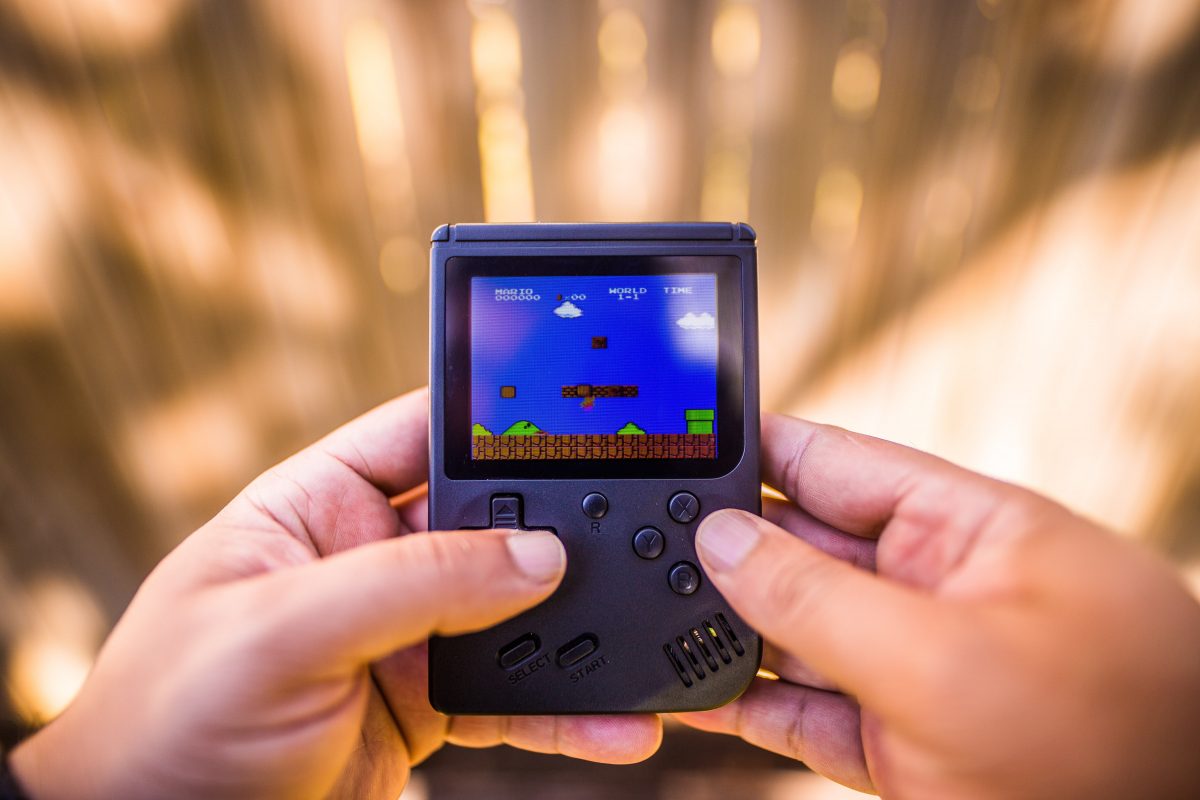
The best handheld emulator for retro gaming depends on your budget and which consoles you want to play, from 8-bit classics up to PlayStation 2 and GameCube. Whether you prioritize raw power, extreme portability, or a nostalgic Game Boy feel, the right device lets you relive your past adventures or explore new titles from the niche genre.
What is the best handheld emulator for your retro gaming needs?
The handheld emulator market has exploded, offering options for every type of retro gamer. The best choice balances the systems you want to emulate, your preferred form factor, and how much you are willing to spend. Below is a quick summary of top picks across different categories to help you start your search.
Best premium handheld emulators for high-end retro gaming
These devices deliver the highest performance, capable of handling demanding emulation for PlayStation 2, GameCube, and even some Nintendo Switch titles. They are ideal for gamers who want the most powerful portable experience available.
1. Steam Deck OLED
This device is a powerhouse for high-end emulation, running PS2, GameCube, and many Switch games smoothly. Its large OLED screen and full PC capabilities make it the ultimate choice for gamers who want a single device for both modern and retro libraries. Ideal for the enthusiast who wants the best performance and a large, vibrant display.
2. AYN Odin 2
A dedicated Android-based emulator that offers exceptional performance for PS2 and GameCube at a lower price point than the Steam Deck. Its Snapdragon 8 Gen 2 chipset ensures smooth gameplay for most titles in these libraries. Perfect for gamers focused solely on high-end retro emulation without the extra bulk of a PC handheld.
3. Ayaneo Pocket S
A premium, sleek Android handheld with a high-resolution screen and powerful internals. It excels at PS2, GameCube, and Dreamcast emulation, offering a refined, modern design. Best for users who want a top-tier Android emulator that looks as good as it performs.
4. Ayaneo 3
Features the first modular design in handheld consoles, allowing for freely combinable controller modules. Powered by a third-generation AMD AI processor for an immersive 3A gaming experience. Offers two premium screen options and an enhanced audio experience. Debuts AYASpace 3.0, featuring practical and highly useful functions.
Best mid-range handheld emulators for PS1, N64, and Dreamcast
These devices offer a sweet spot of price and performance, handling 5th and 6th generation consoles with ease and occasionally tackling lighter PS2 titles. They are the best handheld emulator choice for most retro gamers.
5. Retroid Pocket 4 Pro
A powerful mid-range option that runs PS1, N64, Dreamcast, and PSP flawlessly, with the ability to play some PS2 and GameCube games at playable frame rates. Its active cooling and ergonomic design make it a versatile daily driver. Ideal for gamers who want broad system compatibility without the premium price tag.
6. Anbernic RG556
Features a large, beautiful AMOLED screen and a comfortable ergonomic design. It performs excellently for PS1, N64, and Dreamcast, and can handle lighter PS2 and GameCube titles. Best for those who prioritize screen quality and comfort while playing classic 3D games.
7. Retroid Pocket 6
Considered the "Best Overall" retro handheld in 2026.
8. Retroid Pocket 5
Listed on the official Retroid Pocket store.
9. Retroid Pocket Flip 2
Features a clamshell design. Available with either a D1100 (8GB RAM) or SD865 (12GB RAM) processor.
10. Retroid Pocket Nova
A handheld device listed on the official Retroid Pocket store.
11. Retroid Pocket Classic
Listed on the official Retroid Pocket store.
12. POWKIDDY RGB10MAX3 Pro
A pocket-sized handheld game console from Powkiddy.
13. Powkiddy X55
Features a 5.5-inch 1280x720 IPS screen for a larger display experience. Runs on an open-source Linux system, offering flexibility for customization. Powered by the RK3566 processor.
Best budget handheld emulators for 8-bit and 16-bit classics
They are the best handheld emulator for pure nostalgia on a budget.
Perfect for gamers who want a dedicated device for classic 2D games.
14. Anbernic RG35XX Plus
A direct competitor to the Miyoo Mini Plus, offering similar performance and a slightly larger, more durable build. It also runs Linux-based custom firmware for a seamless retro experience. Best for those who prefer a sturdier feel and want to play up to PlayStation 1 games without spending more.
15. Anbernic RG35XX Pro
A newer model in the RG35XX series. Listed as a best-seller on the Anbernic official store.
16. Miyoo Mini Plus
Features a 3.5-inch IPS screen with a 640x480 resolution and a 4:3 aspect ratio, ideal for retro gaming. Powered by an ARM Cortex-A7 dual-core processor at 1.2GHz and runs a custom Linux distribution, often enhanced by community firmware like Onion OS. Includes a 3000mAh removable battery, offering good portability and ease of replacement.
Ideal for gamers who want a widescreen experience for portable emulation at a low cost.
17. Powkiddy Rgb30
Features a 4-inch 720x720 LCD screen, ideal for 1:1 pixel-perfect retro gaming. Equipped with a high-performance quad-core CPU, ensuring smooth emulation at 60Hz. Supports a wide range of emulators including MAME, N64, PS, GBA, NES, SFC, MD, and NDS. Includes built-in Wi-Fi and a 5000mAh Li-polymer battery.
18. Powkiddy Rgb20sx
Features a unique vertical design with a 1:1 high-definition 720x720 LCD screen. Compatible with a wide array of emulators such as MAME, N64, PS, GBA, and NDS. Includes a 5000mAh built-in Li-polymer battery. Offers a dual TF card design for independent system and game storage.
19. Powkiddy V90s
Operates on an open-source Linux system, allowing for multi-platform customization. Designed to perfectly run over 20 classic emulators. Was available for pre-sale as of May 2025.
Best ultra-portable handheld emulators for gaming on the go
These pocket-sized devices prioritize extreme portability for quick retro gaming sessions. They are the best handheld emulator for fitting in a coin pocket or small bag.
20. Miyoo Mini v4
The smallest fully-featured handheld emulator, capable of playing up to PlayStation 1 games. Its tiny size makes it incredibly easy to carry everywhere. Best for gamers who want the most pocketable device possible without sacrificing too much performance.
Its screen is very small, but it is the ultimate choice for portability. Perfect for quick bursts of retro gaming during a commute or waiting in line.
Best vertical handheld emulators for a Game Boy feel
These devices replicate the classic vertical form factor of the original Game Boy, offering a nostalgic grip and layout. They are the best handheld emulator for players who want that authentic retro feel.
21. Anbernic RG405V
A powerful vertical handheld that can handle PS2 and GameCube emulation, a rare feat for this form factor. Its ergonomic design makes it comfortable for long sessions despite the vertical layout. Best for gamers who want high-end performance in a classic Game Boy shape.
Its compact size and classic look make it a favorite for retro enthusiasts. Ideal for those who want a simple, dedicated device for classic handheld and console games.
How to choose the right handheld emulator for you
Consider these factors to find the perfect device for your needs.
Screen type and aspect ratio: IPS screens are common and offer good color and viewing angles, while OLED screens provide superior contrast and blacks. Emulators with device skin files are shown without a surrounding window frame by default unless Show window frame around device is changed.
Battery life: Higher-end devices with larger screens and more powerful chips tend to have shorter battery life. Budget devices often last longer due to less demanding hardware. Check reviews for real-world battery performance.
Operating system and setup complexity: Android-based devices offer more flexibility and access to the Google Play Store but require more initial setup. Linux-based devices with custom firmware (like OnionOS or GarlicOS) offer a simpler, more console-like experience out of the box. On iPhone, enabling Developer Mode requires going to Settings > Privacy & Security > Developer Mode, toggling it on, restarting the device, and confirming again after reboot. iPhone Developer Mode is required for sideloading emulators outside the App Store, regardless of the method used. In Android Studio's emulator, the Extended controls window is opened via the More button, and under Settings > Advanced you can set Graphics Acceleration to Autoselect. The Android Emulator maps the Menu button to Control+M on Windows/Linux and Command+M on macOS. Some keyboard combinations trigger emulator control shortcuts by default; the Send keyboard shortcuts to setting determines whether all keyboard input goes to the virtual device.
Which systems each tier handles:
Frequently asked questions about handheld emulators
Are handheld emulators legal?
Yes, the devices themselves are legal to buy and own. However, downloading and playing ROMs for games you do not own is a copyright violation. You should only use ROMs from games you have legally purchased.
Do they come with games?
Most reputable handheld emulators do not come pre-loaded with games. Some less expensive devices from certain sellers may include ROMs, but this is legally questionable and the quality of those games is often inconsistent.
Can you connect them to a TV?
Many handheld emulators, especially mid-range and premium models, include a mini-HDMI or USB-C video output port that allows you to connect them to a TV for a console-like experience on a big screen.
What's the difference between a handheld emulator and a phone with a controller?
A dedicated handheld emulator offers a more integrated, streamlined experience with physical buttons, optimized software, and a form factor designed specifically for gaming. A phone with a controller can be more powerful but requires more setup and can be less comfortable for long sessions.
For the wider topic, see niche mobile game lists.
Consoles may come and go, but games are always here to stay, thanks to emulators that function like any outdated gaming platform. An emulator can be downloaded for free; for instance, the best SNES emulator apps. Many players still want a handheld emulator, though, because of the nostalgia of having a physical console.
[caption id="attachment_54446" align="alignnone" width="989"] Photo by Caleb Oquendo from Pexels[/caption]
In fact, a handheld emulator can resemble the console it mimics in terms of features and looks. That makes the retro gaming experience as authentic as what is offered by the official platform which is probably obsolete or hard to find now.
If you want to purchase a handheld emulator, you’ll find plenty of options online. Sifting through all those is challenging, so we’ll share with you what to look for before you buy and the best options currently available on Amazon.
Photo by Caleb Oquendo from Pexels[/caption]
In fact, a handheld emulator can resemble the console it mimics in terms of features and looks. That makes the retro gaming experience as authentic as what is offered by the official platform which is probably obsolete or hard to find now.
If you want to purchase a handheld emulator, you’ll find plenty of options online. Sifting through all those is challenging, so we’ll share with you what to look for before you buy and the best options currently available on Amazon.
Inside This Article
Emulator Features to Check Before You Buy
Great looks or a low price alone will not lead you to the best handheld emulator. You’ll have to know the technical aspects of the product to be able to make a wise choice. Below are what you should check:1. Supported Platforms
The best emulators should be versatile; they should be powerful enough to function as a GBA emulator, a DS emulator, or better a PSP emulator all at once. So, if you want to play games originally released for the GBA, NES, SNES, DS, N64, Sega Saturn or Dreamcast, Gamecube, PSP, or PS1, make sure the handheld emulator you are getting supports them. Now, here's the good news for you. Playing the classics from different consoles is possible because there are handheld emulators that mimic multiple platforms.2. Game Catalog
A handheld emulator can come with built-in retro games or let you add your game ROMs or files. If you’re buying the former type, go with one that has a hundred to thousands of games in its catalog. A budget or midrange emulator nowadays can even feature 3,000 or more games. If you prefer just the classic games you are interested in, look for a handheld emulator with a big or expandable storage capacity.3. Storage and Saving
Storage is important not only for adding game ROMs but also for saving your progress. That is if the handheld emulator you’re about to purchase supports save and load states. When it comes to handheld emulator storage, 16GB of internal memory is already enough to store hundreds of games. Go for that or the 32GB if you want more. Additionally, an expandable one which we’ve mentioned previously is better, so you can insert a memory card to save more content.4. Aspect Ratio
We’re putting more emphasis on the emulator aspect ratio here compared to resolution because the former is how the emulated game matches how it is displayed by the original platform. To explain, you can have a retro game rendered in high resolution but if the emulator has the wrong aspect ratio, you’ll see black bars on the sides, which may negatively affect the game experience. To get the aspect ratio right, keep in mind that 3:2 is better for GBA and PSP emulators, 4:3 for PS1, SNES, and NES emulators, and 16:9 for emulators of newer consoles. This only applies when you are looking for an emulator dedicated to a specific console because many all-in-one emulators already let you choose from an array of aspect ratios within the settings.5. Multiplayer Support
Games are best enjoyed with others. If you agree, then you should be looking for a handheld emulator that supports online or local play and Bluetooth for extra controller support. The said features are usually present in midrange to high-end releases.6. Battery Life
Last but not least among the features to check is the battery life. While handheld consoles of the past are not like gaming phones today that can run nearly all day, some emulators mimicking the gadgets have battery capacities suitable for long hours of retro gaming. Four-hour battery life is already decent for a handheld emulator but you can get versions with a six to 10-hour capacity if you have the budget for it.7. Miscellaneous Features
There are handheld emulator features some gamers are particular with and that includes the analog stick or shoulder button controls and TV docking mode. You can get these as well in high-end models. With regards to the first two, both provide control that is similar to PlayStation and Xbox consoles while the last is for the big-screen experience inspired by the portable and dockable Nintendo Switch.21 Best Retro Handheld Emulators
Let’s now take a trip down memory lane as we showcase the best handheld emulators for retro gamers. Whether you are looking for a premium or budget-friendly option or something with a specific feature, there’s one for you from our list. Below are our top picks which you can purchase on Amazon:Anbernic RG350M
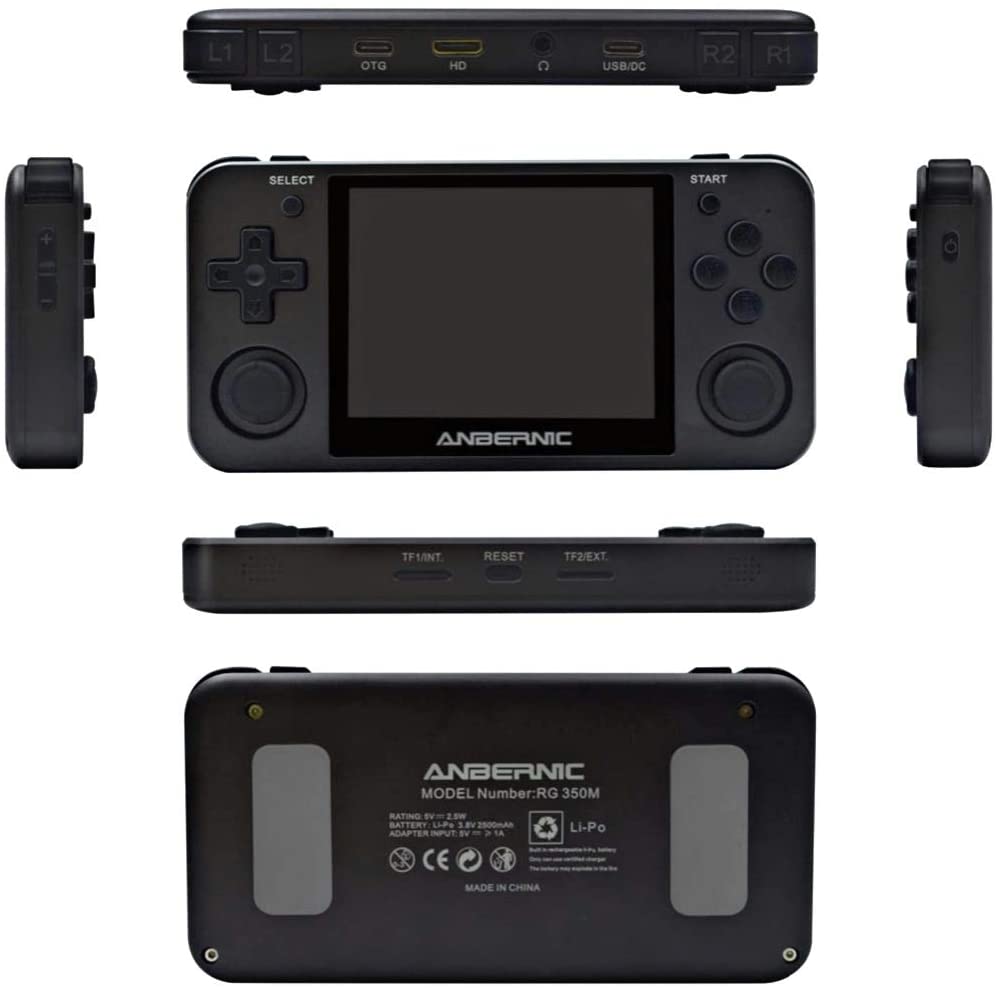 The RG350M from Anbernic is arguably the most popular handheld emulator in this list, with the model and its latest iterations often sold out on Amazon.
There is no surprise to that because the RG350M boasts unique features. Firstly, the emulator has two analog sticks, on top of having a directional pad and shoulder buttons. That configuration resembles that of a PS1 controller so it is great for playing PS1 games.
Secondly, apart from the PS1, it can mimic older consoles, including the Game Boy Color and Advance, Neo Geo, Famicom, and Super Famicom. Moreover, it has 2,500 built-in games for you to enjoy.
Lastly, the handheld emulator has a 640x480-pixel resolution, 16GB internal storage, and a 2,500mAh battery that is good for six hours, which all hit the passing mark.
The RG350M will give you the bang for your buck with its features not commonly available in competitor emulators.
The RG350M from Anbernic is arguably the most popular handheld emulator in this list, with the model and its latest iterations often sold out on Amazon.
There is no surprise to that because the RG350M boasts unique features. Firstly, the emulator has two analog sticks, on top of having a directional pad and shoulder buttons. That configuration resembles that of a PS1 controller so it is great for playing PS1 games.
Secondly, apart from the PS1, it can mimic older consoles, including the Game Boy Color and Advance, Neo Geo, Famicom, and Super Famicom. Moreover, it has 2,500 built-in games for you to enjoy.
Lastly, the handheld emulator has a 640x480-pixel resolution, 16GB internal storage, and a 2,500mAh battery that is good for six hours, which all hit the passing mark.
The RG350M will give you the bang for your buck with its features not commonly available in competitor emulators.
TrophyRak Handheld Emulator
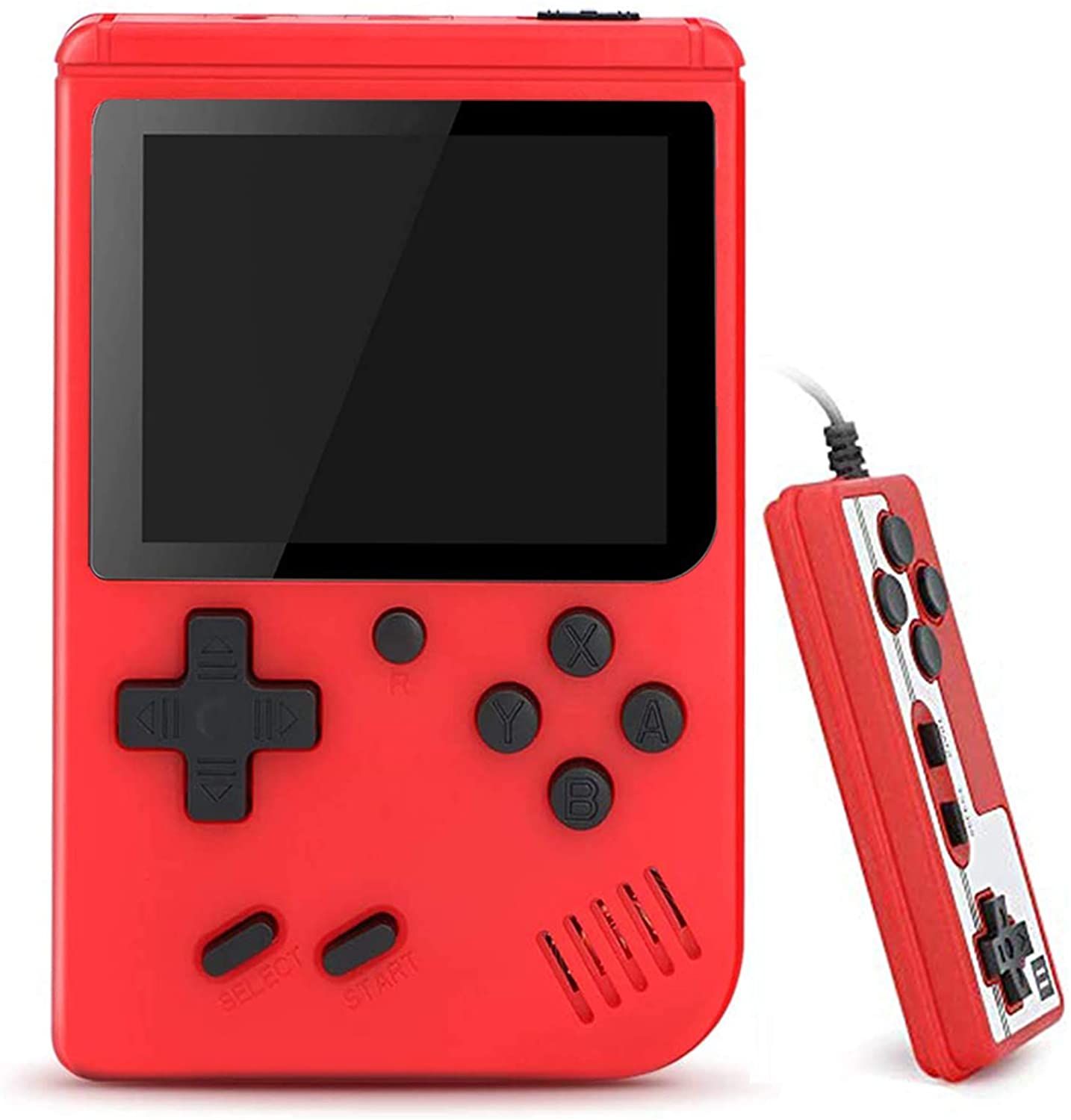 This handheld emulator from TrophyRak is an Amazon Best Seller because it looks like a companion console of the Famicom, also supporting multiplayer and TV modes. To add, you can get it for less than $20, the lowest price among the emulators in this list.
To elaborate, the emulator has a red and white color scheme like the Famicom and comes with a controller meant to be used by the second player. Moreover, it features 500 classic games that can be shown on a bigger screen when connected to a TV.
This handheld emulator from TrophyRak is an Amazon Best Seller because it looks like a companion console of the Famicom, also supporting multiplayer and TV modes. To add, you can get it for less than $20, the lowest price among the emulators in this list.
To elaborate, the emulator has a red and white color scheme like the Famicom and comes with a controller meant to be used by the second player. Moreover, it features 500 classic games that can be shown on a bigger screen when connected to a TV.
GPD XD Plus
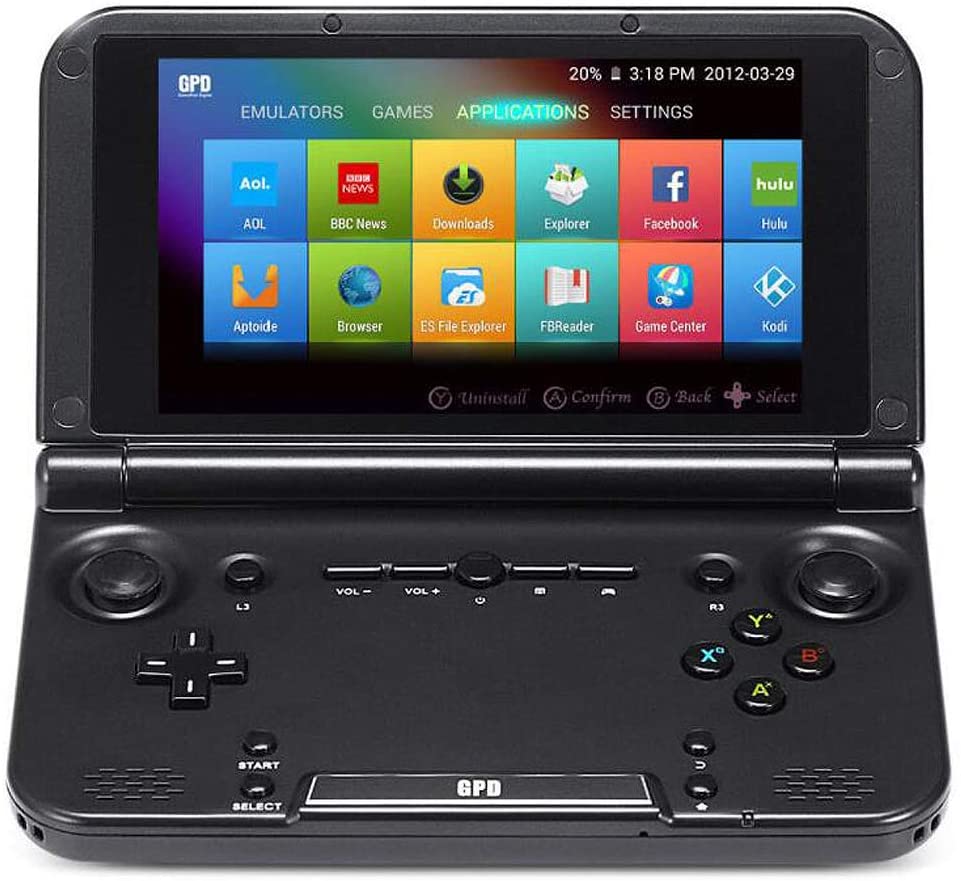 Having a 5-inch 1920x720-pixel touchscreen, Android OS, 6,700mAh battery that lasts seven to 10 hours, and the charm of a flip phone, the GPD XD Plus is the best premium handheld emulator pick on Amazon.
The GPD XD Plus’s other notable features are its firepower for running multiple games smoothly and wireless connectivity. To elaborate, it uses a PowerVR GX6250 processor and 32GB flash memory. Also, you can surf the web from the emulator to access the Google Play Store and download and play your retro or contemporary games.
Having a 5-inch 1920x720-pixel touchscreen, Android OS, 6,700mAh battery that lasts seven to 10 hours, and the charm of a flip phone, the GPD XD Plus is the best premium handheld emulator pick on Amazon.
The GPD XD Plus’s other notable features are its firepower for running multiple games smoothly and wireless connectivity. To elaborate, it uses a PowerVR GX6250 processor and 32GB flash memory. Also, you can surf the web from the emulator to access the Google Play Store and download and play your retro or contemporary games.
Bittboy PocketGo
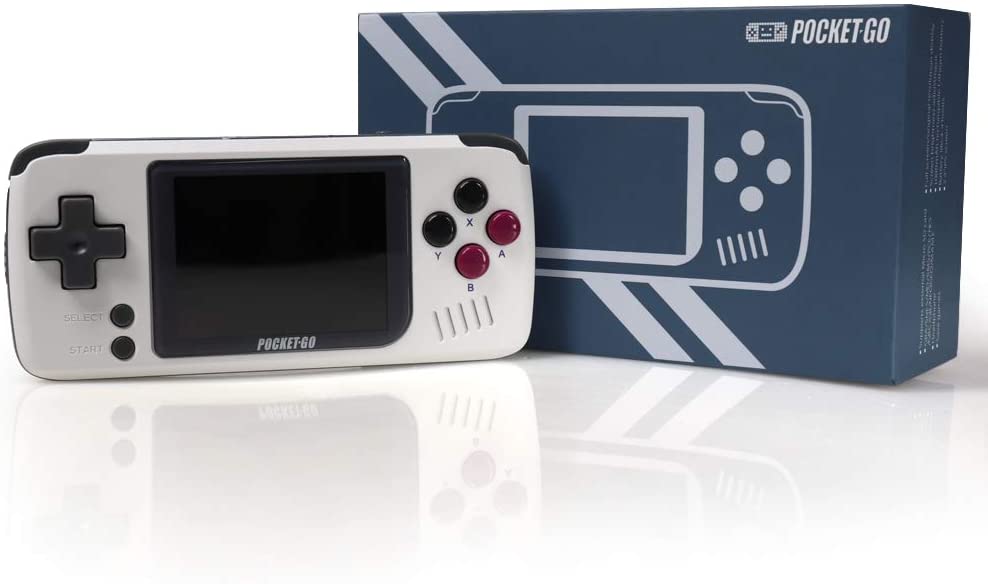 The Bittboy PocketGo is also a top budget-friendly pick, coming at less than half the price of high-end versions on Amazon and with good storage features.
To elaborate, the emulator lets you save and load your progress in any 8- or 16-bit game from more than 10 consoles, including the SNES, GBA, and GBC. Furthermore, its RAM is 32GB and expandable up to 128GB via an SD card you can load with your games. PocketGo is powered by a 1,000mAh battery that is good for four hours of play.
PocketGo can be considered pocket-size, coming at 12.3x5.6x1.4cm with a 2.4-inch IPS display.
The Bittboy PocketGo is also a top budget-friendly pick, coming at less than half the price of high-end versions on Amazon and with good storage features.
To elaborate, the emulator lets you save and load your progress in any 8- or 16-bit game from more than 10 consoles, including the SNES, GBA, and GBC. Furthermore, its RAM is 32GB and expandable up to 128GB via an SD card you can load with your games. PocketGo is powered by a 1,000mAh battery that is good for four hours of play.
PocketGo can be considered pocket-size, coming at 12.3x5.6x1.4cm with a 2.4-inch IPS display.
HigoKids Handheld Game Console
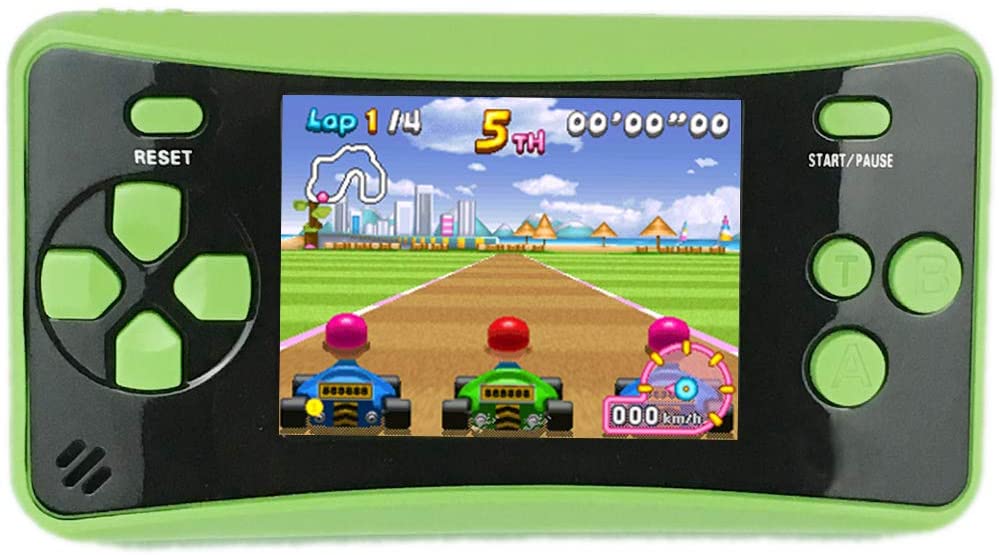 The HigoKids Handheld Game Console is a great way for youngsters to enjoy retro games. Unlike many children’s toys, this has a reinforced colored ABS housing that withstands impact when thrown. Additionally, it is a smooth-functioning emulator that comes at a low price.
The handheld emulator is loaded with 182 games from the 80s and 90s. It renders those on its 3.5-inch screen that can be backlit on a TV.
The HigoKids Handheld Game Console is a great way for youngsters to enjoy retro games. Unlike many children’s toys, this has a reinforced colored ABS housing that withstands impact when thrown. Additionally, it is a smooth-functioning emulator that comes at a low price.
The handheld emulator is loaded with 182 games from the 80s and 90s. It renders those on its 3.5-inch screen that can be backlit on a TV.
Retroid Pocket
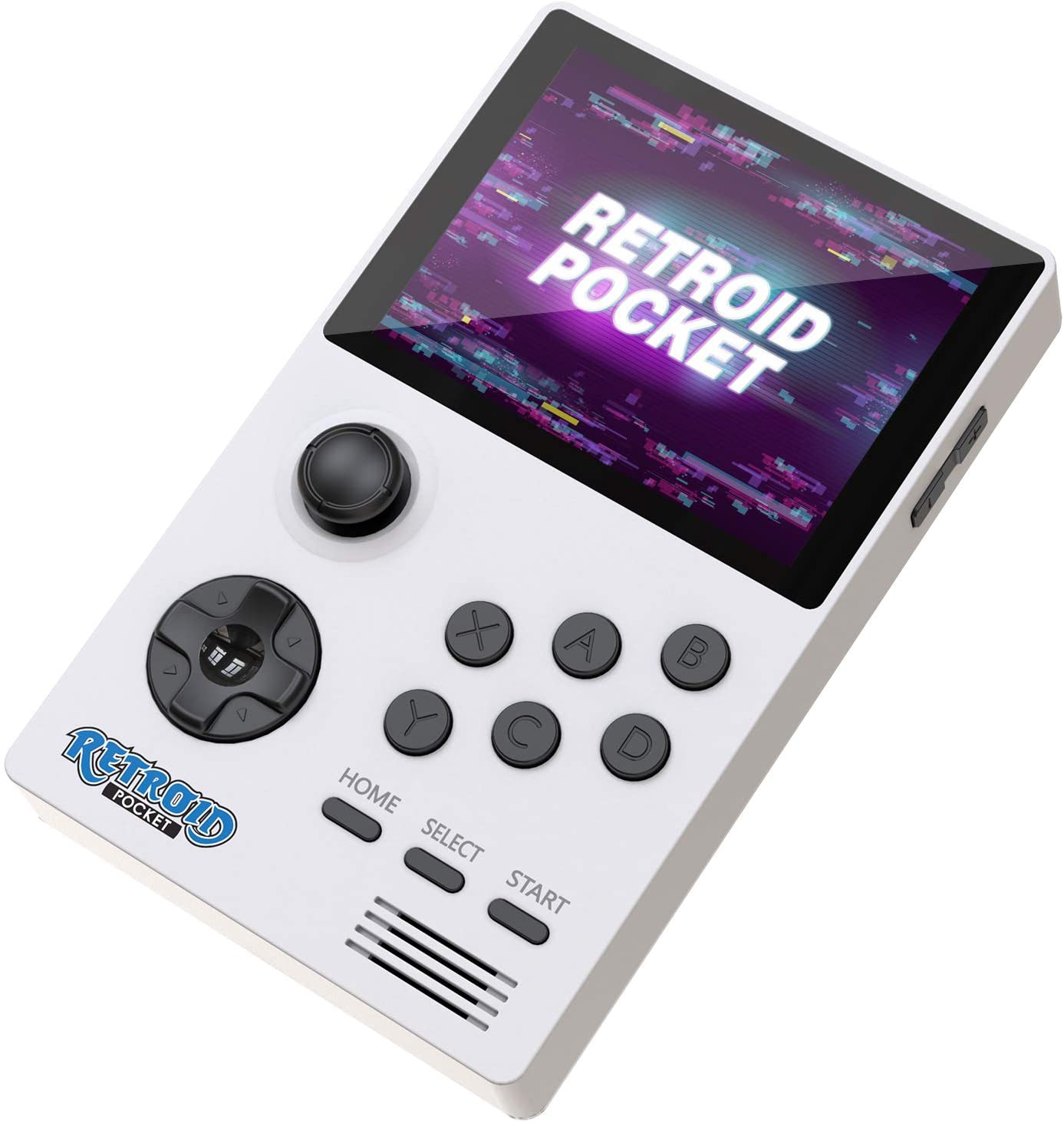 The Retroid Pocket is another great handheld emulator for long hours of gaming because of its 4,000mAh battery. That’s a power that can be likened to what mobile phones today offer.
On top of that, it runs Android, which makes it like a smartphone. In fact, you can use Android cloud gaming apps like Steam Link and Moonlight on the handheld emulator.
In terms of form factor and games, the Retroid Pocket integrates an analog stick, a directional pad, and A, B, X, and Y buttons for playing N64, PS1, PSP, GBA, DS, and other supported games.
The Retroid Pocket is another great handheld emulator for long hours of gaming because of its 4,000mAh battery. That’s a power that can be likened to what mobile phones today offer.
On top of that, it runs Android, which makes it like a smartphone. In fact, you can use Android cloud gaming apps like Steam Link and Moonlight on the handheld emulator.
In terms of form factor and games, the Retroid Pocket integrates an analog stick, a directional pad, and A, B, X, and Y buttons for playing N64, PS1, PSP, GBA, DS, and other supported games.
Hyperkin SupaBoy
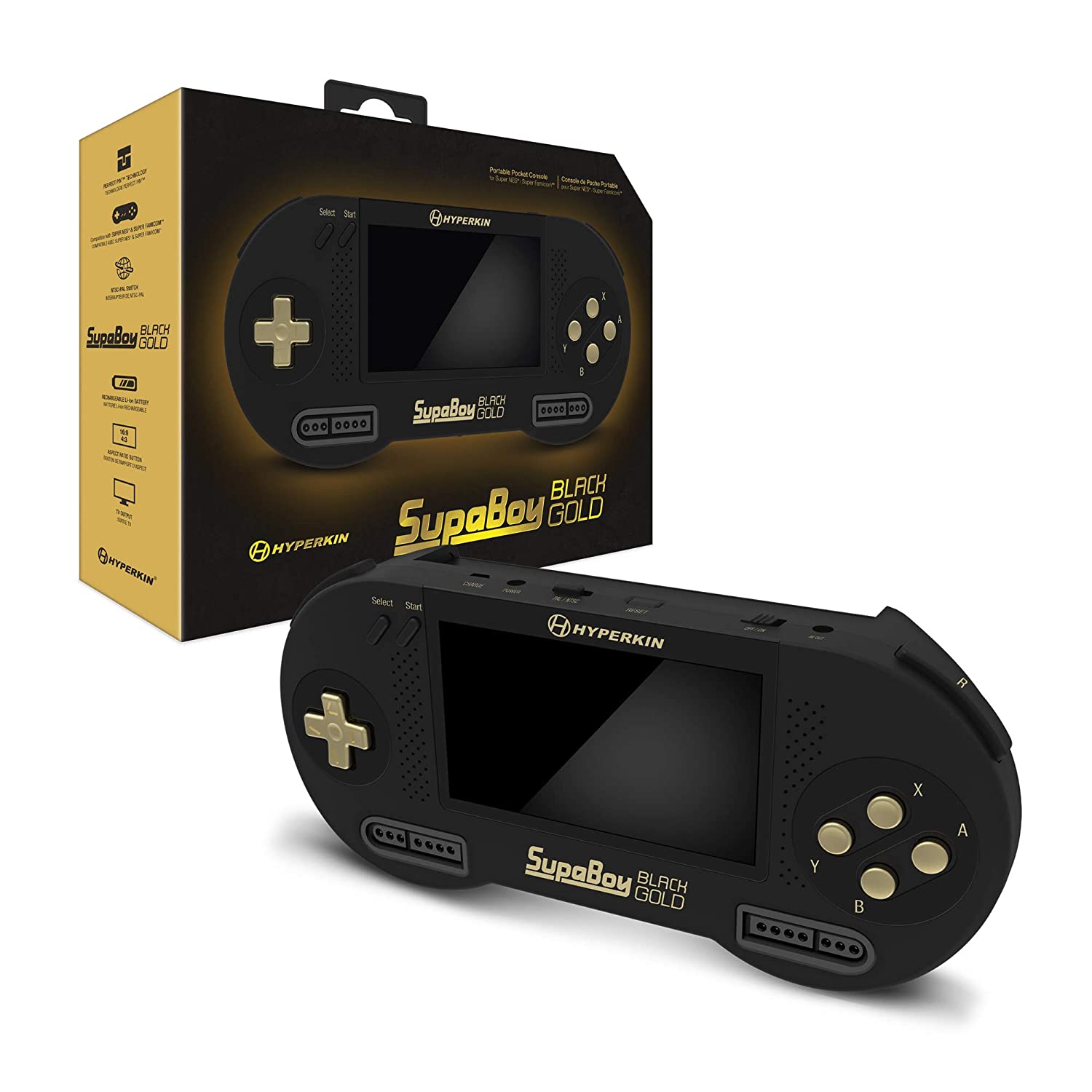 Made to emulate the SNES and Super Famicom, the Hyperkin SupaBoy’s main selling point is its switchable aspect ratio. For example, you can change that to 16:9 from 4:3 or vice versa. For a mid-range or high-end handheld emulator, its 4.3-inch screen is already a hit.
The Hyperkin SupaBoy also matches premium versions in terms of power. It has an advertised 10-hour battery life and is rechargeable.
Made to emulate the SNES and Super Famicom, the Hyperkin SupaBoy’s main selling point is its switchable aspect ratio. For example, you can change that to 16:9 from 4:3 or vice versa. For a mid-range or high-end handheld emulator, its 4.3-inch screen is already a hit.
The Hyperkin SupaBoy also matches premium versions in terms of power. It has an advertised 10-hour battery life and is rechargeable.
MJKJ Handheld Emulator
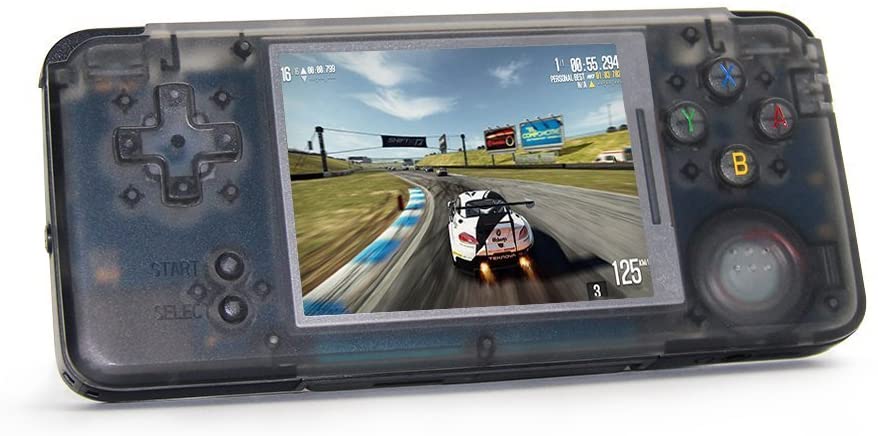 This handheld emulator from MJKJ has 3,000 preloaded retro games from various genres in its arsenal. Furthermore, you can add your games to it via a 32GB SD card.
With variety also comes versatility because the emulator is not only for playing classic games. It doubles as a multimedia player and eBook reader with a built-in speaker.
Additionally, the MJKJ handheld emulator adopts a 3-inch IPS screen with tempered glass and a 1,800mAh battery that lasts about six hours.
This handheld emulator from MJKJ has 3,000 preloaded retro games from various genres in its arsenal. Furthermore, you can add your games to it via a 32GB SD card.
With variety also comes versatility because the emulator is not only for playing classic games. It doubles as a multimedia player and eBook reader with a built-in speaker.
Additionally, the MJKJ handheld emulator adopts a 3-inch IPS screen with tempered glass and a 1,800mAh battery that lasts about six hours.
Baoruiteng Handheld Game Console
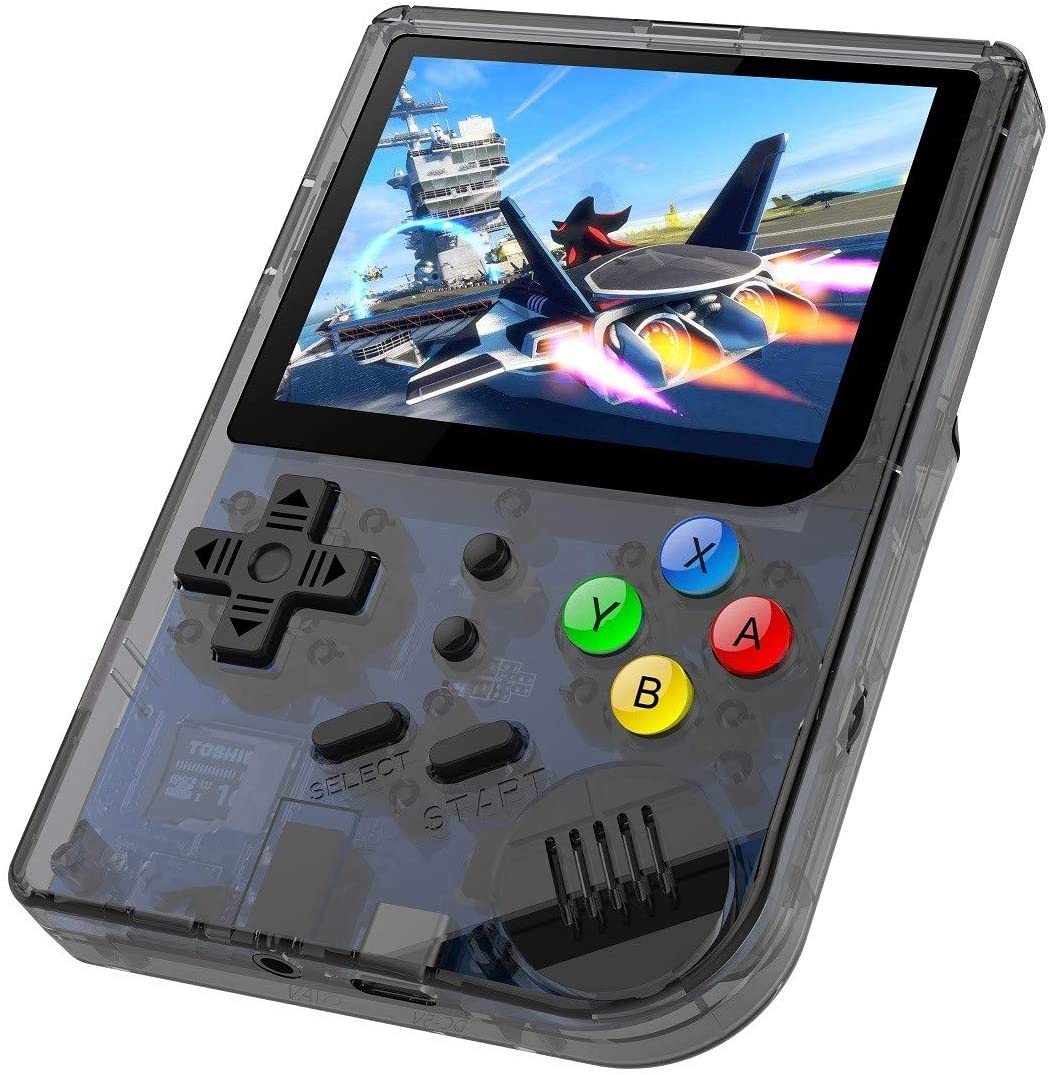 This product from Baoruiteng offers almost the same features the previously discussed handheld emulator has, although the catch here is its vertical orientation and look. That alone might be a convincing factor as it resembles the popular Game Boy console.
The Baoruiteng Handheld Game Console is a midrange emulator with 3,007 games from retro consoles up to the PS1. It also has a 3-inch 960x480-pixel tempered glass screen and a 1,800mAh battery that lasts about six hours.
This product from Baoruiteng offers almost the same features the previously discussed handheld emulator has, although the catch here is its vertical orientation and look. That alone might be a convincing factor as it resembles the popular Game Boy console.
The Baoruiteng Handheld Game Console is a midrange emulator with 3,007 games from retro consoles up to the PS1. It also has a 3-inch 960x480-pixel tempered glass screen and a 1,800mAh battery that lasts about six hours.
CredevZone Handheld Game Console
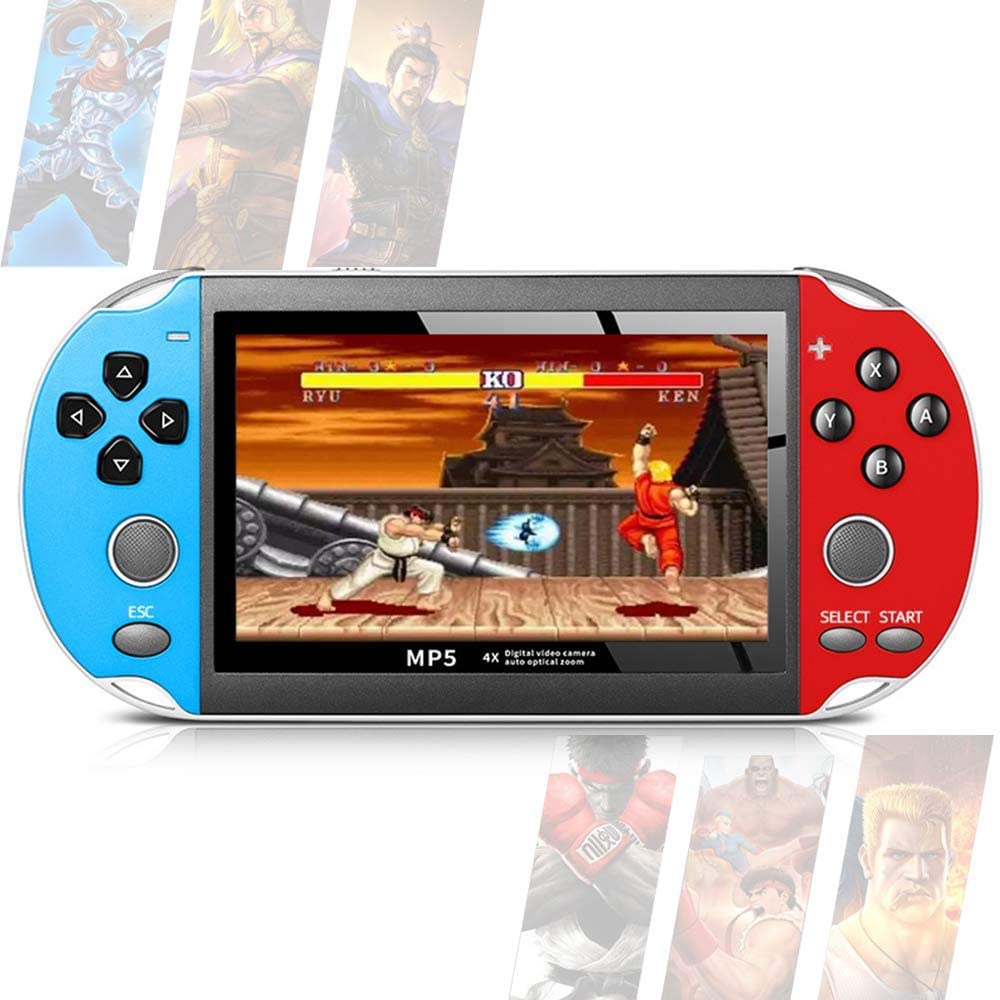 This handheld emulator from CredevZone looks modern yet can run almost any retro game with NES, SNES, Game Boy, GBC, GBA, and PS1 support. Additionally, it has more than 650 preloaded games and several save and load state slots for your game progress. A Recent Run List is also available for resuming games in an instant.
The CredevZone Handheld Game Console is also a hybrid device because it can function as an MP5 player. In fact, watching movies is great on the emulator, thanks to its 4.3-inch screen.
This handheld emulator from CredevZone looks modern yet can run almost any retro game with NES, SNES, Game Boy, GBC, GBA, and PS1 support. Additionally, it has more than 650 preloaded games and several save and load state slots for your game progress. A Recent Run List is also available for resuming games in an instant.
The CredevZone Handheld Game Console is also a hybrid device because it can function as an MP5 player. In fact, watching movies is great on the emulator, thanks to its 4.3-inch screen.
HLF Multi-Function Retro Game Console
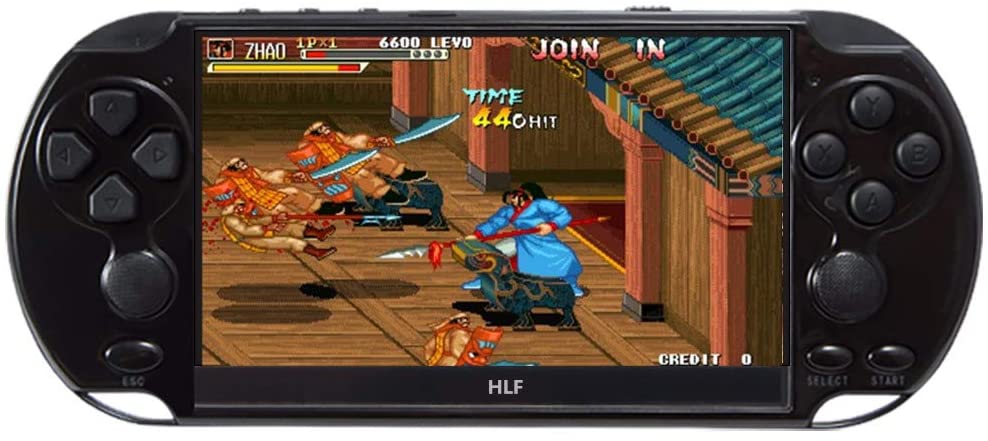 If you are a hardcore retro gamer, 3,000 games might not be enough. Why not double or triple the selection, you ask? HLF did that to its handheld emulator, adding 9,600 games to it.
The HLF Multi-Function Retro Game Console works as a Neo Geo, SFC, CPS, Game Boy, GBA, and GBC emulator to be able to play its massive catalog. Also, it can double as a Sega console, which is unique because a handheld or software-type Sega Saturn emulator is hard to find nowadays.
The emulator can instantly save and load your game progress in up to six slots anytime. To support its games and data backups, the unit has 48GB of memory when the internal and TF card capacities are combined.
Appearance-wise, HLF’s handheld emulator resembles a PSP with a 5-inch screen.
If you are a hardcore retro gamer, 3,000 games might not be enough. Why not double or triple the selection, you ask? HLF did that to its handheld emulator, adding 9,600 games to it.
The HLF Multi-Function Retro Game Console works as a Neo Geo, SFC, CPS, Game Boy, GBA, and GBC emulator to be able to play its massive catalog. Also, it can double as a Sega console, which is unique because a handheld or software-type Sega Saturn emulator is hard to find nowadays.
The emulator can instantly save and load your game progress in up to six slots anytime. To support its games and data backups, the unit has 48GB of memory when the internal and TF card capacities are combined.
Appearance-wise, HLF’s handheld emulator resembles a PSP with a 5-inch screen.
Haihuang Handheld Emulator
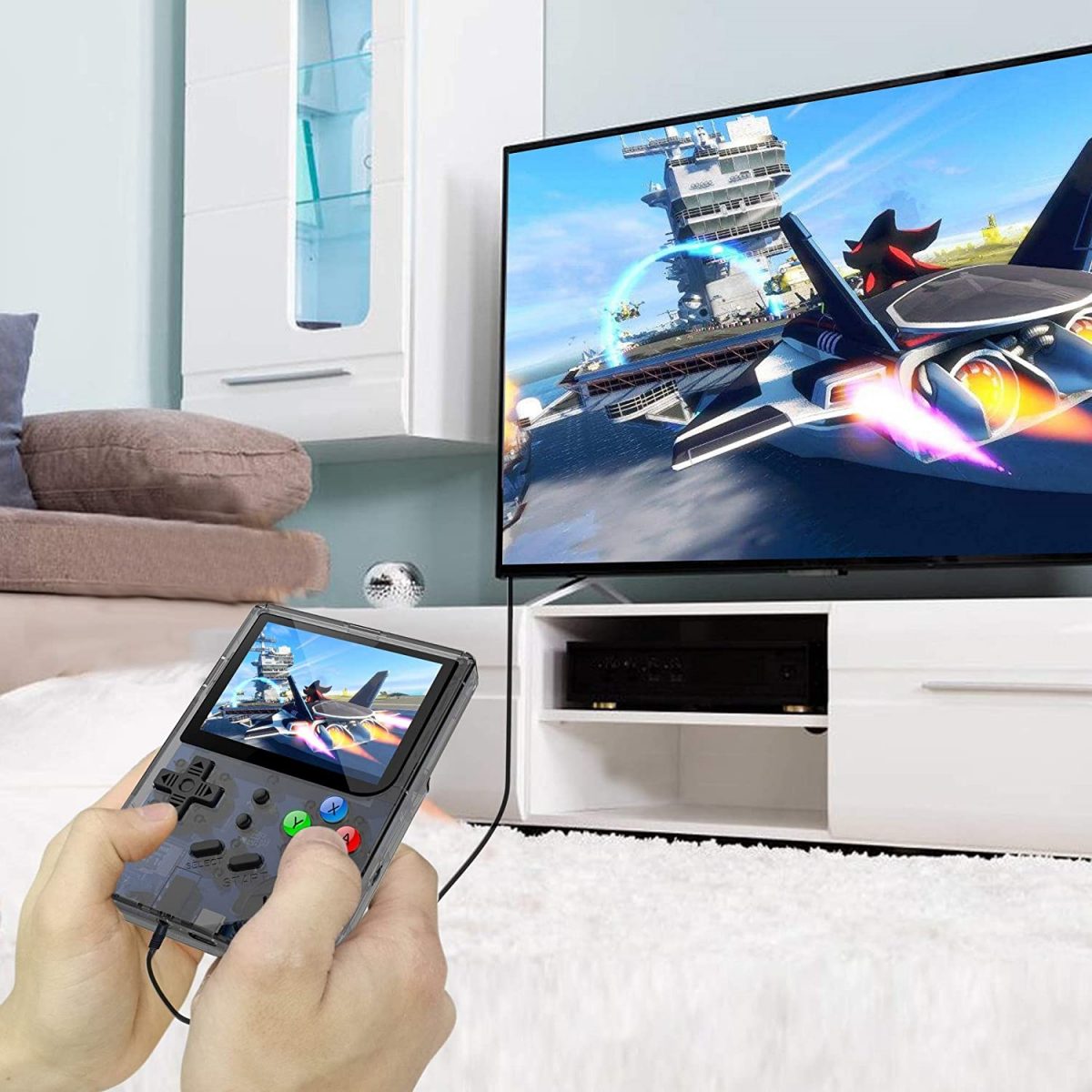 If you’re a retro audiophile, you’ll appreciate Haihuang’s handheld emulator. The device adopts a built-in speaker that supports lossless music and headphones.
Apart from working as a CP1, CP2, Neo Geo, SFC, GBC, and GBA emulator with hundreds to thousands of built-in games, it can double as a multimedia player and eBook reader. Video resolution is up to 720p HD and memory is up to 64GB when a TF card is used. The emulator also supports TV output.
If you’re a retro audiophile, you’ll appreciate Haihuang’s handheld emulator. The device adopts a built-in speaker that supports lossless music and headphones.
Apart from working as a CP1, CP2, Neo Geo, SFC, GBC, and GBA emulator with hundreds to thousands of built-in games, it can double as a multimedia player and eBook reader. Video resolution is up to 720p HD and memory is up to 64GB when a TF card is used. The emulator also supports TV output.
LKTINA Handheld Portable Game Console
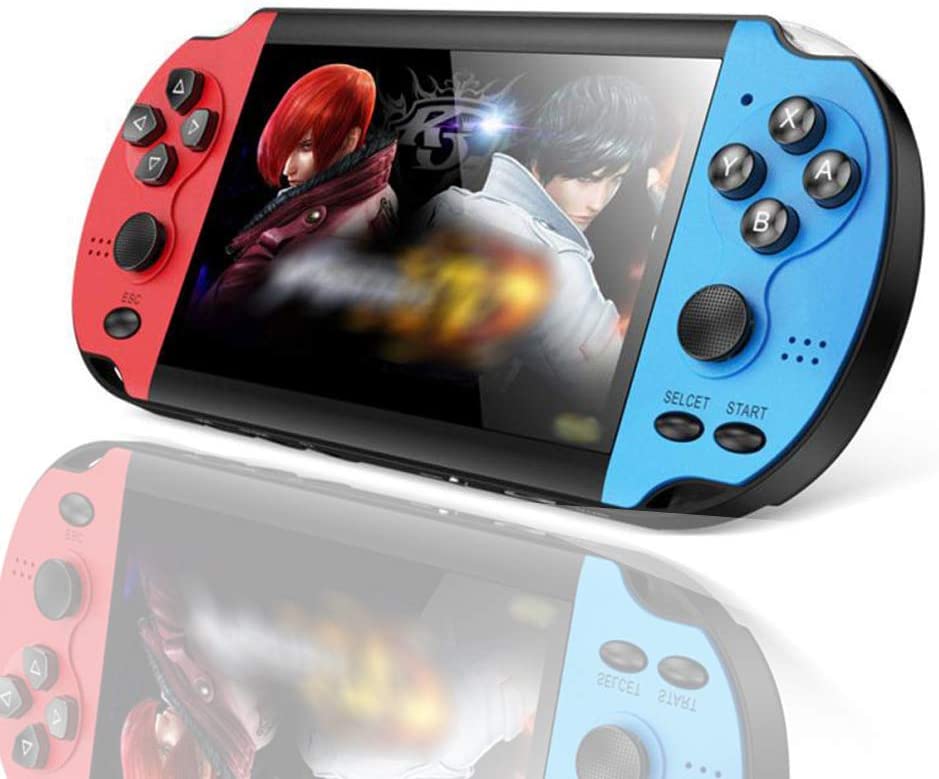 This handheld emulator by LKTINA looks like a Nintendo Switch and PSP hybrid, adopting the same colors and form, respectively.
In terms of games, it has thousands of preloaded classics, including retro titles played on the NES, Game Boy, GBA, GBC, and SFC. The emulator also has quick button shortcuts for its save or load states.
In terms of hardware, the LKTINA Handheld Portable Game Console features a 4.3-inch 480x272-pixel screen and a camera for taking videos and photos. It also has an interface for connecting to a TV.
This handheld emulator by LKTINA looks like a Nintendo Switch and PSP hybrid, adopting the same colors and form, respectively.
In terms of games, it has thousands of preloaded classics, including retro titles played on the NES, Game Boy, GBA, GBC, and SFC. The emulator also has quick button shortcuts for its save or load states.
In terms of hardware, the LKTINA Handheld Portable Game Console features a 4.3-inch 480x272-pixel screen and a camera for taking videos and photos. It also has an interface for connecting to a TV.
8-bit Old Arcade
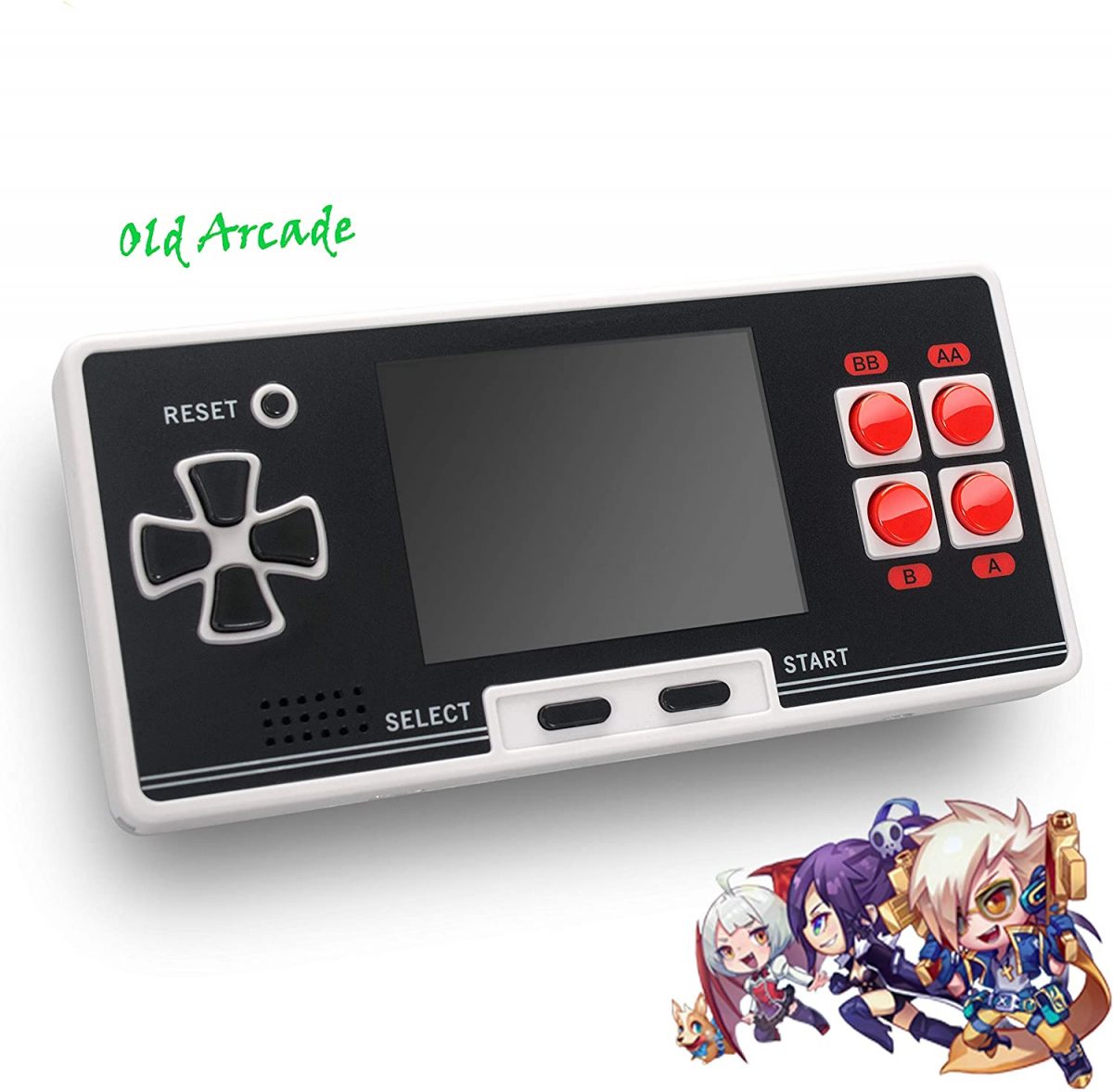 You already have a hint on what platform 8-bit Old Arcade supports based on how it looks. If you guessed NES, then you’re right. The handheld emulator can even disguise itself as an NES controller because of its appearance.
8-bit Old Arcade already has up to 200 games preloaded in it, so there is no immediate need to download ROMs. Moreover, it is easy to power and hooks up with a TV. All you need is a USB cable or three AAA batteries, and the provided AV cable, respectively.
You already have a hint on what platform 8-bit Old Arcade supports based on how it looks. If you guessed NES, then you’re right. The handheld emulator can even disguise itself as an NES controller because of its appearance.
8-bit Old Arcade already has up to 200 games preloaded in it, so there is no immediate need to download ROMs. Moreover, it is easy to power and hooks up with a TV. All you need is a USB cable or three AAA batteries, and the provided AV cable, respectively.
Goolsky X16 Handheld Emulator
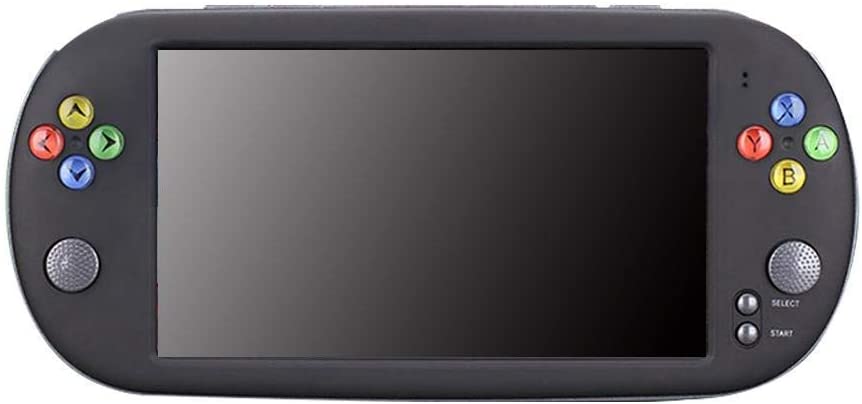 The Goolsky X16 handheld emulator is also a great pick, versatility-wise. It supports GBA and NES games in 29 languages. Also, you can connect it to your computer for adding games or a TV for a bigger screen.
The emulator’s screen is already huge to start with, measuring 7 inches. You can watch high-resolution videos and browse photos or even read eBooks on it.
In terms of storage, it has 8GB of internal space. You can extend that to 32GB via a TF card.
The Goolsky X16 handheld emulator is also a great pick, versatility-wise. It supports GBA and NES games in 29 languages. Also, you can connect it to your computer for adding games or a TV for a bigger screen.
The emulator’s screen is already huge to start with, measuring 7 inches. You can watch high-resolution videos and browse photos or even read eBooks on it.
In terms of storage, it has 8GB of internal space. You can extend that to 32GB via a TF card.
My Arcade Pixel Player
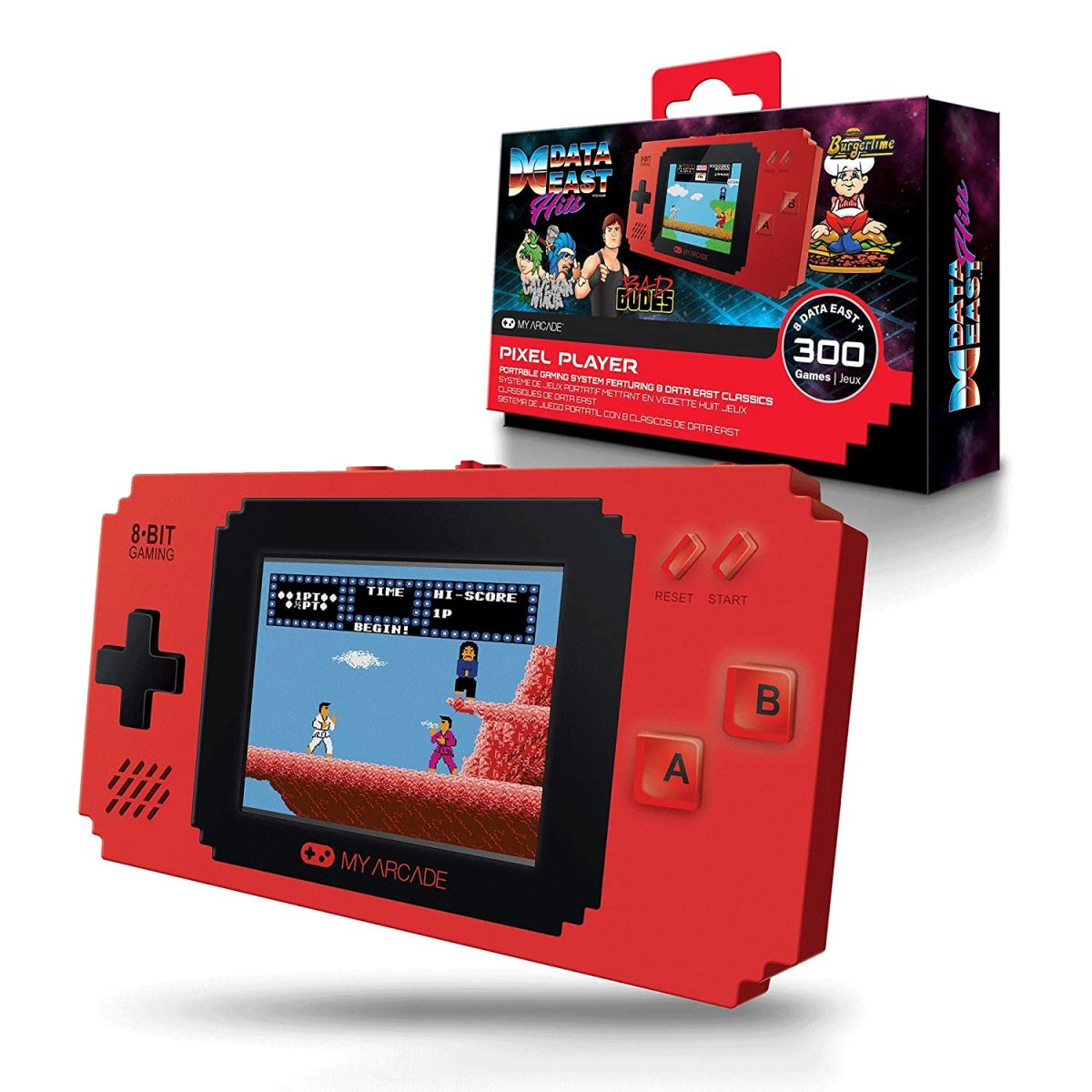 Everything about My Arcade Pixel Player screams pixels. In fact, the emulator’s cool housing shape and the games it plays are inspired by and are in pixels, respectively.
The handheld emulator has 308 built-in retro games from sports, racing, puzzle, and other genres. It can play the classics in color on its 2.75-inch display.
Everything about My Arcade Pixel Player screams pixels. In fact, the emulator’s cool housing shape and the games it plays are inspired by and are in pixels, respectively.
The handheld emulator has 308 built-in retro games from sports, racing, puzzle, and other genres. It can play the classics in color on its 2.75-inch display.
Chaonatech Handheld Emulator
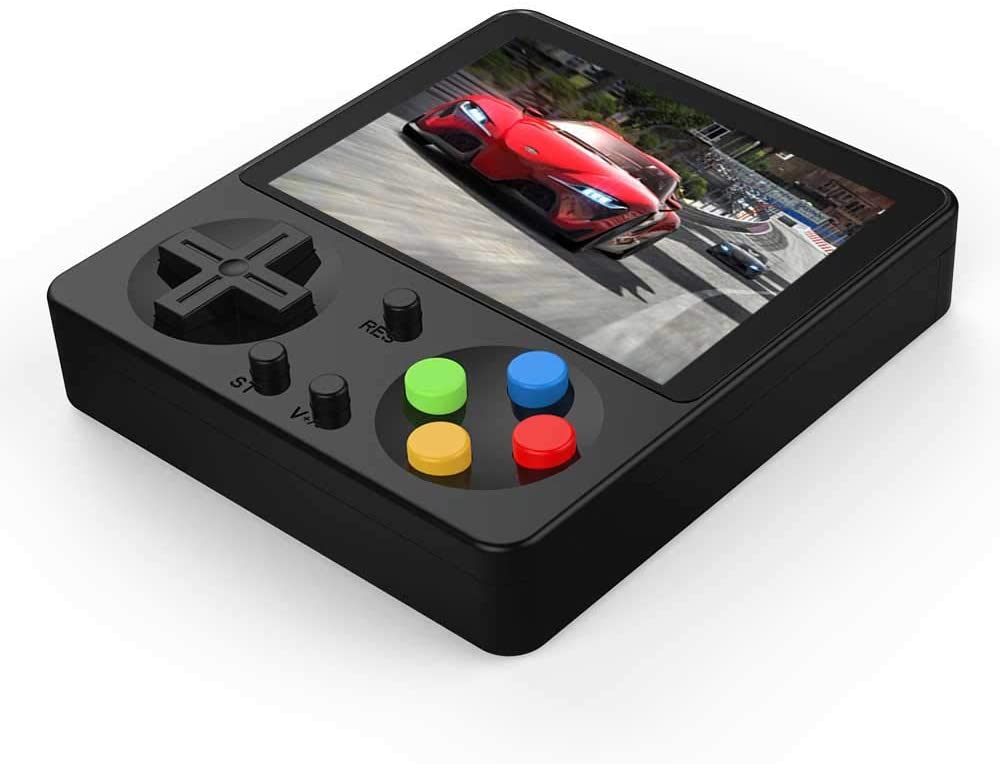 Chaonatech’s handheld emulator is the most compact and sleek model in this list because of its glossy black square-shaped housing. It is also one of the most budget-friendly options on Amazon.
The emulator can mimic 8-bit consoles and has 333 games from the fighting, puzzle, arcade, adventure, and sports genres built-in. Furthermore, it is HD and compatible with TVs.
Chaonatech’s handheld emulator is the most compact and sleek model in this list because of its glossy black square-shaped housing. It is also one of the most budget-friendly options on Amazon.
The emulator can mimic 8-bit consoles and has 333 games from the fighting, puzzle, arcade, adventure, and sports genres built-in. Furthermore, it is HD and compatible with TVs.
GoolRC Flip Handheld Emulator
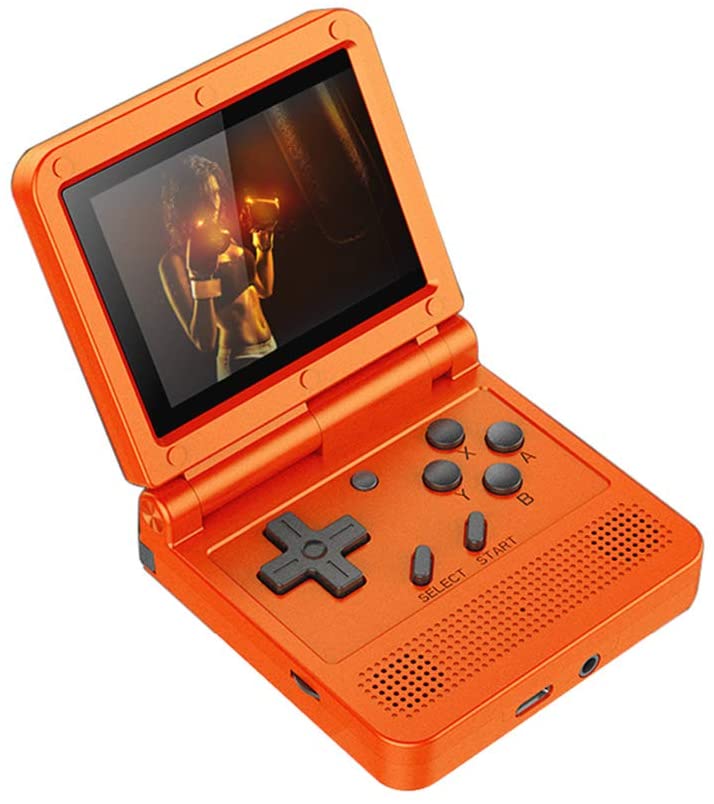 Flip consoles, just like flip phones, are “in” once again with the emulator type resurfacing on Amazon. This model from GoolRC is one that packs the necessary features in a compact form: Game Boy-like controls and a 3-inch HD screen.
The handheld emulator is open-source, so it can run games from various retro consoles. Furthermore, there are 2,000 preloaded games in it but you can add more through a 16GB TF card.
Flip consoles, just like flip phones, are “in” once again with the emulator type resurfacing on Amazon. This model from GoolRC is one that packs the necessary features in a compact form: Game Boy-like controls and a 3-inch HD screen.
The handheld emulator is open-source, so it can run games from various retro consoles. Furthermore, there are 2,000 preloaded games in it but you can add more through a 16GB TF card.
Hawiton Handheld Game Console
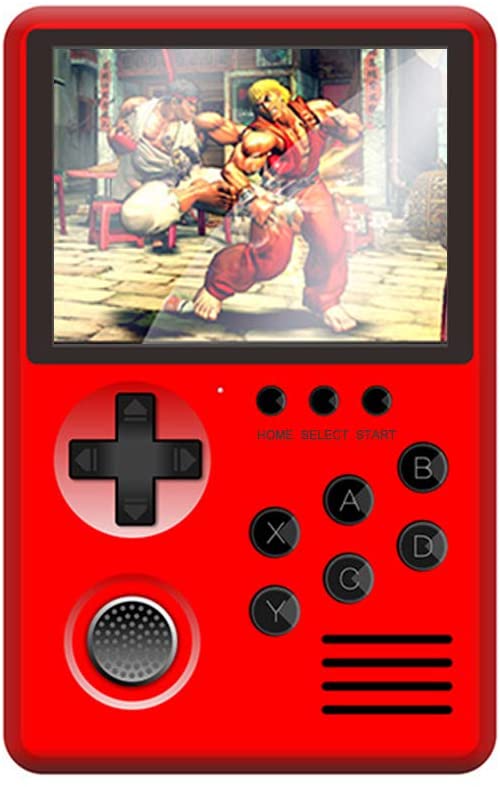 The Hawiton Handheld Game Console combines ergonomic controls and good aesthetics. Its unique features include a 360-degree rocker and “breathing” lights on its back.
The device emulates multiple consoles, including Game Boy, GBA, GB, GBC, SFC, CPS1, and CPS2. Moreover, there are 1,576 retro games built into its memory. You can insert a TF card in the emulator for your games.
The handheld emulator connects to a TV via an AV cable for a widescreen experience.
The Hawiton Handheld Game Console combines ergonomic controls and good aesthetics. Its unique features include a 360-degree rocker and “breathing” lights on its back.
The device emulates multiple consoles, including Game Boy, GBA, GB, GBC, SFC, CPS1, and CPS2. Moreover, there are 1,576 retro games built into its memory. You can insert a TF card in the emulator for your games.
The handheld emulator connects to a TV via an AV cable for a widescreen experience.
Mus Run Handheld Emulator
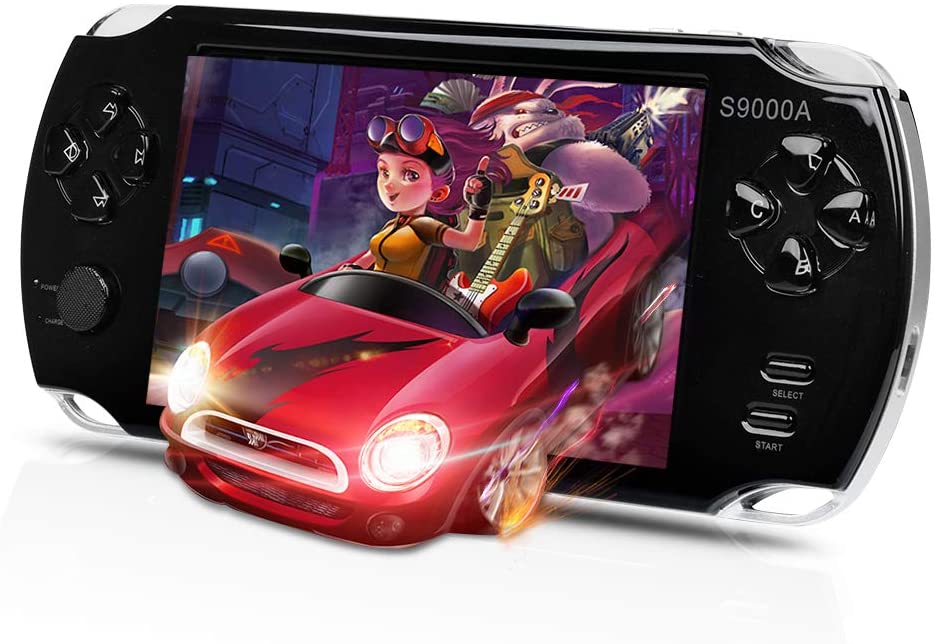 The Mus Run emulator is another device music lovers and gamers will enjoy. It can play music for 70 hours and games for up to five hours. Additionally, it has 3,000 classics preloaded but you can add any Game Boy, GBA, GBS, SFC, and other supported games of choice.
The Mus Run emulator integrates a 5-inch screen with a 16:9 aspect ratio and stores up to 16GB in its internal memory.
The Mus Run emulator is another device music lovers and gamers will enjoy. It can play music for 70 hours and games for up to five hours. Additionally, it has 3,000 classics preloaded but you can add any Game Boy, GBA, GBS, SFC, and other supported games of choice.
The Mus Run emulator integrates a 5-inch screen with a 16:9 aspect ratio and stores up to 16GB in its internal memory.
Great Boy Handheld Emulator
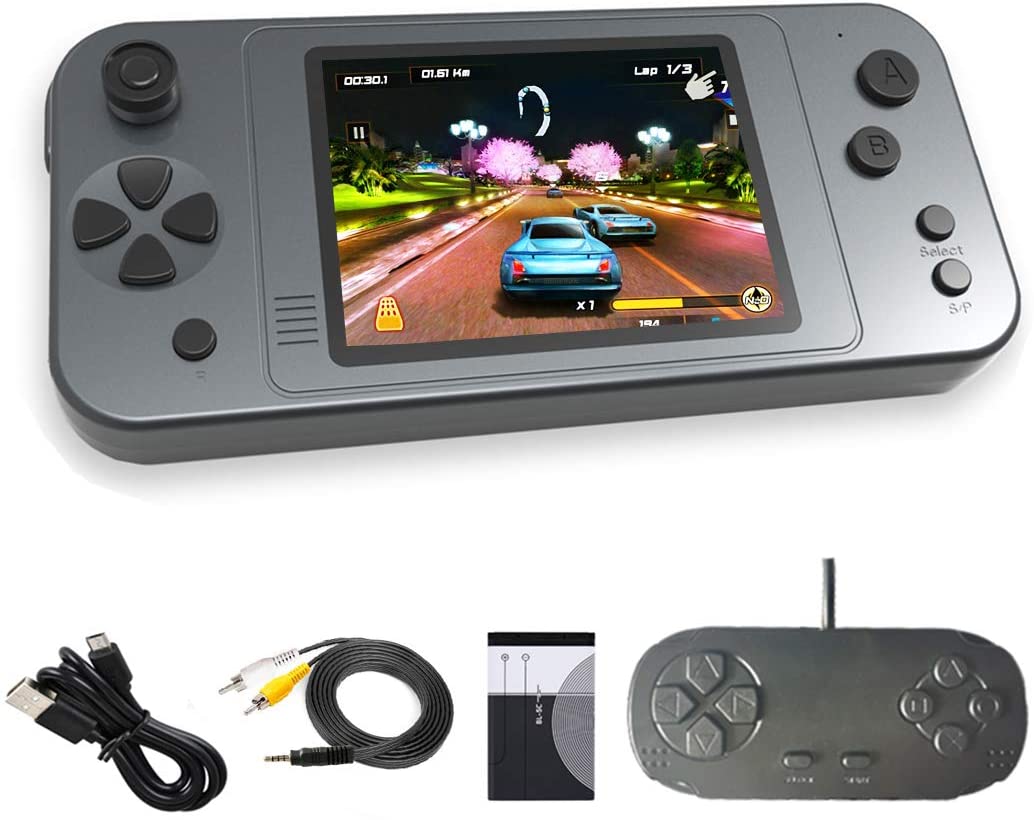 The Great Boy handheld emulator has the shape of an iPhone 4. That said, it is compact and sleek.
Looks alone are not the only reason for you to try the device. The emulator also comes with 380 classic titles, a gamepad for retro gamers who are more comfortable with a separate controller and can be linked to a TV for those who want to play on a big screen.
The Great Boy handheld emulator has the shape of an iPhone 4. That said, it is compact and sleek.
Looks alone are not the only reason for you to try the device. The emulator also comes with 380 classic titles, a gamepad for retro gamers who are more comfortable with a separate controller and can be linked to a TV for those who want to play on a big screen.