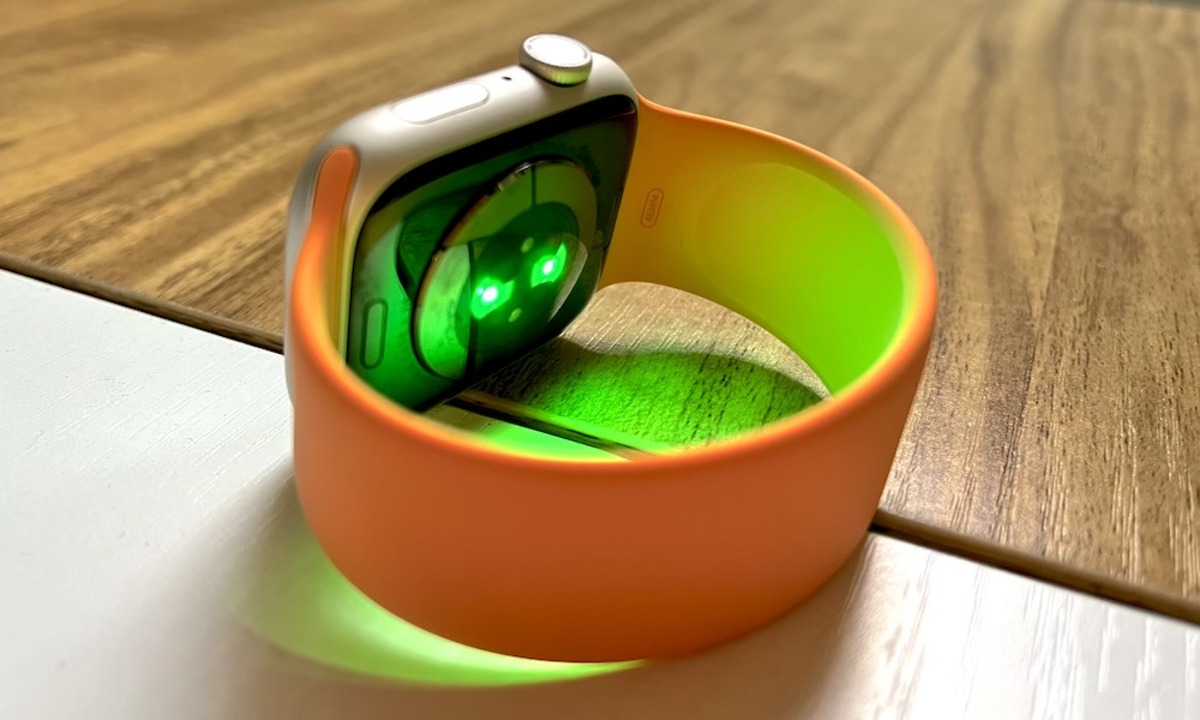
The flashing green light on your smartwatch is the optical heart rate sensor actively measuring your pulse. This sensor uses a technology called photoplethysmography (PPG), where green LED lights shine into your skin and light-sensitive photodiodes detect changes in the reflected light caused by blood flow.
What the flashing green light on your smartwatch really is
The green light is part of the optical heart rate sensor. It works by shining green LED light into your skin; as your heart beats, blood volume in your wrist changes, altering how much light is reflected back. The photodiodes capture these changes and calculate your heart rate in real time. This is the primary function of the green light, not a notification or a fault.
Why is the green light flashing when I'm not wearing my watch?
If you see the green light flashing while your smartwatch is on a table or nightstand, it is usually due to one of three causes: an active workout or breathing exercise that was not ended, or, most commonly, the "Daily Heart Rate Monitoring" setting being enabled. When this setting is active, the watch attempts to measure your heart rate at regular intervals, typically every 5 minutes, even when it is not on your wrist. The sensor tries to detect a pulse, fails, and continues its scheduled attempts.
How to turn off the flashing green light
To stop the green light from flashing when you are not wearing the watch, you need to disable continuous heart rate monitoring. The exact steps depend on your device and its companion app.
Sekonda smartwatch
- Open the Sekonda Smart app.
- Tap the menu.
- Select "Device".
- Toggle off the switch next to "Daily Heart Rate Monitoring".
Disabling this feature may help conserve battery life. You will need to enable this feature again for automatic readings once you are ready to wear your watch.
Huawei smartwatch
- Open Huawei Health.
- Go to Devices > Health monitoring.
- Disable Continuous heart rate monitoring (for green light).
- Disable Automatic SpO₂ (for red and green light).
- Disable Additional emotions/stress records (for green light).
If the light affects your sleep, it is advised to disable unnecessary monitoring features before going to bed, tighten the strap (to improve signal quality and reduce blinking frequency), and update the device to the latest version.
Other smartwatch lights you might see
Smartwatches use different lights for different sensors. A red light indicates SpO2 (blood oxygen) monitoring, which requires a combination of red and green light. During sleep tracking, some devices, such as Huawei models, use invisible infrared light for heart rate monitoring instead of the green PPG light. In non-sleep mode, Huawei devices use PPG green light for regular monitoring. On Garmin FiX® devices, a flashing green light means "Calibration in Process once signal is detected." For Garmin Dash Cam Mini 3, a slow flashing green light means the device is booting. The device backlight may also occasionally turn green or red when worn at night, which is normal as the device automatically switches the light source type based on the health monitoring feature.
If you need to turn on a smart bracelet, you can typically press and hold the touch button or side button for a few seconds. To charge my smartwatch, use the magnetic charging cable that came with the device and connect it to a USB power source. If you are unsure on which wrist should I wear my smartwatch, most manufacturers recommend the non-dominant wrist for best sensor accuracy. To identify my smartwatch model, check the back of the watch case or the original packaging for the model number.
Frequently Asked Questions
Will turning off the green light stop my heart rate from being tracked?
Yes. Disabling continuous heart rate monitoring stops the green light from flashing, but it also prevents the watch from automatically recording your heart rate throughout the day. You can still manually take a reading during a workout if your watch supports on-demand measurements.
Why does the green light stay on even after I take my watch off?
This happens because the "Daily Heart Rate Monitoring" setting remains active. The watch tries to take a reading every few minutes regardless of whether it detects skin contact. Follow the steps above to disable that setting in your companion app.
Is the green light harmful to my skin or eyes?
No. The green LED used in smartwatches is a low-power, consumer-grade light that is not harmful to skin or eyes. It is similar to the light used in pulse oximeters and is considered safe for regular wear.
Why does my smartwatch flash green and red at the same time?
A combination of green and red light typically indicates that the watch is measuring your blood oxygen saturation (SpO2). The red light is required for SpO2 monitoring, while the green light helps with heart rate detection during the same measurement.
Can I change the green light to another color?
No. The green light is a physical property of the LED used in the optical heart rate sensor. You cannot change its color through software settings. The light will always be green when the PPG sensor is active.
How do I know if the green light on my smartwatch indicates a charging status?
The green light on a smartwatch is for heart rate monitoring, not charging. A charging indicator is typically a battery icon on the screen, a solid LED of a different color (often red or amber), or a lightning bolt symbol, depending on your model.