






To check Xiaomi warranty status, the only official documented method is to contact Xiaomi Support directly with your device's IMEI or serial number. Xiaomi does not provide a self-service online checker or a built-in menu path on the device for customers to verify their warranty period themselves.
The official way to check your Xiaomi warranty
No self-service online warranty checker exists on Xiaomi's official support pages. The only documented official method is to contact Xiaomi Support, ideally with your IMEI or serial number ready. Customer support teams in each region can look up your warranty coverage and service status when you provide this information.
Why you can't just check online
Common myths about checking warranty on the device itself or through a Mi Account are not supported by Xiaomi's official documentation. Some devices may show a warranty period under Settings > About phone > Warranty or Warranty status, but this is not consistently available across all models or regions. Similarly, navigating to the device settings or product section within your Mi Account may display warranty details for some products, though this is not a universally documented feature. The company directs all warranty questions to region-specific support channels, making direct contact the only reliable method.
Find your region's Xiaomi support contact
Xiaomi provides dedicated support channels for each region. Contact the appropriate team using the details below. You can also try offline verification methods: contact a Xiaomi retailer, visit an authorized Xiaomi service center, or check the product packaging for warranty information.
- UK: Phone +44 800 021 1888, Monday to Friday 09:00-18:00. Online chat and email at service.uk@support.mi.com.
- UAE: Hotline (800) 03 20 664, Monday to Friday 09:00-18:00. Online chat and email at support.ae@support.mi.com.
- Singapore: Hotline 8008528474, Monday to Saturday 09:00-18:00. Online chat and email at service.sg@support.mi.com.
- Malaysia: Hotline 1800 18 0112, Monday to Friday 09:00-18:00. Email at service.my@support.mi.com.
- Germany: Phone 0800-223 11 44 with weekday support hours shown on the page. Email at service.de@support.mi.com.
- Russia: Enter IMEI or serial number to check service status. Phone 8-800-775-66-15, email at service.ru@russia.mi.com.
What to have ready before you contact them
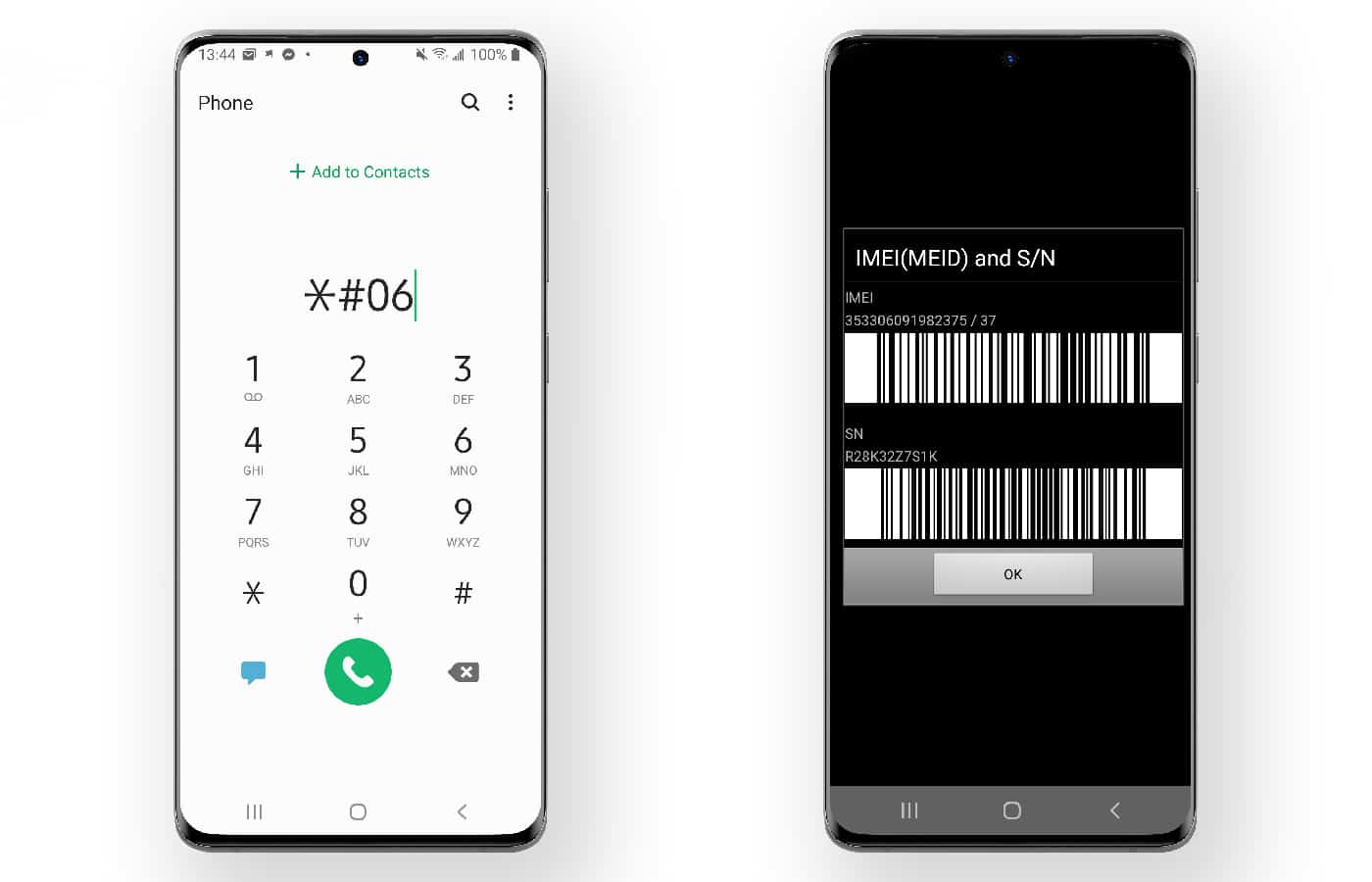
Before reaching out to Xiaomi Support, locate your device's IMEI or serial number. Support teams require this information to check service status and warranty coverage. To find the IMEI, dial *#06# on your phone's keypad, or check the original packaging or the sticker on the device. Having your purchase receipt handy can also help verify the purchase date.
Frequently Asked Questions
How long is the standard warranty for a Xiaomi device?
Xiaomi typically offers a one-year limited warranty for its smartphones, covering manufacturing defects and hardware issues. For specific warranty duration and terms, check the warranty card that came with your device or contact Xiaomi Support for your region.
What if my Xiaomi device was repaired elsewhere?
If your device has been repaired by a third party, the warranty may be voided. Xiaomi Support can confirm whether your device remains eligible for warranty service after an unauthorized repair. Always keep any repair receipts for reference.
What should I do if my Xiaomi warranty has expired?
If your warranty has expired, you can still get your device repaired at an authorized Xiaomi service center, but you will be responsible for the cost. Contact Xiaomi Support for a repair quote or visit a local service center directly.
Can I check my Xiaomi warranty through my Mi Account?
The only documented method is to contact Xiaomi Support directly with your IMEI or serial number.
Does the warranty cover issues from different carriers and plans?
Warranty coverage is determined by Xiaomi's standard terms and conditions, not by your choice of carriers and plans. If you purchased your device through a carrier, check with them first, but the official warranty check must still go through Xiaomi Support using your IMEI.
How can I find the IMEI number of my Xiaomi smartphone?
You can find the IMEI number by dialing *#06# on your phone's keypad, checking the original product packaging, or looking at the sticker on the device itself.















