






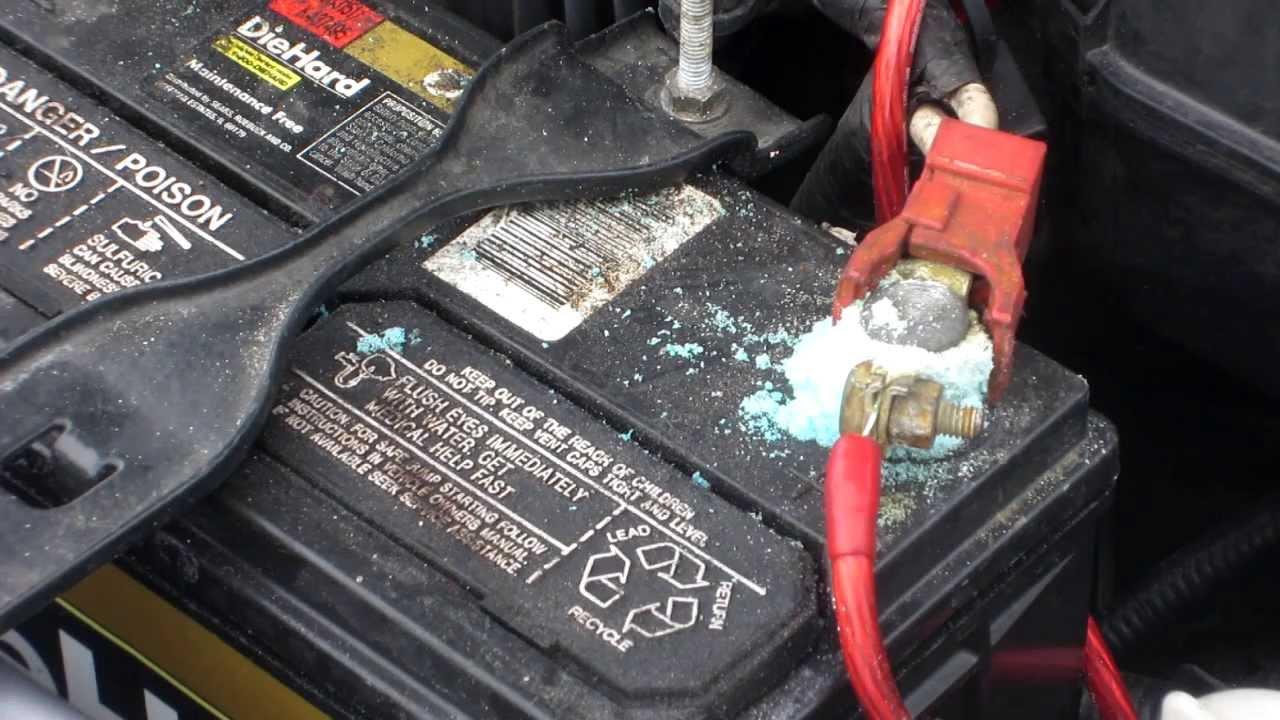
To stop corrosion on battery terminals, keep them clean and dry, and apply a protective coating to prevent the chemical reaction that causes buildup. Prevention is simpler than repair, and regular inspection catches corrosion early before it causes starting problems or shortens battery life.
How to stop corrosion on battery terminals
Corrosion on battery terminals is a universal problem that affects vehicles and battery-powered devices. The white or blue-green powdery buildup creates a poor electrical connection, leading to starting difficulties, dimming lights, and reduced battery life. Prevention centers on cleanliness and dryness. Use Anti-Corrosion Washers as a prevention method, placing them between the battery terminal and cable connector before tightening. Check and Tighten Connections Regularly as a specific prevention method to maintain good electrical contact and reduce corrosion likelihood. For removable batteries in gadgets, toys, and tools, you can maintain terminals at home. For phones with sealed batteries, professional service is required because the terminals are not user-accessible.
What causes corrosion on battery terminals
Battery terminal corrosion results from a chemical reaction between battery acid fumes and metal terminals. During charging and discharging, batteries release corrosive gases such as hydrogen sulfide. These gases react with the terminal metal, forming the white or blue-green powdery residue. Electrolyte Leakage is a cause of corrosion, where acidic electrolyte directly contacts terminals from a battery leak. Moisture accelerates this reaction by providing a conductive environment, and high temperatures speed up the chemical process. Poor Quality or Defective Batteries are a cause, producing higher levels of corrosive gases or degrading faster. Sealed phone batteries rarely expose terminals to the air, but charging ports can corrode if liquid enters them.
Signs of corrosion on battery terminals
Corrosion appears as a white, blue, or green powdery residue around the terminals. Poor electrical connection symptoms include difficulty starting the engine, dimming headlights, flickering dashboard lights, faster battery drain, and trouble jump-starting. Visible pitting or discoloration on removable battery contacts indicates advanced corrosion. A strange odor near the battery may also signal the chemical reaction is occurring.
Keep the battery clean and dry
This is the single most effective ongoing habit for preventing corrosion. Regularly wipe the battery terminals and surrounding area with a clean, dry cloth. Avoid exposing the battery to moisture from rain, spills, or high humidity. Store battery-powered devices in low-humidity environments when not in use. Keeping the battery properly sealed and protected from water exposure dramatically reduces corrosion risk.
How to remove and clean corroded battery terminals
Follow these steps for removable batteries in gadgets, toys, and tools. For vehicle batteries, the same process applies to the battery posts and cable clamps.
- Put on protective gloves and goggles before handling the battery.
- Disconnect the negative terminal first, then the positive terminal. Loosen the clamps with a wrench or pliers and remove them from the battery posts.
- Inspect the terminals and posts for visible corrosion or buildup.
- Mix a paste of baking soda and water (about one tablespoon baking soda to one cup water).
- Apply the paste to corroded areas using a small brush or toothbrush. Gently scrub until the corrosion loosens.
- Let the paste sit for a few minutes to neutralize the acid.
- Rinse thoroughly with clean water.
- Dry the terminals completely with a clean cloth. Any remaining moisture can cause new corrosion.
- Reconnect the positive terminal first, then the negative terminal. Tighten clamps securely.
For vehicle batteries, applying a terminal protectant spray or dielectric grease after cleaning adds an extra layer of protection against moisture and acid exposure.
When to seek professional service for phone batteries
If your phone shows a liquid-detection alert when connecting a USB-C cable or accessory, or if you see visible corrosion inside the charging port, contact the manufacturer or an authorized service provider. Apple states battery service should be done through an Apple Store or Apple Authorized Service Provider. Attempting to clean sealed phone battery terminals yourself can damage the device and void the warranty.
Knowing when to hand off a device protects both the gadget and the user. For removable batteries in household items, the cleaning steps above are safe and effective. For phones, professional service is the correct path.
Frequently Asked Questions
Does corrosion damage devices permanently?
Yes, if left untreated, corrosion can permanently damage battery terminals and the surrounding electrical components. The acidic residue eats away at metal, creating pitting and weakening connections. Early cleaning often saves the device, but severe corrosion may require terminal or battery replacement.
How often should I inspect terminals?
Check battery terminals every three to six months for signs of corrosion. Inspect more frequently in hot, humid climates or if you notice electrical problems like slow cranking or dim lights. For seasonal equipment like boats or lawn tools, inspect at the start of each use season.
Can I use household items besides baking soda to clean corrosion?
Baking soda and water is the recommended household solution because its alkaline properties neutralize battery acid effectively. Lemon juice or vinegar (acids) can also dissolve corrosion, but they must be rinsed thoroughly and dried completely to prevent accelerating further corrosion. Commercial battery terminal cleaners are available and work well.
What should I do if corrosion keeps returning?
Recurring corrosion after cleaning suggests an underlying issue. Check for a leaking battery, loose connections that allow vibration, or a charging system overcharging the battery. Replace the battery if it is leaking or old. Ensure all connections are tight and apply a terminal protectant after each cleaning.
Can I prevent battery terminal corrosion?
Yes, prevention is straightforward. After cleaning the terminals, apply a thin layer of petroleum jelly as an alternative protective coating to dielectric grease. This creates a barrier against moisture and corrosive gases, significantly slowing the chemical reaction that causes buildup.
For the wider topic, see batteries and charging.
















