To get unlimited hotspot for free, the honest answer is that no universal setting or trick exists to bypass carrier limits on iPhone or Android. What you can actually do is use your phone's built-in personal hotspot within your existing plan's data allowance and watch for carrier promotions that include hotspot data allowances.
How to get unlimited hotspot for free: the real answer
There is no documented, legitimate way to enable free unlimited hotspot on any smartphone. The feature that turns your phone into a Wi‑Fi hotspot, called Personal Hotspot on iPhone and portable hotspot on Android, is controlled by your wireless carrier and your plan. The only ways to use it without extra charges are to stay within the hotspot data your plan already provides or to take advantage of limited-time promotions your carrier may offer.
Use your phone's built-in personal hotspot
iPhone
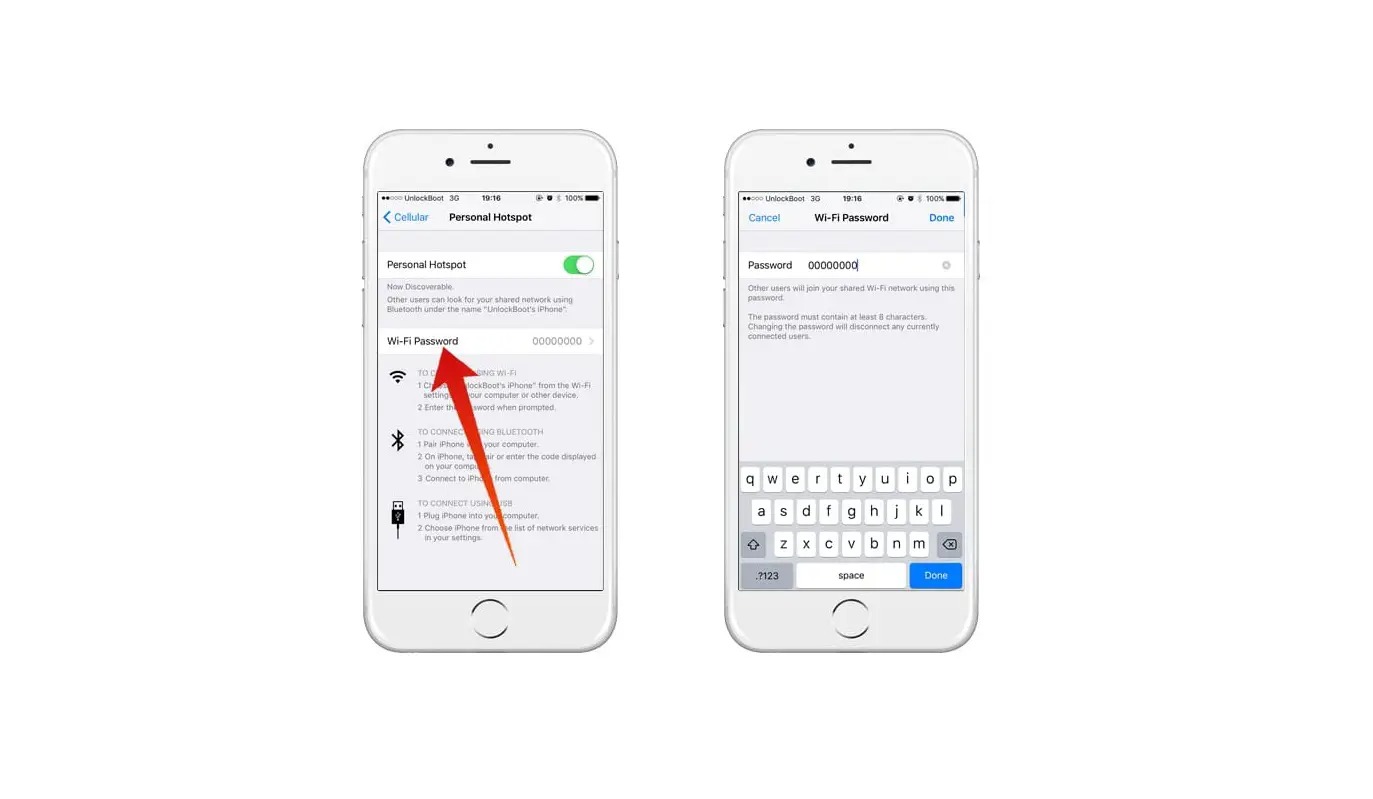
- Open Settings > Personal Hotspot (or Settings > Cellular > Personal Hotspot).
- Tap Allow Others to Join to turn it on.
- To change the password, tap Wi‑Fi Password and enter at least 8 characters. Apple says to use only ASCII characters for the hotspot password.
- On the other device, open its Wi‑Fi list, select your iPhone’s name, enter the password, and tap Connect.
iPhone 12 or later, iPad Pro 11-inch (3rd generation or later), iPad Pro 12.9-inch (5th generation or later), and iPad mini (6th generation) can use Maximize Compatibility in Settings > Personal Hotspot. Supported devices include iPad (Wi-Fi + Cellular) as a hotspot provider.
Android
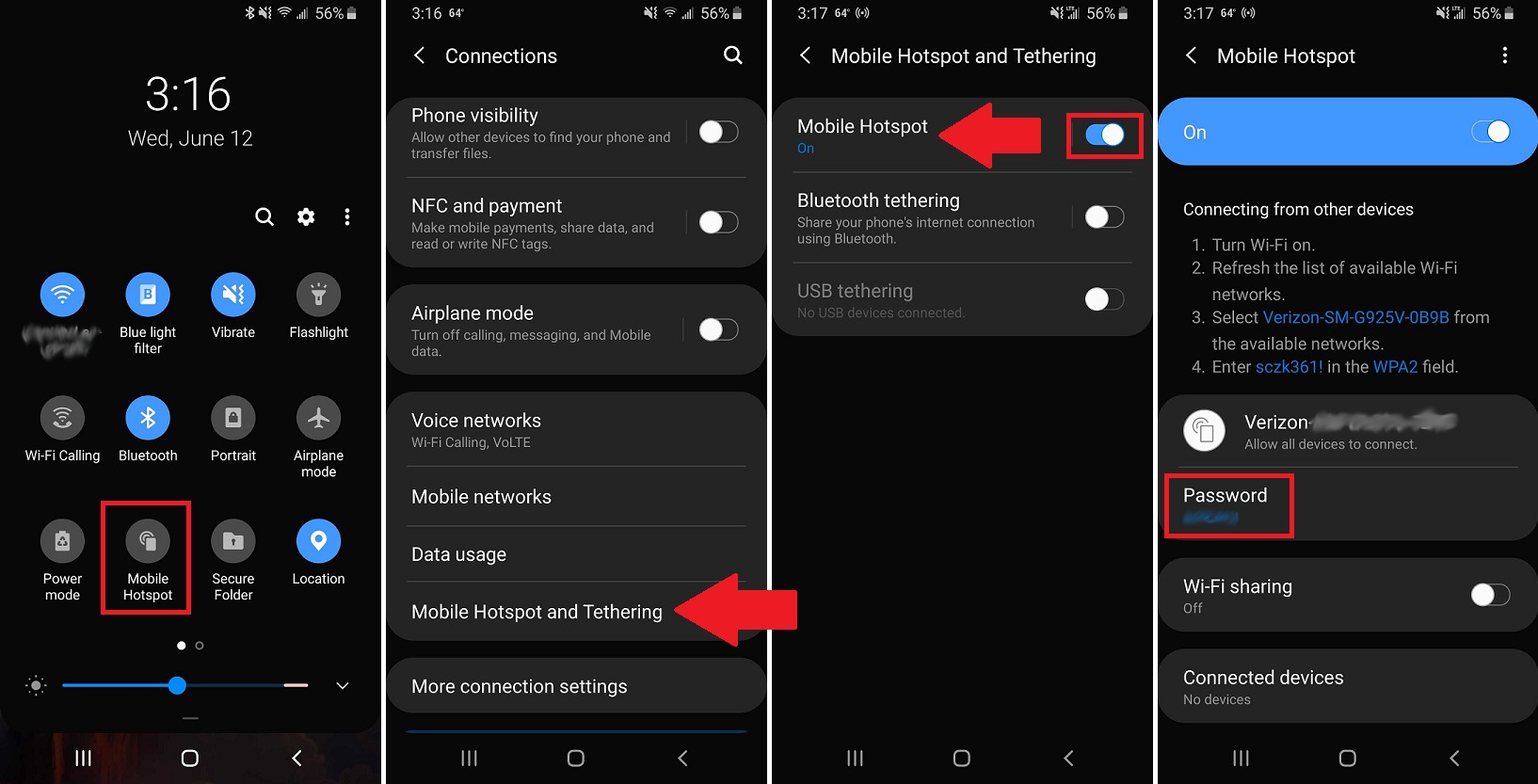
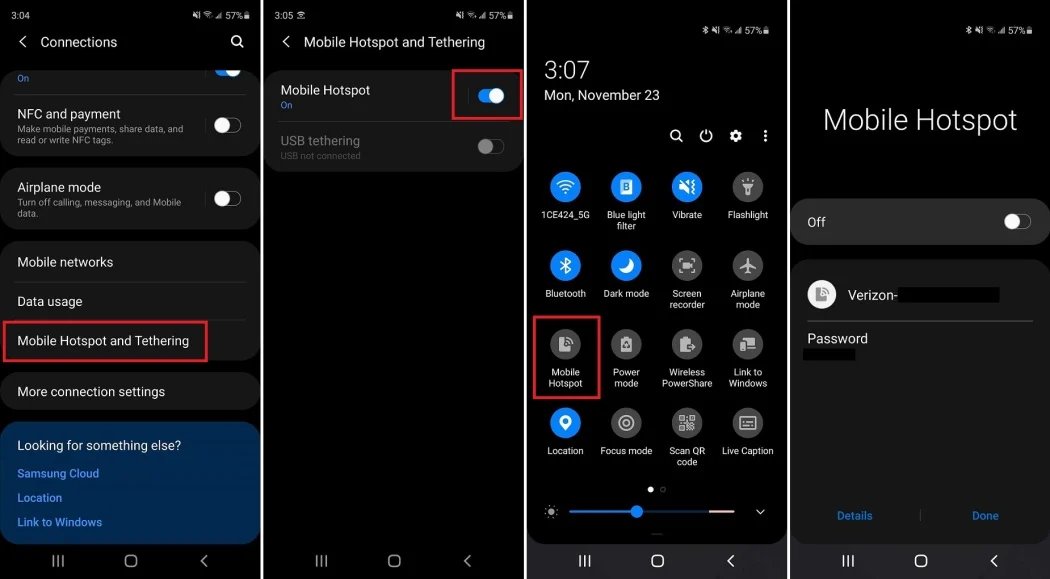
- On a Pixel phone, open Settings > Network & internet > Hotspot & tethering > Wi‑Fi hotspot, then turn on Wi‑Fi hotspot.
- On most Android phones, swipe down from the top of the screen, tap Hotspot. If it is missing, tap Edit in Quick Settings to add it.
- To connect another device, open that device’s Wi‑Fi list, select the hotspot name, enter the password, and tap Connect.
- If you do not want a password, touch and hold Hotspot, tap Security, and choose None.
Google Fi phones can share internet with up to 10 devices at a time using the portable Wi‑Fi hotspot. Turn off tethering when done to conserve battery life and data.
What to check when personal hotspot isn't working
If Personal Hotspot is dimmed or unavailable on an iPhone, open Settings > Cellular and make sure Cellular Data is turned on. Then confirm that your wireless carrier has enabled Personal Hotspot on your plan. Without carrier support, the option will not work. Also note that Personal Hotspot uses the iPhone’s cellular internet connection only, it cannot share a Wi‑Fi connection to other devices.
Check your carrier's plan and promotions
Apple states that Personal Hotspot works only if your wireless carrier has enabled it and your wireless plan supports it. Since hotspot availability depends entirely on your carrier, look for limited-time promotions that include hotspot data. These offers are not universal and vary by carrier and region, but they are the only documented way to get extra hotspot data at no additional cost.
What 'unlimited' really means for hotspots
Even on plans labeled "unlimited," hotspot data is almost always subject to throttling, deprioritization, and device caps. After you use a certain amount of hotspot data, speeds may be reduced significantly. Additionally, carriers often limit how many devices can connect at once, Google Fi, for example, caps it at 10 devices. Tethering consumes your smartphone's cellular data, so ensure you have a sufficient data plan to avoid excessive charges. Understanding these documented limits helps set realistic expectations: no plan offers truly unlimited, unthrottled hotspot data for free.
Frequently Asked Questions
What is a hotspot?
A hotspot is a feature that turns your smartphone into a portable Wi‑Fi access point, sharing its cellular data connection with other devices like laptops, tablets, or other phones.
What are the limitations of using a hotspot?
Most carriers impose a data cap on hotspot usage, even on unlimited plans. After that cap, speeds are slowed or additional charges may apply. The number of devices that can connect at once is also limited, typically to 5 or 10.
Is free unlimited hotspot possible?
No documented method or setting on iPhone or Android provides free unlimited hotspot. Any claim otherwise is not supported by official support pages from Apple, Google, or major carriers. The only legitimate ways to use hotspot without extra cost are to stay within your plan's included hotspot data or to use a carrier promotion that offers additional hotspot data for a limited time.
Can I use my phone as a hotspot without a data plan?
No, a hotspot requires an active cellular data plan to share the internet connection.
Related reading: How To Get A Hotspot For Free and How To Find My Hotspot.