






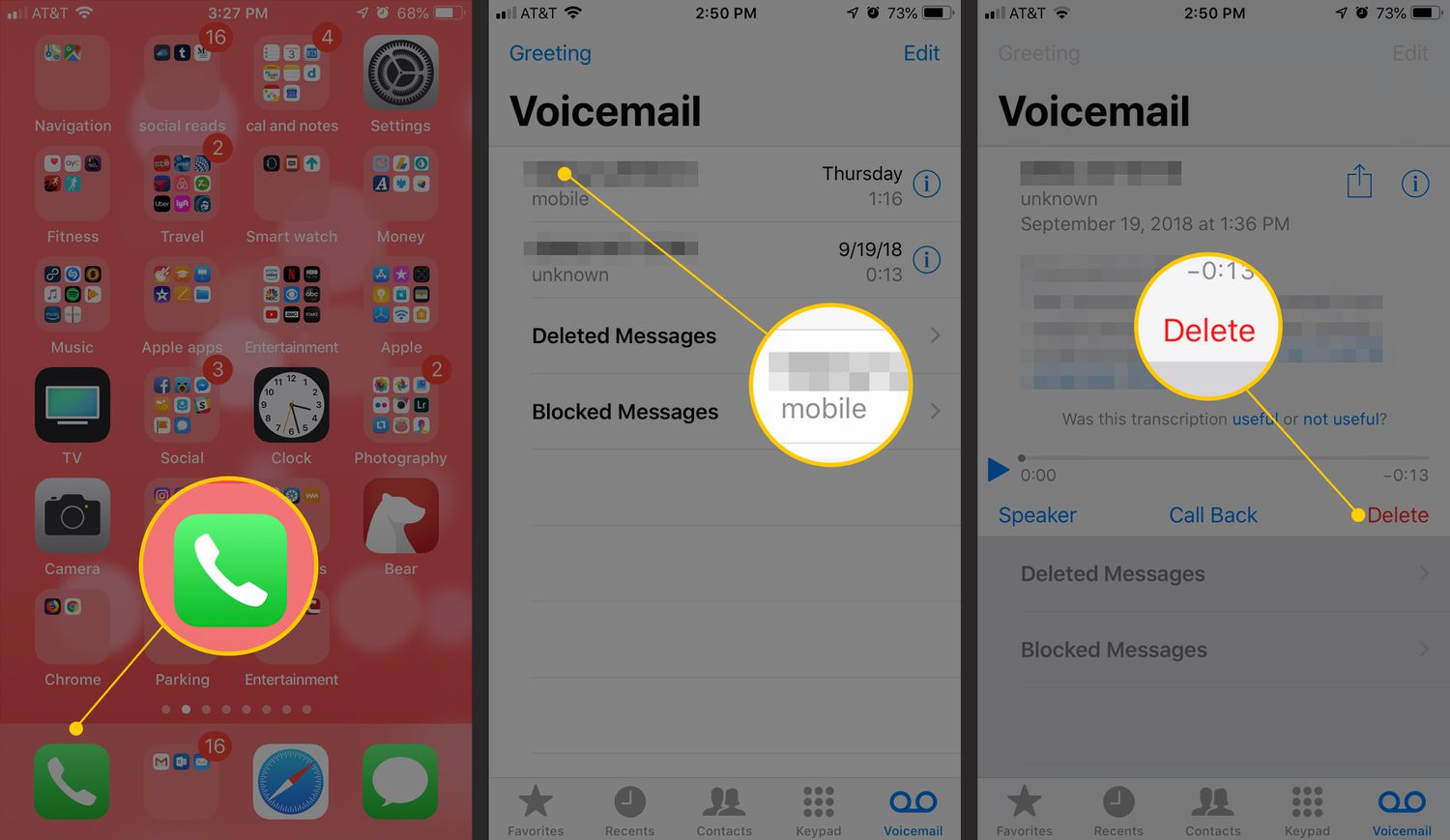
To empty your phone mailbox, open the Phone app and delete voicemail messages individually. The exact steps depend on your device and operating system, but the core action is the same: locate the voicemail, then delete it.
How to empty phone mailbox on iPhone
On an iPhone, voicemail is cleared directly in the Phone app. The layout you see depends on your Phone app version, but the deletion process is straightforward.
- Open the Phone app.
- If you see a Voicemail tab at the bottom, tap it. If you see a Calls tab, tap it, then tap the voicemail filter.
- Tap the voicemail message you want to delete to open it.
- Tap Delete.
On iPhone, you can enable voicemail transcription by going to the Voicemail tab, tapping Greeting, and toggling on Transcribe Voicemails. Deleted messages can be recovered from the Deleted Messages folder for a limited time. However, in some countries or regions, carriers may permanently erase deleted messages. Messages may also be deleted automatically if you change your SIM card.
How to empty phone mailbox on Android with Google Voice
The only current official method for emptying voicemail on an Android device is through the Google Voice app.
- Open the Voice app.
- Tap Voicemail.
- Select one or more voicemail items. To select multiple, touch and hold the first item, then tap additional items. On Android, some devices may have a 'Clear all' option to delete all voicemail messages in one go.
- Tap Delete.
- If prompted, tap I understand to confirm.
If you need to empty voicemail on Android phone using your carrier's built-in voicemail system, contact your carrier for instructions, as no official documentation exists for this process.
What about Windows Phone and BlackBerry?
No current official support pages from carriers or platform manufacturers document steps for emptying voicemail on Windows Phone or BlackBerry devices. If you use one of these platforms, your best option is to contact your mobile carrier directly for instructions.
Frequently Asked Questions
Can all voicemails be emptied at once on iPhone?
The official steps only describe deleting individual messages and recovering them from Deleted Messages.
Can multiple voicemails be deleted at once on Android?
Yes, in the Google Voice app you can select multiple voicemail items by touch-and-holding the first one and then tapping additional messages before tapping Delete.
Is there a documented voicemail retention limit?
Can deleted voicemails be recovered?
On iPhone, deleted messages go to Deleted Messages and can be recovered temporarily, though carrier behavior may vary by region. On Android with Google Voice, deletion is permanent after confirming. For carrier voicemail on any platform, recovery depends on your carrier's policies.
Does deleting voicemails free up storage space on my phone?
Most voicemails are stored on the carrier's server, not on your device, but if messages are also saved locally, deleting them can help free up some storage space.
For the wider topic, see setting up and managing voicemail.















