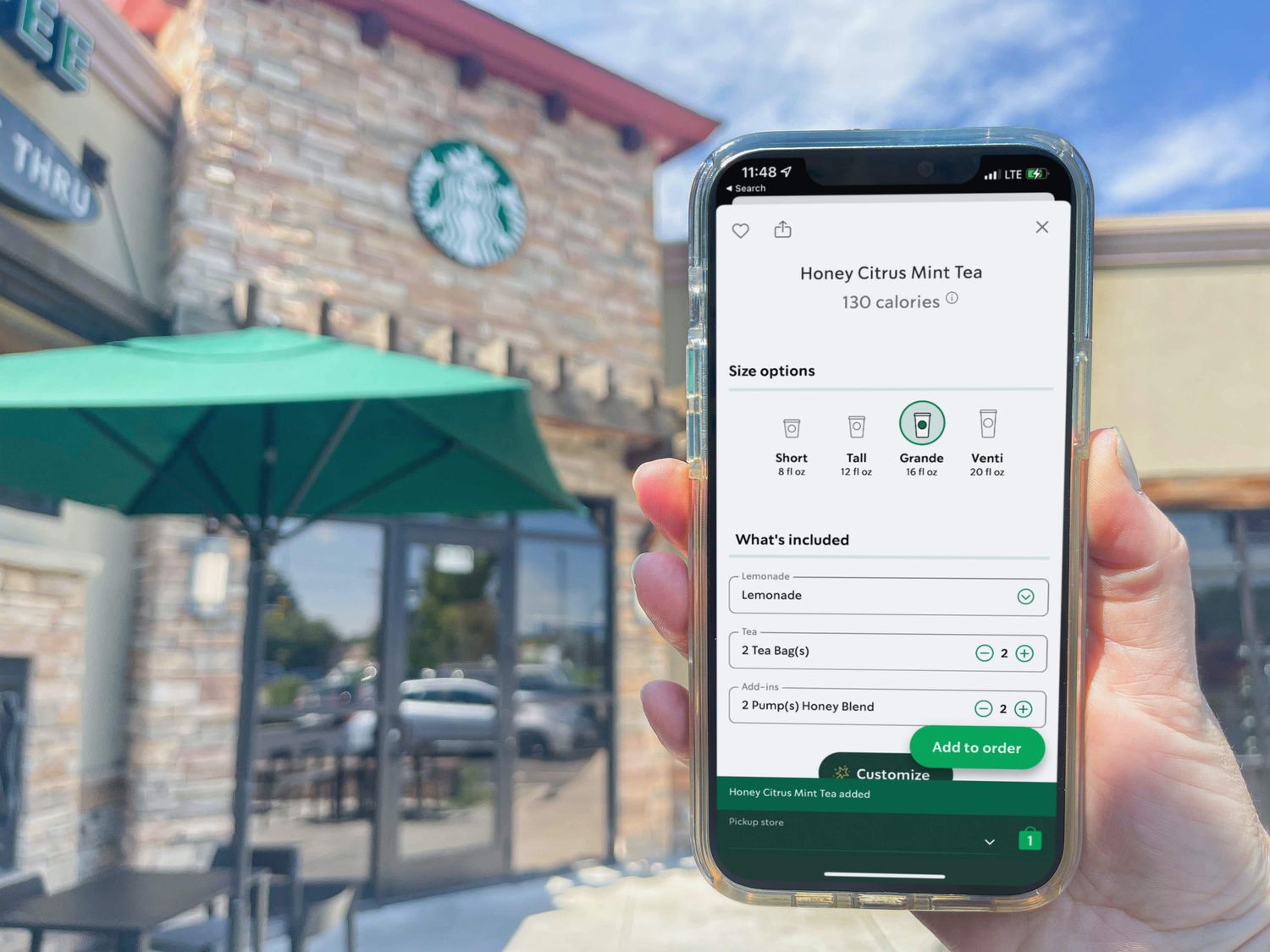
To order a Medicine Ball on mobile, you must search for its official name, "Honey Citrus Mint Tea," because searching for the nickname "Medicine Ball" in the Starbucks app will not return any results. This is the single most important step to ordering the drink, as the app's menu only lists it by its registered name.
Why you can't find 'medicine ball' on the Starbucks app
The drink you know as the "Medicine Ball" is officially named "Honey Citrus Mint Tea" on the Starbucks menu and in the mobile app. The app's search function does not recognize common nicknames like "Medicine Ball" or "Cold Buster." When you type these terms into the search bar, the app will simply show no matching items, which is the primary point of confusion for most customers. The drink is a standard menu item, not a secret menu hack, so it is fully available, you just need to use its correct name to find it.
Step-by-step: how to order a medicine ball on mobile
- Open the Starbucks app on your phone.
- Select a specific Starbucks store to order from before viewing the menu.
- Navigate to the "Menu" section of the app.
- Tap on the "Hot Teas" category.
- Scroll to the "Green Teas" section, where the "Honey Citrus Mint Tea" is typically located between "Matcha Tea Latte" and "Jade Citrus Mint Brewed Tea."
- Select "Honey Citrus Mint Tea" from the list.
Alternatively, you can use the app's search bar and type "Honey Citrus Mint Tea" or sometimes just "Citrus Mint" to find the drink directly without navigating through the menu categories.
How to customize your honey citrus mint tea
After selecting the drink, tap the "Customize" button to adjust the standard recipe. The standard "Honey Citrus Mint Tea" consists of Jade Citrus Mint green tea, Peach Tranquility herbal tea, honey, and steamed lemonade. You can adjust the number of honey packets to control sweetness, request less lemonade for a milder citrus flavor, or add extra tea bags for a stronger brew. You can also request fewer pumps of syrup or sauce to further adjust the sweetness level. Once your customizations are set, choose your desired size from the available options: Short, Tall, Grande, or Venti. Note that Trenta size is not available for this drink. After customizing, select your preferred pickup method (in-store or drive-thru) and proceed to place your order.
Saving the drink for faster future orders
To skip the menu navigation next time, you can save your customized "Honey Citrus Mint Tea" as a "Favorite" in the app for quick reordering. If you have previously purchased the drink in-store using your Starbucks app, it may also appear in your "Previous" or "Recent" orders tab, allowing you to reorder it with one tap without re-entering customizations. This is especially useful for those who track their health goals through wearables and fitness apps and want a consistent, quick way to reorder their go-to beverage.
Frequently Asked Questions
What sizes are available for the Honey Citrus Mint Tea?
You can order it in Short, Tall, Grande, or Venti. The Trenta size is not available for this drink when ordering through the Starbucks app.
Is the Medicine Ball a secret menu item?
No. While it originated as a customer creation, Starbucks officially added it to the menu as "Honey Citrus Mint Tea" in 2017, making it a standard menu item rather than a secret menu drink.
Can I order the Honey Citrus Mint Tea without honey?
Yes. When customizing the drink in the app, you can reduce or remove the honey packets entirely. You can also adjust the number of pumps of syrup or sauce to control sweetness.
Why does my app show the drink as unavailable at my store?
This typically means the selected store is temporarily out of one of the core ingredients, such as the Jade Citrus Mint tea bags or Peach Tranquility herbal tea. Try selecting a different nearby store from the location menu.
Related reading: How To Blur Background In Lightroom Mobile, How To Indent On Google Docs Mobile, and How To Loop Songs On Soundcloud Mobile.