The only verified way to create email without a phone number is to use an Apple Account, which includes a free iCloud email address. This method is officially documented by Apple and does not require a phone number for account creation, unlike Gmail which mandates one.
The only verified way to create an email without a phone number
If you need an email address but cannot or do not want to provide a personal phone number, the only officially supported path is creating an Apple Account on an iPhone or iPad. This account comes with a free iCloud email address, and Apple does not require a phone number during the setup process. By contrast, Google's official support documentation confirms that a phone number is required to create a Gmail account, and no workaround is provided.
Create a free Apple Account on iPhone or iPad
This is the primary method to get a free email address without a phone number. Follow these steps on your iPhone or iPad:
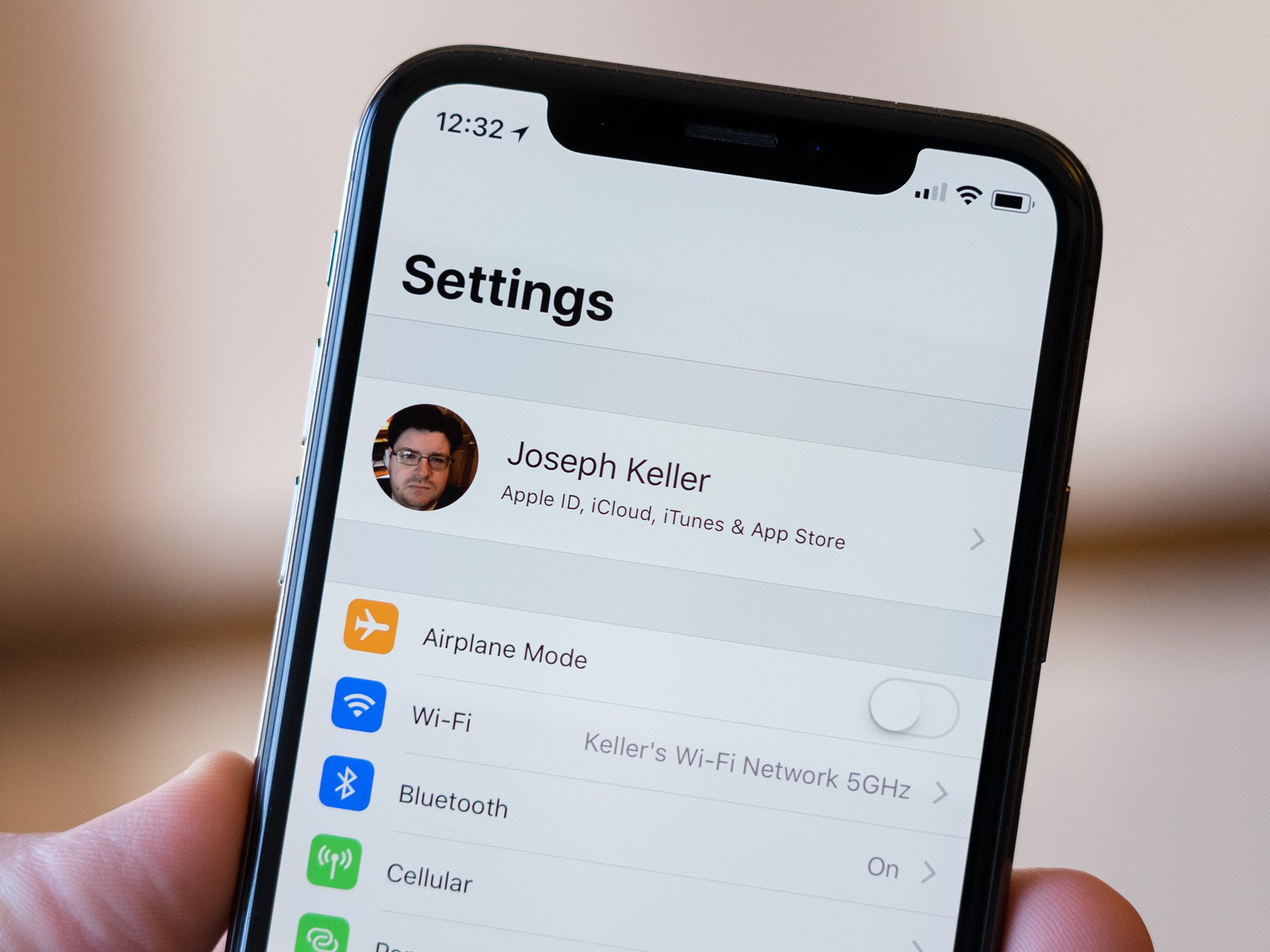
- Open Settings and tap your name at the top.
- Choose Forgot password or don’t have an account?
- Tap Create a Free Apple Account.
- If you do not have an existing email address, tap Don’t have an email address? to get a free iCloud email address.
- Follow the onscreen prompts to set a strong password, select your country or region, and set up two-factor authentication. Apple does not ask for a phone number during this process.
Alternative: Create an Apple Account from the App Store
If you are signed out of iCloud, you can create an account directly from the App Store:
- Open the App Store.
- Tap the My Account button (your profile icon).
- Select Create New Apple Account.
- Follow the same steps to choose a free iCloud email address if you do not have one, and complete the setup without a phone number.
Add your new iCloud email to the Mail app
Once your Apple Account is created, you can access your new iCloud email directly in the Mail app:
- Go to Settings > Apps > Mail > Mail Accounts.
- Tap Add Account.
- Enter your iCloud email address and password. If iCloud is not listed, choose Add Other Account > Mail Account.
- Fill in your Name, Email Address, Password, and Description, then tap Next.
- Follow the remaining prompts to finish adding the account.
Why you can’t create a Gmail account without a phone number
Many people searching for how to create email without phone number are trying to set up a Gmail account. However, Google’s official support threads state that if Google requires a phone number and you cannot provide one, the account cannot be opened. No current, documented, Google-supported path exists for creating a Gmail account without phone number verification. Temporary or disposable email services provide addresses valid for a short period, ranging from a few hours to several days, depending on the provider. Some email service providers offer alternative verification methods like security questions instead of a phone number. The methods often suggested elsewhere, such as using temporary or disposable email services, borrowing a friend’s phone number, or using virtual numbers, are not supported by Google’s official documentation and are not reliable.
Managing your new account’s privacy
After creating your Apple Account, you can further control your privacy by changing the primary email associated with the account. Go to Sign-In & Security, then choose Add New Primary Phone or Email. You can select Existing Email Address or New iCloud Email Address to switch to a different primary email, giving you ongoing flexibility for creating accounts without a phone number.
Frequently Asked Questions
Can I use a temporary phone number to create a Gmail account?
Google does not officially support temporary or virtual phone numbers for account creation. If their system detects a virtual number, it will typically reject the verification step.
Does the Apple Account method work on a Mac or iPad?
The steps documented by Apple for creating an account without a phone number are specifically for iPhone and iPad.
Will I lose access to my iCloud email if I change my Apple Account’s primary email?
No. You can change the primary email on your Apple Account without losing access to your iCloud email address. The iCloud address remains active and can still receive mail.
Is two-factor authentication required for a no-phone-number Apple Account?
Apple documents that two-factor authentication is part of the account creation process, but it does not require a phone number. It uses trusted devices and your Apple ID password instead.
Can I create multiple iCloud email addresses without a phone number?
You can create one free iCloud email address per Apple Account. To have multiple addresses, you would need to create separate Apple Accounts, each following the same no-phone-number process.
Why do some email providers require a phone number for account creation?
As a security measure to verify identity and prevent unauthorized access.
Are there any privacy concerns associated with providing a phone number for email account creation?
Reputable providers have strict privacy policies to protect user data.
Related reading: How To Use Tablet As Phone.