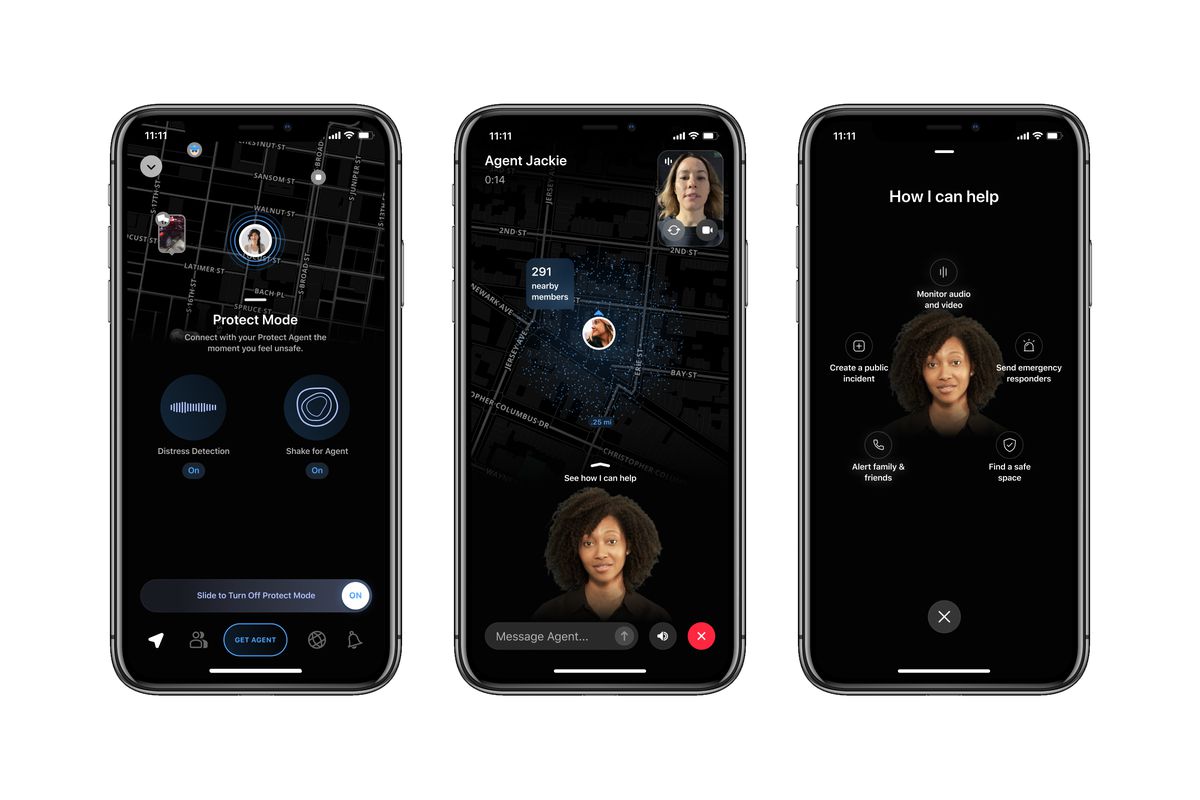
Citizen is a mobile safety app that provides real-time safety alerts, live incident video, and immediate updates about nearby events. The citizen safety app uses your device’s location and push notifications to keep you informed about crimes, emergencies, and public safety concerns as they happen in your area.
Inside this article
- What is the Citizen safety app?
- How does the Citizen app work?
- What devices support Citizen?
- Key features of Citizen
- Frequently Asked Questions
What is the Citizen safety app?
Citizen describes itself as a safety app that provides real-time alerts, live incident video, and immediate incident updates. The app is designed to enhance personal safety and community awareness by delivering location-based notifications about crimes, emergencies, and other public safety concerns in your vicinity. Unlike traditional safety apps, Citizen takes a proactive approach by providing instant updates about incidents as they occur, helping you stay aware of potential dangers in your surroundings.
How does the Citizen app work?
Citizen works by combining user-generated reports with data from official sources to deliver accurate and timely safety information. The app functions best when your device allows push notifications, camera access, microphone access, and location access, including background location when the app is not open. When an incident is reported and verified, the app sends push notifications to users in the affected area, keeping them informed and allowing them to take necessary precautions. Users can also report incidents they witness directly through the app, which uses location-based technology to pinpoint the exact location of the incident.
To set up notifications on iPhone, go to Settings > Notifications > Citizen and turn on Allow Notifications, making sure the alert style is not set to None and Show as Banners is enabled. If required permissions are not enabled, the app will not function effectively and you will not be able to access all features.
What devices support Citizen?
Citizen says the latest version is compatible with iOS 9 or higher and Android 7.0 and up. The Apple App Store listing varies by page, showing requirements of iOS 18.0 or later on one page and iOS 17.0 or later on another. Citizen also says iPad and tablet access may work, but those devices are not officially supported and may behave oddly.
Key features of Citizen
The documented features of Citizen include:
- Real-time safety alerts
- Live incident video
- Immediate incident updates
- Push notification delivery when permissions are enabled
- Location-based alerts when location access is enabled
- A 'SafeWalk' feature that lets you invite friends or family to virtually accompany you on your way home.
- A 'Help Request' feature that quickly alerts nearby Citizen users in case of an emergency.
- Neighborhood safety scores based on crime rates, incident history, and user feedback.
These features work together to keep you informed about incidents happening nearby and allow you to share live video footage as events unfold. The app also enables users to submit incident reports and videos, providing valuable information to law enforcement agencies. For users concerned about privacy, the app supports privacy screens and screen locking methods to help protect your information while using the service.
Frequently Asked Questions
Is Citizen free?
The app is described as “free” on Citizen’s site, but no current pricing page for paid plans was retrieved in available documentation. The app offers a paid subscription called Citizen Protect, which provides 24/7 professional monitoring and access to a network of emergency responders.
What permissions does it need?
Citizen requires push notifications, camera, microphone, and location access, including background location in some cases. Without these permissions, the app will not function effectively.
Does it work on iPad?
It may open on an iPad, but Citizen says iPad and tablet devices are not officially supported and may behave oddly.
Can I use Citizen to report emergencies?
Citizen is not intended for reporting emergencies. If you find yourself in a life-threatening situation, call your local emergency services right away. Citizen is designed to provide real-time information and alerts, not as a substitute for contacting emergency services.
Where is Citizen available?
Citizen is currently available in select cities across the United States and is gradually expanding coverage.
Related reading: How To Edit Mobile Videos Using The InShot App: A Guide.






![What Is The Canva App: An Easy Guide [Mobile Photo Editing Steps Included]](/wp-content/uploads/2020/04/canva_logo.jpg)