You can play Reversi and Othello right now in your phone’s browser at Reversi.now. No app store, no account, no download, just open the page and start flipping discs against the computer or a friend. The site works with touch controls and is playable on a small screen, though a tablet or desktop makes it easier to see the whole board at once.
How the Game Actually Works (If You Haven’t Played in Years)
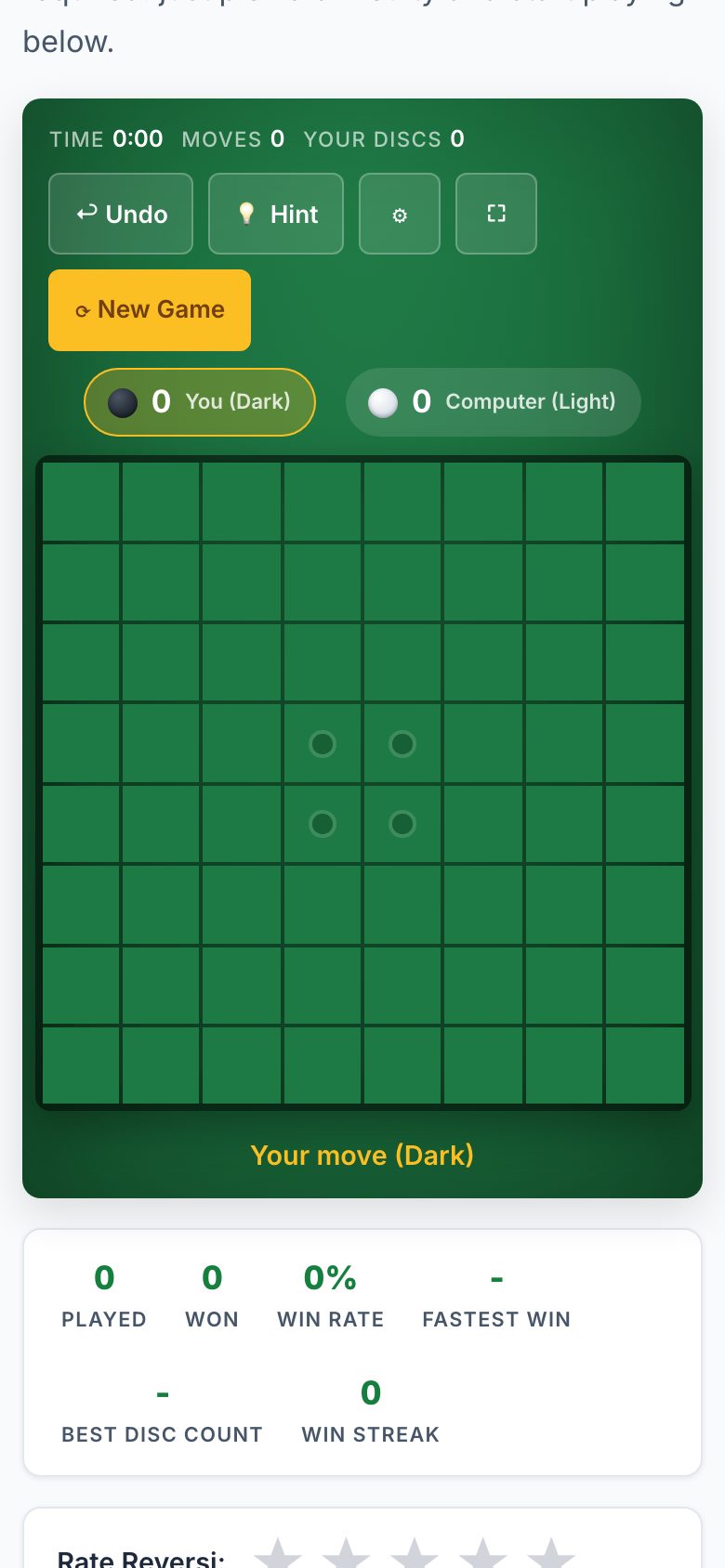
Reversi and Othello share the same 8x8 board and the same core rule: you place a disc (black or white) so that it traps one or more of your opponent’s discs between your new disc and another of your discs already on the board. Those trapped discs flip to your color. The game ends when neither player can make a legal move. The player with more discs of their color wins.
What confuses most returning players is that you don’t choose your color, it’s assigned. Black moves first. Also, you can’t just play anywhere. You must place a disc that actually flips something. If you have no legal moves, you pass, and your opponent keeps playing until you can move again. That pass rule is where many casual games fall apart, because passing is not a choice, it’s forced.
On a phone, the board is small but tappable. Each square is a touch target. You’ll see your legal moves highlighted (the site does this automatically), so you won’t waste taps on illegal spots. The computer opponent at easy, medium, and hard levels is good for learning the flow again. If you want a real match, the “play a friend” mode lets two people share one phone, passing it back and forth.
The Decisions That Separate a Good Player from a Bad One
Anyone can flip a few discs. Winning consistently takes planning. The first mistake beginners make is grabbing corners too early. Corners are permanent, they can never be flipped, so they look great. But if you take a corner before you’ve built a stable edge, you often give your opponent a chance to build a wall that locks you out of the rest of the board.
The second mistake is playing for the most discs right now. In Reversi, the leader mid-game often loses. Why? Because when you have more discs, you have fewer safe moves. Your opponent can force you to play into bad spots, giving them the edges and corners later. Good players think in terms of “mobility”, how many legal moves you have versus your opponent. Fewer moves for you, more for them, is bad news.
Third, learn to read the “X-squares” (the diagonal squares next to corners). Playing there often lets your opponent take the corner right after. A strong player will sacrifice a disc or two to bait you into that trap. The site’s strategy guide covers this in detail, but the short version is: control the edges, avoid the X-squares unless you see a clear win, and don’t chase the lead until the last ten moves.
Finally, the endgame matters more than the opening. With 64 squares, the last 10-15 moves are a puzzle. Count your discs, count your opponent’s possible moves, and force them to flip you into a corner. The computer at “hard” difficulty will punish you for sloppy endgames, so play it repeatedly until you can beat it consistently.
What to Look for in a Place to Play It
Not every browser game is worth your time. You want a site that respects your phone’s storage and your patience. First, no install and no sign-up. If a game asks for an email or a password, close the tab. You’re here to play, not to manage another account. Second, the site should load fast and not bombard you with ads that cover the board. A few ads are fine, but they shouldn’t move or resize the board mid-move.
Third, check for multiple difficulty levels. If you’re new, you want “easy” to learn without stress. If you’re experienced, “hard” should challenge you. The site you’re on offers easy, medium, and hard against the computer, plus a daily challenge that gives you a fresh puzzle every 24 hours. That daily mode is great for a quick break, one game, one score, done.
Fourth, look for a “pass and play” option. That’s the friend mode. On a phone, this works best if you can both see the screen clearly. If you’re sharing, hold the phone between you and take turns tapping. It’s not as smooth as a physical board, but it’s free and immediate.
Finally, check if the site explains the rules and strategy. You don’t need a lecture, but a quick “how to play” section and a few strategy tips help if you’re rusty. The site you’re on has both, plus a history section if you’re curious about the game’s origins. That’s a sign the developer cares about the game, not just about getting you to click ads.
Variants and Modes Worth Knowing
Classic 8x8 Reversi is the standard, but the site offers several twists that change the strategy completely:
- Othello, This is the same board and rules as Reversi, but with a specific starting position (two discs of each color in the center, diagonally). Some people use the names interchangeably, but purists say Othello is the trademarked version. On this site, you can play it as a separate mode.
- Anti-Reversi, The goal flips. You want the fewest discs of your color at the end. This sounds easy but it’s brutally hard, because you have to make legal moves that flip your own discs while avoiding flipping your opponent’s. It’s a great brain teaser.
- Rolit, This is a 4-player or team variant played on a larger board (usually 8x8 but with four colors). You’re trying to have the most discs of your color at the end, but you can flip multiple colors at once. It’s chaotic and fun, but it’s harder to play on a phone because the board is crowded. Play this one on a tablet or desktop.
- Daily Challenge, A fresh puzzle every day, usually with a specific goal (like “win by 10 discs” or “beat the computer in 20 moves”). It’s a good way to practice a specific skill without committing to a full game.
For a phone, stick to classic Reversi or Othello for quick matches. Anti-Reversi is also fine because it’s the same board size. Rolit is best saved for a bigger screen, the extra colors and discs make it hard to see on a small display.
Frequently Asked Questions
Do I need to create an account to save my progress?
No. The site works entirely in your browser. Your daily challenge score is tracked locally on your device, but you don’t need an account. If you clear your browser history, you lose that score, so don’t worry about it too much. It’s a casual game, not a ranked ladder.
Can I play against a friend on a different phone?
Yes, but not in real-time. The site offers online multiplayer, but you’ll need to share a link or a room code. Your friend opens the same URL on their phone, and you take turns. It’s not as smooth as a dedicated app, but it works for a slow, thoughtful game. If you’re in the same room, just use the “play a friend” mode on one device and pass it back and forth.
Why does the computer sometimes pass for me?
That’s not the computer passing, it’s the rules. If you have no legal moves, the game automatically passes your turn. You’ll see a message like “No moves available, passing to opponent.” This is normal and happens in every Reversi game. Don’t try to avoid it; just wait for your next turn.
Is there a way to undo a move?
The site doesn’t list an undo button. If you mis-tap, you’ll have to live with it or restart the game. That’s actually good for learning, it forces you to think before you tap. If you’re playing against the computer, you can just start a new game. Against a friend, you’ll both need to agree to restart.
What’s the best difficulty to start with?
Start with “easy” if you’re relearning the rules. You’ll win quickly, which builds confidence. Then move to “medium” to learn basic strategy. “Hard” is for when you can beat medium consistently, it plays aggressively and punishes mistakes. The daily challenge is always a good middle ground because it’s a fixed puzzle, not a full game.
More like this: Free Games You Can Play in Your Phone's Browser · Browser Games That Work on a Phone: The Directory
Related reading: Play Checkers on Your Phone Browser - No App Needed.