Your cellular plan QR code is provided directly by your mobile carrier or travel eSIM provider, it is not something you can find on your device after activation. To find cellular plan QR code, check the email you received after purchase, the welcome card included with your plan, the official app from your carrier, or your online account dashboard.
Where to find your cellular plan QR code
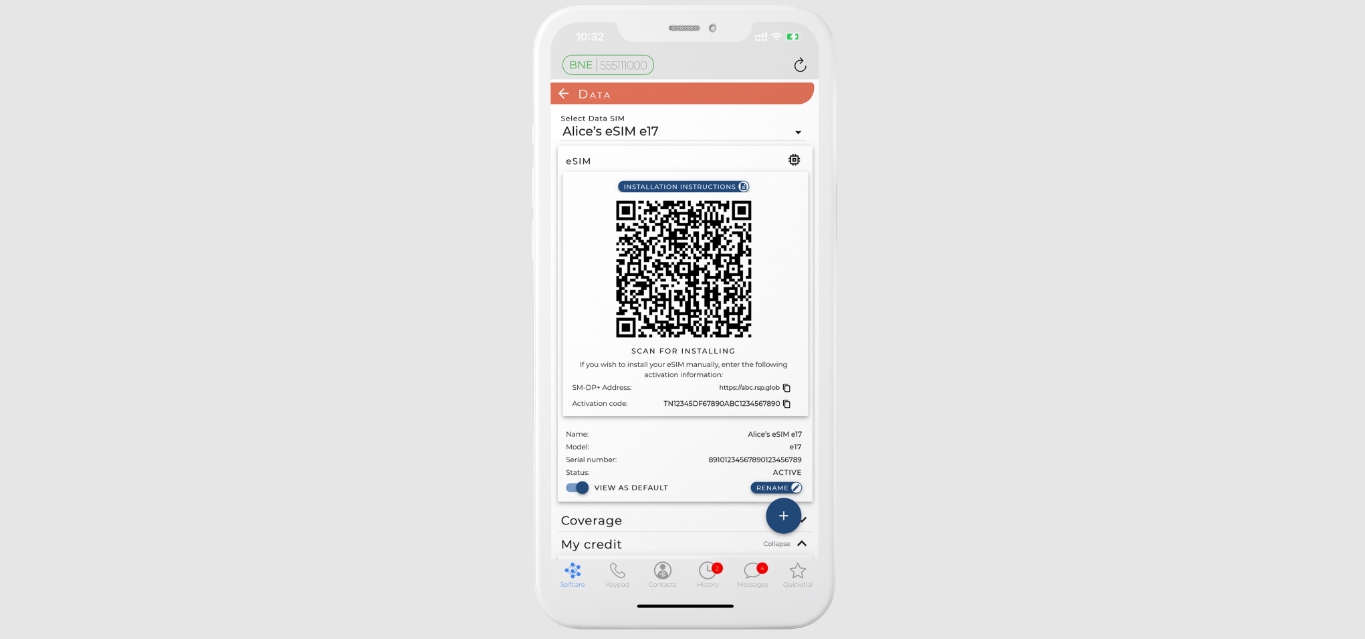
Carriers deliver eSIM QR codes through several verified channels. Look in the confirmation email sent after you buy a plan online. Some carriers include a printed QR code on a welcome card inside the packaging of a physical eSIM kit. You can also open your carrier's official app and navigate to the eSIM or plan management section. Finally, log into your online account on the carrier's website, many display the QR code under a "Device" or "eSIM" tab.
Before you start: what you'll need
To activate an eSIM using a QR code, your device must be eSIM-compatible, carrier-unlocked, and connected to a stable Wi-Fi network. You may need to provide your device's IMEI number to your carrier to receive the correct eSIM QR code. Your carrier may ask for your device's IMEI number to generate the correct QR code; for example, if you need to find IMEI on Google Pixel 6, go to Settings > About phone > IMEI. Having this number ready speeds up the process.
How to get the QR code from your carrier
Contact your carrier
Call or chat with customer support and request an eSIM QR code for your line. Be prepared to verify your account, this often involves finding account and PIN numbers; for T‑Mobile customers, you can find my T-Mobile PIN number in your online account under Profile settings. If you are porting a number, you may need to get T-Mobile transfer PIN from your account or by calling 611. For Simple Mobile users, you can to find Simple Mobile account number by logging into your online portal or checking your welcome email.
Purchase a plan online
Many carriers and travel eSIM providers let you buy a plan directly from their website. After checkout, the QR code appears on the confirmation page and is also sent to your email. Save or screenshot the code immediately.
Visit a retail store
Go to a carrier retail location and ask for an eSIM QR code. Store representatives can print the code or display it on a screen for you to scan, and they can assist with activation on the spot.
Google Fi example
For Google Fi, eSIM setup on an iPhone is done through the Google Fi app while signed into your account, or by visiting fi.google.com/ios/quicksetup for a QR code.
What if I can't find a QR code?
Some carriers offer alternative activation methods that don't require a QR code. For example, newer iPhones (iPhone 12 and later) with Verizon service may not require a QR code for eSIM activation, often using the My Verizon app or carrier activation. Additionally, some carriers offer an 'eSIM Simple Setup' where the plan is automatically downloaded to your device without needing to scan a QR code. If scanning fails, most devices offer an option to 'Enter Details Manually' where you can input the SM-DP+ address and activation code provided by your carrier.
How to scan your cellular plan QR code
On iPhone
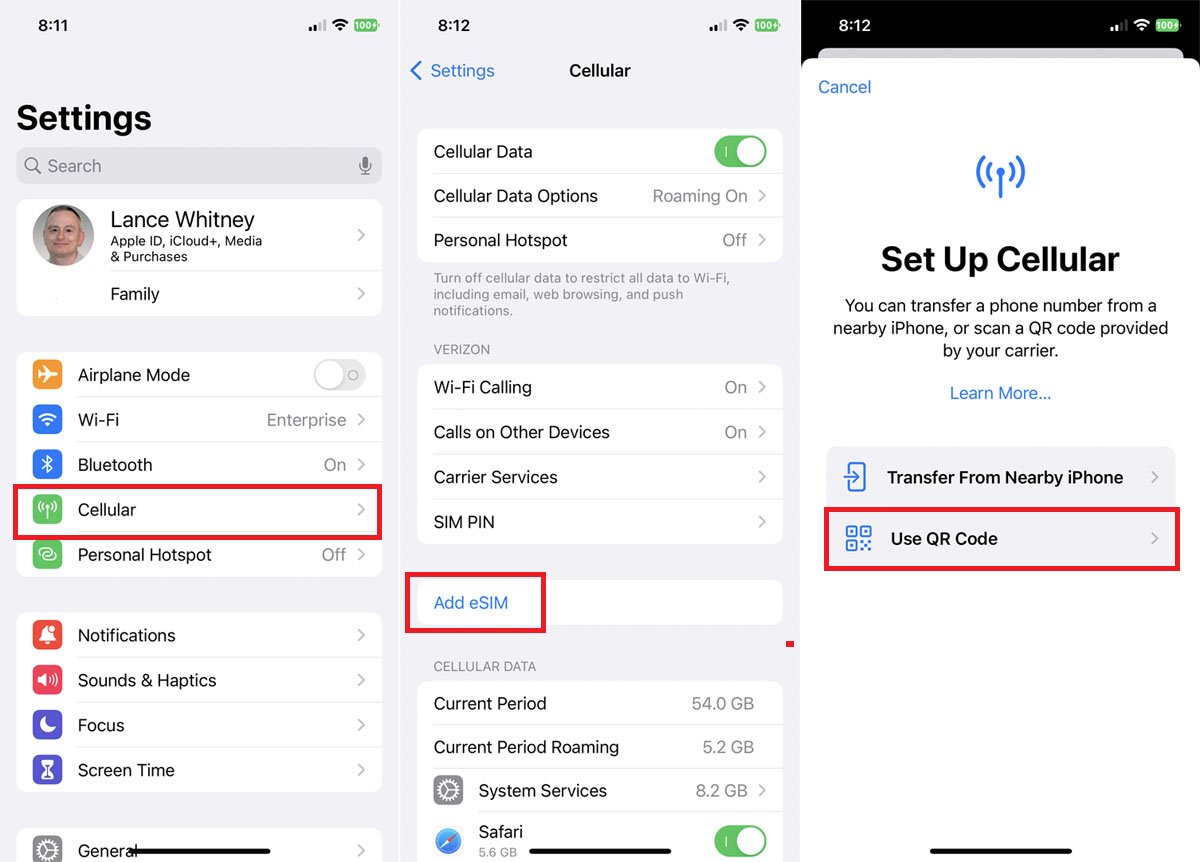
- Navigate to Settings > Cellular (or Mobile Data/Mobile Service) > Add eSIM (or Add Cellular Plan) > Use QR Code (or Scan QR Code).
On Samsung Galaxy
- Go to Settings > Connections > SIM manager > Add eSIM > Scan QR code.
On Google Pixel
- Go to Settings > Network & Internet > SIMs > Add eSIM (or Add SIM / + icon) > Scan QR code (or Download a SIM instead).
After scanning the QR code, follow the on-screen prompts to download, install, and label your new cellular plan. For travel eSIMs, ensure that 'Data Roaming' is enabled for the new eSIM line in your phone's settings after activation.
Frequently Asked Questions
What is a QR code on a cellular plan?
A cellular plan QR code is a unique square barcode that contains the information your phone needs to download and install an eSIM profile, including network details and plan allowances.
Can I activate an eSIM without scanning a QR code?
Yes. Some carriers offer automatic eSIM activation through their app or via carrier settings update. You can also manually enter the SM‑DP+ address and activation code if the QR code is unavailable.
What if I lose the QR code for my cellular plan?
Contact your carrier's customer support. They can resend the QR code via email, display it in your online account, or provide the SM‑DP+ details for manual entry.
Can I transfer my eSIM to a new device without the QR code?
In most cases, you will need a new QR code from your carrier for the new device. Some carriers allow you to re-download the eSIM profile from your online account or app.
Do I need Wi-Fi to scan an eSIM QR code?
Yes. A stable Wi-Fi connection is required to download the eSIM profile after scanning the QR code. Without internet access, the installation will not complete.
For the wider topic, see finding account and PIN numbers.
For provider-specific activation steps, see uPhone’s eSIM installation guide; exact menu names can vary by phone and software version.
More eSIM resources: Browse our eSIM guides and troubleshooting resources for compatibility, setup, travel-data and account-safety advice.