The quickest way to open a new tab in Safari on a Mac is to press Command-T. This keyboard shortcut instantly creates a blank new tab, making it the fastest method for any user who wants to open a new tab in Safari without lifting their hands from the keyboard.
Keyboard shortcut method
On Mac, press Command-T to open a new tab. Pressing Command-T is the fastest documented method for opening a new tab in Safari on Mac. If you prefer an alternative, Control-T also works. Both shortcuts bypass the need for a mouse or trackpad entirely, which is why they are the preferred choice for speed-focused browsing.
Mouse click method
On Mac, click the + button in the Safari toolbar to open a new tab. For users who prefer clicking, Safari provides a visible + button in the toolbar. Clicking this button opens a new tab immediately. This method is straightforward and ideal when your hands are already on the mouse.
Menu bar method
If you navigate through menus rather than using shortcuts, open Safari and click File in the menu bar, then select New Tab. This path is slower than a keyboard shortcut but works well for users who prefer visual menu navigation over memorizing key combinations.
Using a touchpad or trackpad shortcut
On a Mac with a trackpad, you can use a gesture to open a new tab. Place your cursor on a link, then perform a two-finger double-tap or double-click. This opens the link in a new tab without leaving your current page. On Mac, Command-click a link to open it in a new tab. Apple also documents Command-clicking a link as a reliable way to open it in a new tab, which works with both trackpad and mouse.
Open a new tab in Safari on iPhone
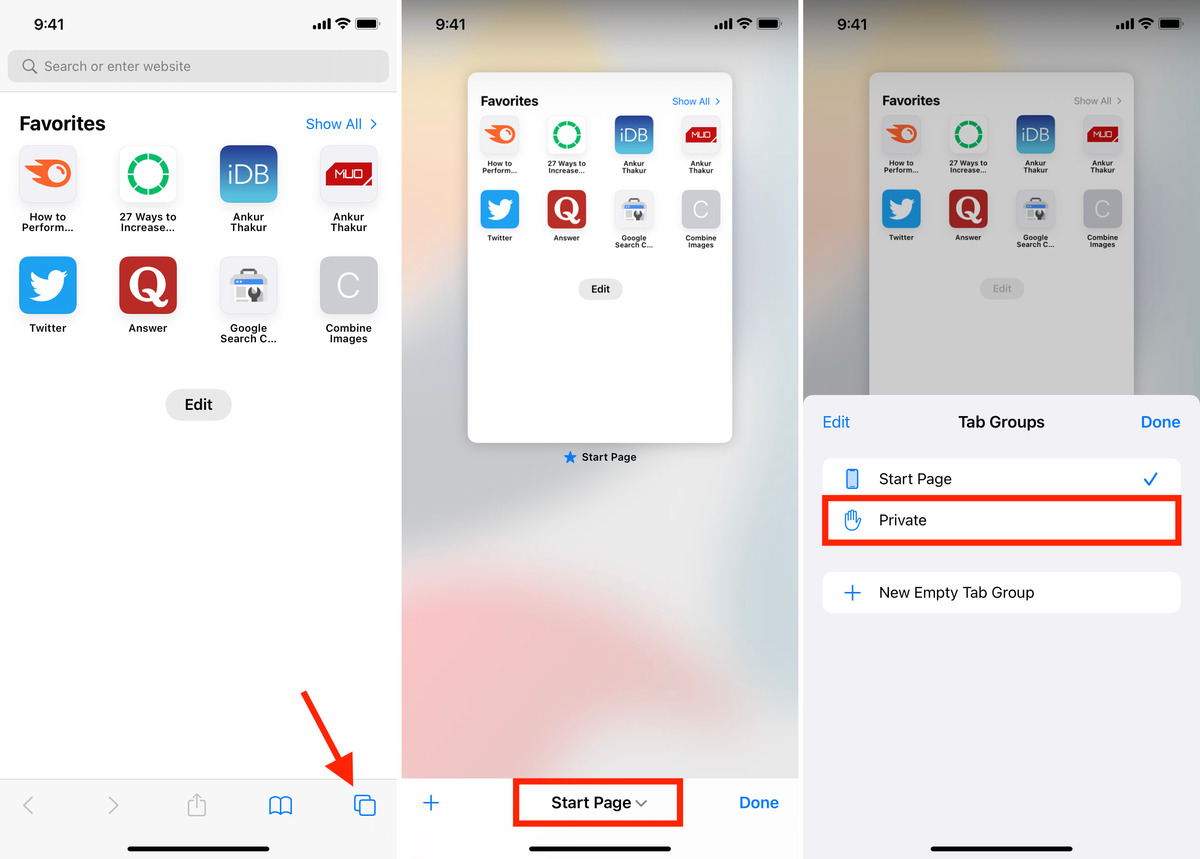
On iPhone, open Safari, tap the tab controls, then tap New Tab. On iPhone, open Safari and tap the tab controls (the icon that shows the number of open tabs), then tap New Tab. On iPhone, touch and hold a link, then tap Open in New Tab. Alternatively, touch and hold a link, then tap Open in New Tab from the pop-up menu. Both methods are documented by Apple and work on current iOS versions.
Customize how new tabs behave in Safari
On Mac, go to Safari > Settings > General and use the New tabs open with menu to control what page appears when you open a new tab, options include a blank page, your start page, or a specific website. On Mac, go to Safari > Settings > General > New tabs open with to control what page opens in new tabs. In Safari > Settings > Tabs, toggle Open pages in tabs instead of windows to force links that would normally open in a new window to open in a new tab instead. On Mac, go to Safari > Settings > Tabs > Open pages in tabs instead of windows to control tab behavior for pages that would otherwise open in Windows.
On iPhone, go to Settings > Apps > Safari > Open Links and choose In Background to make links you touch and hold open in a new tab without switching to it. This is useful when you want to queue up pages while staying on your current one, especially when browsing over wireless networks and hotspots where quick access to multiple tabs can save time.
Enable iCloud Tabs syncing on iPhone, iPad, and Mac via Settings > your name > iCloud > See All > Safari.
Frequently Asked Questions
Can I open multiple new tabs at once in Safari?
Yes. On Mac, press and hold the Command key while left-clicking multiple links or bookmarks. Each click opens a new tab, and you can release the Command key to switch to the last opened tab.
How do I right-click the tab bar to open a new tab?
On Mac, right-click (or Control-click) on the existing tab bar at the top of the Safari window and select New Tab from the context menu. This provides a mouse-based alternative to clicking the + button.
Can I customize the keyboard shortcut for opening a new tab in Safari?
Safari does not offer a built-in way to change the Command-T shortcut. However, you can use third-party applications or browser extensions to reassign keyboard shortcuts for Safari.
Is there a way to open a new tab without using the keyboard or mouse?
Yes. On Mac, click an existing tab and drag it downward toward the bottom of the Safari window. A new empty tab will appear, and you can release it to switch to that tab.
Does Safari on iPhone have a limit on the number of open tabs?
You can open as many as your device’s memory allows, though performance may slow with very large numbers.
Related reading: How To Use The Magnifier, How Do I Get Magnifier Off My Screen, and Tip Of The Day: How To Use Private Tabs In Safari.