To make your phone play a Happy Birthday tune when a specific contact calls, you need to set a custom happy birthday ringtone phone alert for that person. There is no built-in feature that makes your phone automatically sing the song; instead, you assign a birthday-themed ringtone or text tone to the contact, and the phone plays that sound for their incoming calls and messages.
How to set a happy birthday ringtone on your phone
Setting a Happy Birthday ringtone on your phone is the only official way to get the song to play from the device. Neither Apple nor Google provides a feature that makes the phone generate the melody on its own. The documented options are to choose a ringtone or assign a sound to a contact, not to make the phone sing automatically.
Set a happy birthday ringtone on iPhone
- Open Settings and tap Sounds & Haptics.
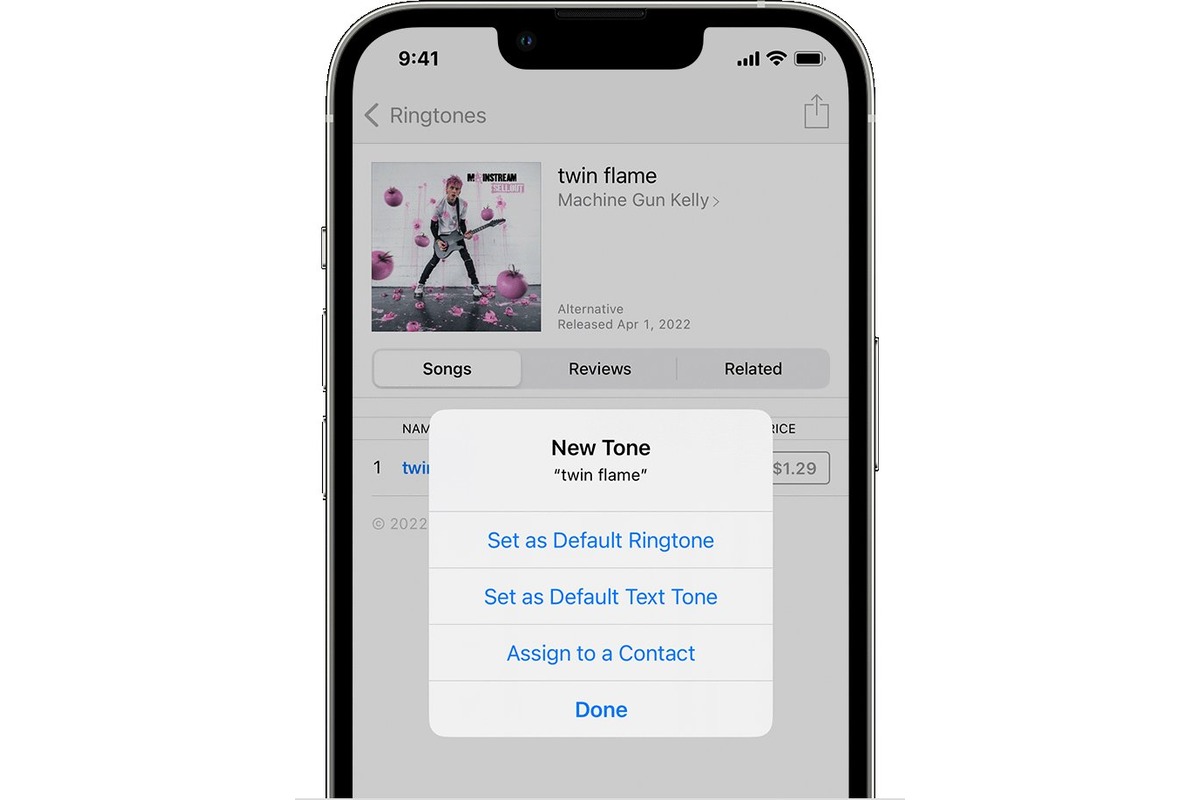
- Tap Ringtone and scroll through the available tones, or tap Tone Store to browse and buy new sounds.
- To assign the ringtone to one person, open the Contacts app, tap the birthday person’s name, then tap Edit.
- Tap Ringtone or Text Tone and select your chosen Happy Birthday sound.
- On the same screen, you can tap Haptics and choose a vibration pattern or tap Create New Vibration for a custom alert.
Set a happy birthday ringtone on Android
- Open the Phone app, tap More (three dots), then tap Settings > Sounds and vibration.
- Tap Phone ringtone and pick from the list of available tones.
- On devices that use the standard Android settings, go to Settings > Sound & vibration > Ringtone.
- On Samsung Galaxy phones and tablets, open Settings > Sounds and vibration to set a ringtone.
Use a custom audio file as your birthday ringtone
If you have a downloaded Happy Birthday song saved as an audio file, you can set it as a ringtone on Android using Google Files. Open the file, play it, and then follow the ringtone flow from the playback screen. On iPhone, you can buy compatible tones from the Tone Store, or use a computer to add custom audio files through iTunes or Finder; the iPhone does not support setting arbitrary audio files directly from the device without using a computer.
Assign the ringtone to a specific contact
On iPhone, open Contacts, tap the birthday person, tap Edit, then tap Ringtone or Text Tone and select your chosen sound. On Android, open the Contacts or Phone app, find the contact, tap Edit or the menu, then look for Ringtone or Set ringtone and pick the Happy Birthday tone. This ensures the tune plays only when that specific person calls.
What these settings can and cannot do
Ringtones play for incoming calls, clock alarms, and the clock timer. Text tones play for text messages, voicemail, and other alerts. You can choose from tones listed on the ringtone or text tone screen and create a custom vibration pattern on iPhone. No official feature makes the phone sing during a call. If you want to sing to someone, you must do it manually, the phone has no in-call singing feature. There is no way to record a conversation on Android phone through the ringtone settings; that is a separate function unrelated to birthday alerts.
Tips for a memorable happy birthday setup
Use a custom ringtone or contact-specific ringtone so the birthday person hears a themed sound when they call. On iPhone, use a vibration pattern if you prefer a silent notification. On Android, use the ringtone picker to choose a preloaded tone, or use a stored audio file if your device and file app support that flow. Surprise the birthday person with a special guest singer coordinated ahead of time.
Etiquette for singing happy birthday on a phone call
The official support pages do not give etiquette instructions for singing Happy Birthday on a call. If the goal is to sing during a call, that is done manually by the caller; no retrieved support page documents an in-call singing feature. Get permission before singing over the phone call. Choose an appropriate time and place for the call, considering work schedules, distractions, and privacy. Ensure a good audio connection; use a headset or earphones for improved audio clarity. Encourage others on the call to sing along and create a virtual choir.
Fun alternatives to standard happy birthday tunes on your phone
Set a custom ringtone for the birthday person’s contact on iPhone. Set a custom ringtone on Android or assign one through the Phone app ringtone settings. Use a vibration pattern on iPhone for a silent but personalized alert. Select a suitable app for singing, such as karaoke apps that provide backing tracks and lyrics for 'Happy Birthday'. Set the tempo and key within the chosen app to suit your singing style or the birthday person's preferences. Choose the preferred voice or instrument accompaniment within the app. Practice and record your rendition using the app's record button. Sing a funny or customized parody version with inside jokes or personalized lyrics. Use different musical genres or styles like jazz, rock ballad, or reggae for the rendition. Incorporate birthday-themed ringtones or sound effects played during the song as background.
Frequently Asked Questions
Can I make my phone sing happy birthday automatically when someone calls?
No. There is no official Apple or Google feature that makes the phone generate or sing the song. The only way to hear a birthday tune is to set a ringtone or text tone that plays for that contact.
Can I use a voice recording of me singing happy birthday as a ringtone?
On Android, you can use Google Files to set any audio file as a ringtone. On iPhone, you need to convert the recording to a compatible format and sync it through a computer; the iPhone does not allow direct assignment of arbitrary audio files from the device.
Will the happy birthday ringtone play for text messages too?
Yes, if you set a text tone for the contact, the sound will play for incoming text messages and other alerts. On iPhone, you can set separate ringtone and text tone for the same person.
What if I don't want the ringtone to play for everyone?
Assign the ringtone only to the birthday person’s contact. On both iPhone and Android, you can set a unique ringtone for individual contacts, so the birthday tune plays only when that specific person calls.
Can I set a happy birthday ringtone on an iPad?
Yes. Apple’s ringtone guidance applies to iPhone and iPad. The steps are the same: go to Settings > Sounds & Haptics (or Sounds) and choose a ringtone or text tone.
Related reading: Why Does My Phone Ring Volume Start Loud Then Go Low? and How To Find Out Your Old Phone Number.