Where to Play Right Now
You can play Slide Puzzles, Nonograms, and Lights Out immediately in your phone’s browser at Puzzle.now. No app install, no storage taken, no account creation, and no notification permissions to deny. The site lists these games directly on its main page, along with 2048, Memory Match, and a daily challenge.
How the Slide Puzzle Actually Works
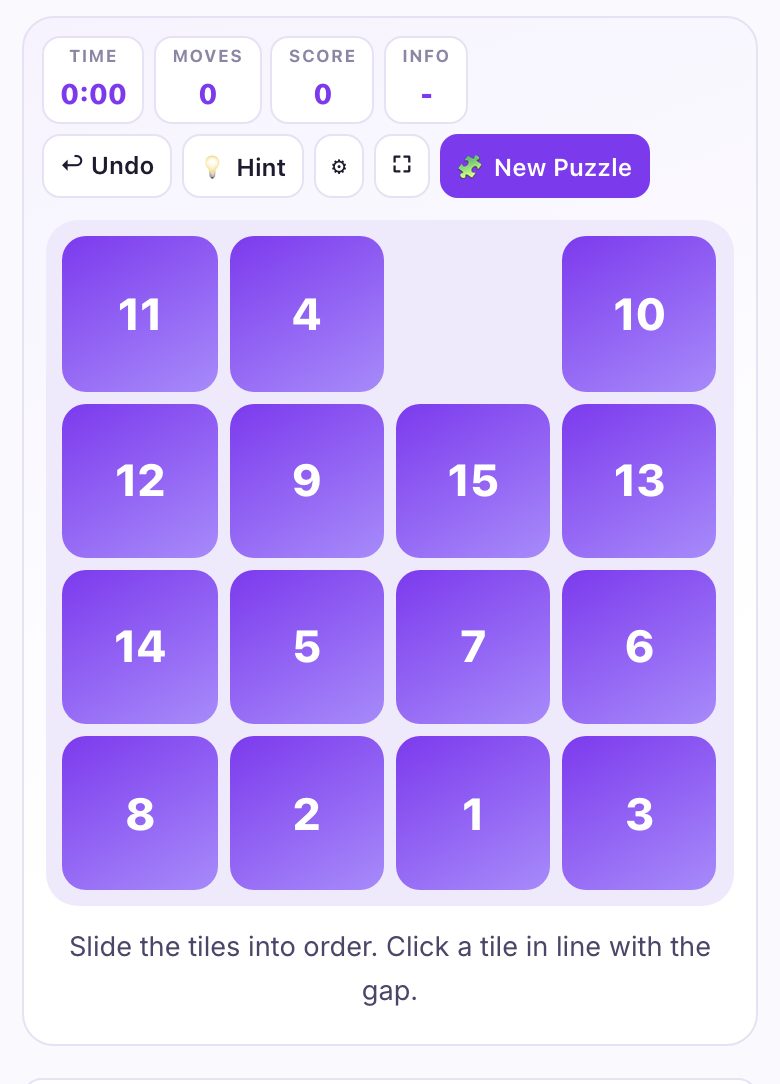
If you haven’t touched a slide puzzle in years, the core rule is simple: you have a grid of numbered tiles (or image pieces) with one empty space. You slide adjacent tiles into that space to scramble or solve the image. The goal is to arrange the tiles in numerical order or complete the picture, typically from left to right, top to bottom, with the empty space in the bottom-right corner.
What surprises people returning to it is that the empty space is your only tool. You cannot lift or remove tiles. Every move shifts the blank, which means you are always one step away from undoing your last action. This is why most beginners solve the top row first, then the second, and so on. You are not solving the whole puzzle at once; you are solving it in horizontal bands.
On a phone, you simply tap a tile adjacent to the blank to slide it. The touch targets are large enough for thumbs, but if you have a very small screen (under 5 inches), you might want to rotate to landscape. The grid size matters too, a 3x3 is quick, but a 4x4 or 5x5 will test your patience. The site offers different grid sizes, so start small if you are rusty.
The Decisions That Separate a Good Player from a Bad One
Bad players scramble the puzzle randomly and hope for luck. Good players use a fixed strategy. The first decision is always the same: solve the top row first, but do not touch it again. Once that row is correct, you never move those tiles again. This creates a smaller puzzle to solve below, which is easier to manage.
The second decision is about the last two rows. For a 4x4 puzzle, you should solve the first two rows completely, then focus on the bottom two rows as a combined block. Many novices try to solve the third row independently, but that leaves the fourth row impossible to finish without breaking the third. Instead, solve the bottom two rows together, moving tiles in a clockwise or counter-clockwise cycle.
Another key decision is recognizing when you are stuck. If you have the top row done but the blank is in the wrong column, you need to move the blank around the perimeter to reposition it. A good player never makes a move without thinking two steps ahead about where the blank will be. On a phone, this means pausing before each tap, especially on smaller grids where a single wrong tap can undo five minutes of work.
Finally, good players use the “snail method” for image puzzles. If you are solving a picture, you do not look at the whole image; you look at the edges and corners first. Identify the four corner pieces, place them, then build the border. Once the border is done, the inside becomes a smaller slide puzzle. This works identically on a phone screen, but you may need to pinch-zoom if the image is detailed, though the site does not list pinch-zoom as a feature, so rely on the tile numbers if available.
What to Look for in a Place to Play It
Not all browser puzzle sites are equal, especially on a phone. First, check that the site does not force you into a full-screen app-like interface that hides the address bar. You want a site that works in a normal browser tab, so you can switch away and back without losing your game. The site description for puzzle.now mentions “no download, no signup,” which is the first filter.
Second, look for touch responsiveness. On a phone, the difference between a good and bad puzzle site is whether a tap registers instantly. If you tap a tile and there is a half-second delay, that will frustrate you on a 5x5 grid. The site should also handle accidental swipes, if you swipe your thumb across the screen, it should not move a tile unless you tap directly on it.
Third, consider the grid size options. A good site lets you choose between 3x3, 4x4, 5x5, and sometimes larger. On a phone, a 5x5 grid is playable but tight, each tile might be smaller than your thumb. If you have larger fingers, stick to 4x4. The site also lists a daily challenge, which is a good way to get a fixed puzzle without choosing a size yourself.
Finally, check whether the site saves your progress. Since you are not installing an app, you want a site that uses browser storage (like localStorage) to remember your in-progress game. The description does not explicitly say it saves, so do not assume it does. If you leave mid-puzzle, be prepared to start over unless you leave the tab open.
Variants and Modes Worth Knowing
Beyond the classic numbered slide puzzle, the site offers a nonogram (also known as Picross or Paint by Numbers). This is a logic puzzle where you fill in cells based on row and column clues to reveal a hidden picture. It is a completely different skill, no sliding involved, but it is perfect for a phone because you can tap to fill and long-press to mark an X. The site lists it as a separate game, so you can switch between them.
Lights Out is another variant on the site. It is a grid of lights that toggle on and off when you tap them, but the twist is that tapping one cell also toggles its neighbors. The goal is to turn all lights off. This is a pure math puzzle, and on a phone it works well because you can see the whole grid at once. The strategy is to solve it row by row, but the last row requires a specific pattern, you will learn it by trial and error.
There is also a daily challenge mode listed on the site. This gives you one specific puzzle per day, often with a fixed size and a timer. It is a good way to practice without choosing your own difficulty. The site also mentions live multiplayer, but be cautious on a phone. Multiplayer slide puzzles can be chaotic if the screen is small, so try it once to see if the touch controls keep up.
One mode worth knowing is the “memory match” game, also listed on the site. It is not a slide puzzle, but it exercises the same spatial reasoning. If you are waiting for a bus and only have one minute, a memory match is quicker to finish than a 5x5 slide puzzle. The site groups these under “Other games worth playing,” so you can find them easily.
Frequently Asked Questions
Do I need to create an account to save my score?
No. The site description explicitly says “no signup.” Your score is likely stored only in your browser’s memory or local storage, which means it will disappear if you clear your browsing data. If you want to keep a personal best, write it down manually or take a screenshot.
Can I play these games on a small phone screen?
Yes, but with caveats. A 3x3 slide puzzle is comfortable on any screen. A 4x4 is playable on screens 5 inches or larger. A 5x5 grid will have very small tiles, you might need to zoom in, but the site does not list pinch-zoom as a feature. If you have a phone under 5 inches, stick to 3x3 or nonograms, which have larger tap targets.
What happens if I accidentally close the browser tab?
Unless the site uses local storage to save your game state, you will lose your progress. The description does not mention autosave. To be safe, do not close the tab mid-game. If you need to switch apps, leave the tab open in the background, most mobile browsers will keep it alive for a while.
Is the daily challenge different from the regular puzzle?
Yes. The daily challenge is a fixed puzzle that changes every 24 hours, and it is the same for everyone playing that day. It is a good way to compete with friends informally, just compare times or moves. The regular puzzles are randomly generated, so you can play those endlessly.
Can I play these games offline?
No. Because it is a browser-based site, you need an internet connection to load it. Once loaded, some browsers might cache the page, but the site does not list offline support. If you are on a train without signal, you will not be able to play.
More like this: Free Games You Can Play in Your Phone's Browser · Browser Games That Work on a Phone: The Directory