






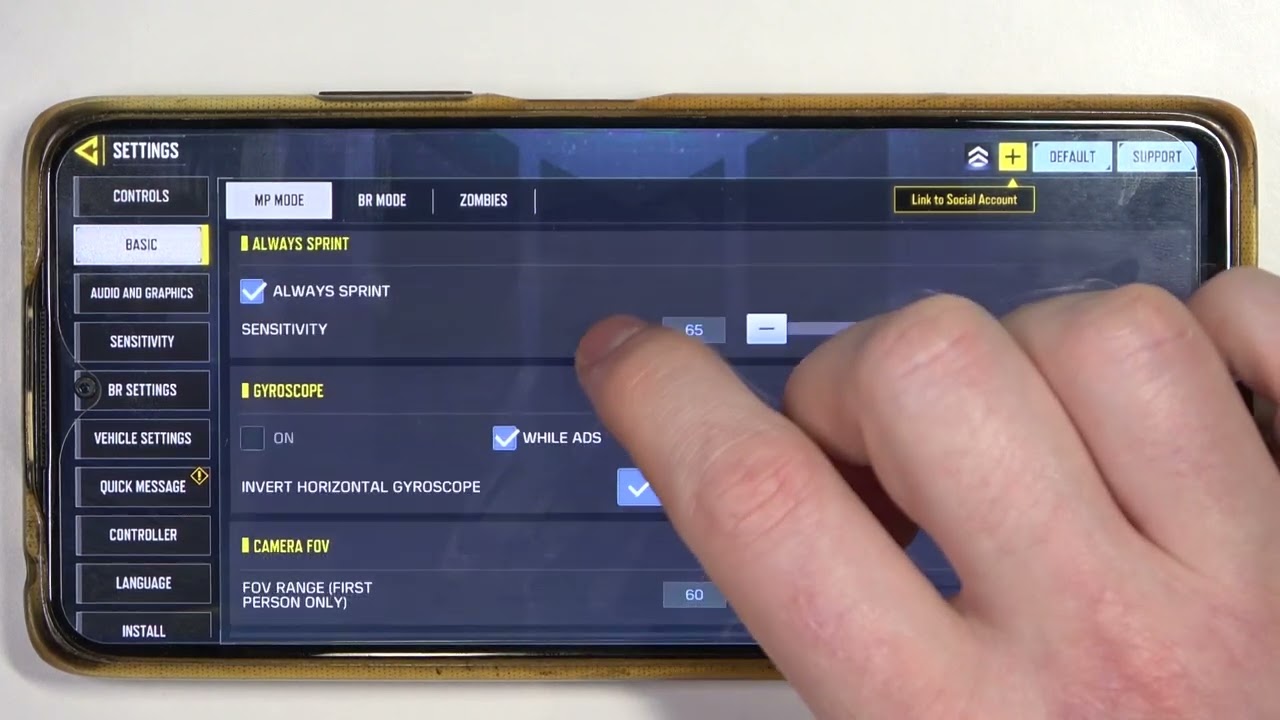
Getting started with cod mobile settings
To get the best performance out of your COD mobile settings, you need to make sure the game client itself is ready before dropping into a match. To get the latest maps, weapons, and seasonal content, update Call of Duty mobile through your device’s app store. If you are switching from a smaller screen or just want better peripheral vision, you can change FOV in COD mobile from the in-game settings. Your account identity is equally important, and when you want a fresh alias you can change username in COD mobile by tapping your name at the top of the main screen, opening your Player Profile, and selecting the edit icon. The rename costs 500 COD Points, uses a Name Changing Card, and is limited to once every three days.
Some account adjustments are more permanent. Activision Support states that it is unable to adjust the region in which you originally registered. You cannot directly change region in COD mobile yourself if you registered in the wrong location. While you are fine-tuning your controls, keep in mind that many of the general platform guides you might find cover non-COD games or tasks like redeeming Steam codes and signing out of Xbox. If your goal is specifically managing your COD Mobile profile, stick to the Activision and Apple ID linking guides. The others will not help with your COD account.
If your goal is to obtain a specific operator, you might try to get ghost in COD mobile. You often need to watch for limited-time events, battle pass tiers, and bundle store rotations. Community trackers can help you spot these windows before they close.
Linking and managing your account
Securing your progress starts with the decision to link COD mobile account to a permanent login method, especially if you have been playing as a guest. Open Settings from the gear icon at the top of your main screen and tap the Link button to choose a provider and sign in. You can link COD mobile to Facebook through that same in-game menu, which lets you carry your loadout and rank across devices. Should you ever need to separate the two, you can unlink COD mobile account from Facebook by first logging out of your Facebook account in a browser and the Facebook app, then using the in-game logout option. Be certain you want to break the connection before attempting to unlink Apple ID from COD mobile. For a quick sign-out on a shared phone, you may be able to logout of COD mobile from the Other tab in Settings. If you intend to walk away for good, the most drastic option is to delete COD mobile account, which permanently wipes your stats and purchases without a way to get them back.
Recovering access and troubleshooting
If you find yourself locked out of your profile, you can attempt to recover call of Duty mobile account by submitting a request through Activision’s account recovery page. When your progress vanishes after a reinstall, if you were playing on a guest account, that progress is lost; if you had linked your account, log back in with the exact same linked account to reinstate your weapons and rank. For Android users dealing with persistent glitches, you can clear the local cache through your device’s app settings for Call of Duty: Mobile. While you might want to remotely secure your profile, the game does not offer a built-in button to force a sign-out on other devices, and no official method to sign out of all Xbox consoles from phone in connection with your COD Mobile login was found. Because guest sessions are fragile and the app lacks a universal sign-out switch, your safest defense is always keeping your progress tied to an Activision, Facebook, Apple ID, or Google login.
Playing with different controls and screens
If touch controls start to feel limiting, you can use controller on COD mobile by pairing a PlayStation 4 (excluding first-generation models), PlayStation 5, Xbox One, or Xbox Series S/X controller through your device’s Bluetooth settings before launching the game, which is the best way to get console-like precision on the go. On Android, long-press the Bluetooth icon in your notification panel to pair a new device, then open the app and test the response in the in-game settings. iPhone users follow the same general flow from the iOS Bluetooth menu, and the game will recognize the controller once it is connected. The mobile apps themselves do not support a keyboard and mouse setup, so to play COD mobile with keyboard and mouse you need a PC emulator like Gameloop where the default control scheme maps to your keys, giving you the familiar desktop feel you may prefer. To play COD mobile on PC, you install the game inside the emulator and adjust the keyboard controls from its settings panel, giving you the larger display and precise aim you are after, all without needing a separate console.
Custom matches, items, and rewards
When you want to play a controlled match with friends instead of jumping into public lobbies, you can make a private match in COD mobile. Official documentation confirms that the core earnable currency in the game is Credits, which you accumulate by playing public Multiplayer or Battle Royale matches. COD Points do not drop through regular play, and many players still search for a way to get COD points for free in COD mobile. The official rewards page does not list any method to earn them without purchase, so be wary of third-party offers that ask for your login details. You could attempt to get ghost in COD mobile, but it hinges on time-limited bundles and events instead of a documented, permanent unlock. For those wondering if they can make money by playing COD mobile, the official help materials cover only in-game rewards, currencies, and seasonal battle pass items, with no mention of real-world cash payouts or monetization features. Any service promising to pay you for matches is operating outside the game’s documented systems.
Guides for other games and platforms
If you have arrived here while trying to manage your Call of Duty Mobile profile, you might be looking at instructions for an entirely different game. Many players land on pages that show how to enter Genshin codes mobile, which involves opening the in-game menu, tapping the payment icon, and using the Redeem Code option tied to a specific HoYoverse server, a process that has nothing to do with your Activision login or COD Points.
Similarly, you might see steps to link Brawlhalla accounts to mobile through the Settings menu inside that app, using a Ubisoft account to enable cross-progression, but this will not connect your COD Mobile profile to anything. General platform tasks also create confusion. You might need to redeem Steam code on mobile for a Wallet balance by navigating through Store > Account Details > Redeem a Steam Gift Card or Wallet Code in its own app, while game keys must be redeemed in a mobile browser instead.
Even the straightforward action to log out of PUBG mobile from the Basic Settings tab in that game’s lobby is a completely separate sign-out flow that cannot affect your Call of Duty session. If your goal is to secure or link your COD Mobile account, you should stick with the Activision, Facebook, Line, Google Play, and Game Center connection options, because these other guides lead to unrelated ecosystems.
Frequently Asked Questions
How do I change my FOV in COD Mobile?
Open Settings from the gear icon on the main screen, go to the Basic tab, and adjust the FOV slider to your preference. The available range depends on your device, and a higher field of view can help with peripheral vision during matches.
Can I recover a guest account after uninstalling COD Mobile?
No, guest account progress is lost when you uninstall the app or switch devices. You must link your account to Activision, Facebook, Apple ID, or Google Play through the Settings menu before removing the game to keep your stats and purchases.
How do I link my Brawlhalla account to mobile?
Open the Settings menu inside the Brawlhalla app and use a Ubisoft account to enable cross-progression. This process connects your Brawlhalla profile across platforms but does not interact with your COD Mobile login or Activision account.







