Getting started with cod mobile loadouts and movement
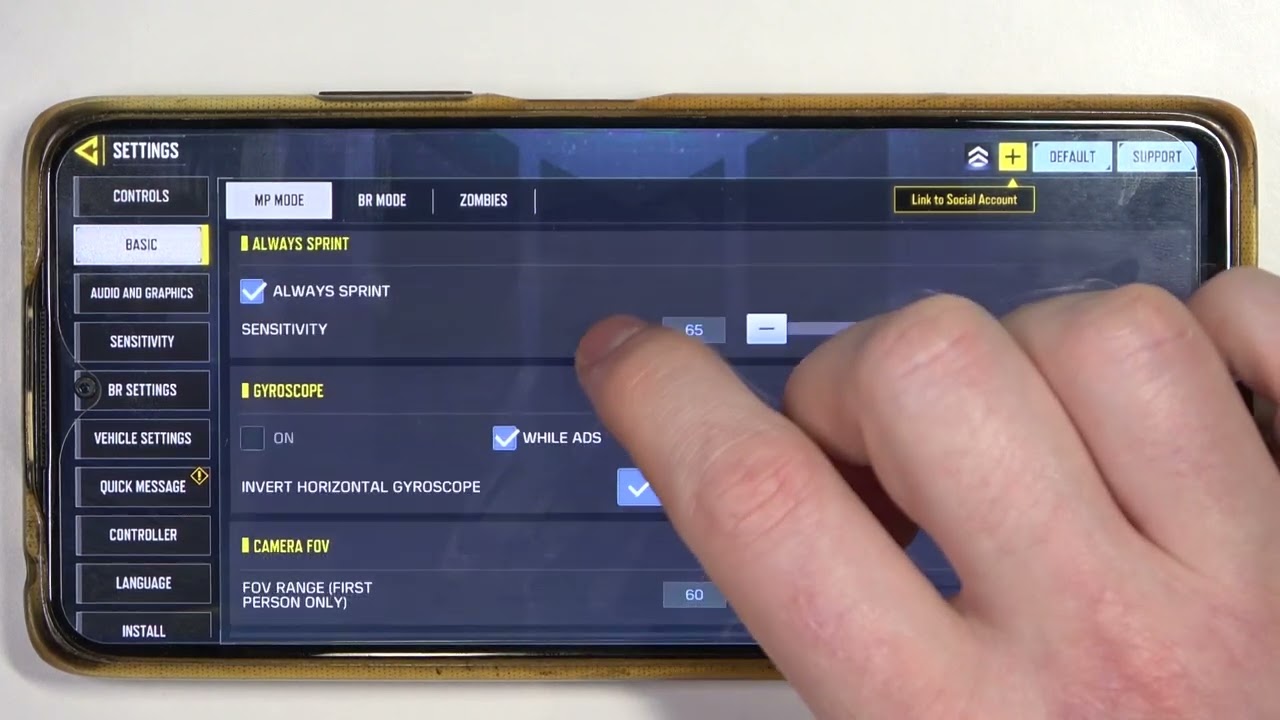
Before you commit to a specific COD mobile loadouts strategy, take the time to dial in how you actually shoot in Call of Duty Mobile. The game relies on dragging your finger around the right side of the screen to aim. A sensitivity setting that feels twitchy in the Gunsmith will punish you in a live firefight. Your movement matters just as much as your accuracy. You can move faster in Call of Duty Mobile by using the Control Stick for standard navigation. Tapping the Auto-Run button sends your soldier sprinting forward without you needing to hold anything down. Getting comfortable with that sprint toggle keeps your thumb free to scan the environment. That freedom is often the difference between reaching cover and getting dropped in the open.
Once your movement feels natural, shift your attention to the Loadout menu. The single biggest time-saver buried in the interface is the ability to use XP cards in COD Mobile. Instead of trying to level a fresh weapon by passively earning kills in public matches, you can spend these cards to instantly boost it to maximum level. This process opens up every attachment slot immediately. Skipping this step is what turns a reasonable camo grind into a slog. With a maxed weapon in hand, you can then test your build in private rooms by setting up 1v1 matches in COD Mobile. A controlled duel against a friend lets you isolate recoil patterns and time-to-kill speeds without the chaos of a full lobby. That focused, efficient approach to progression is a universal habit. It works on the same principle as trying to lvl up fast in ARK mobile, where stacking the right multipliers early on saves you from an endless, slow grind later.
Call of Duty Points are the premium currency that purchase the Battle Pass and high-end blueprints. You should know that some players try to acquire these points through third-party generators. These unofficial services often lead to stolen account credentials or a permanent ban. The only safe route is buying the currency directly through the in-game store. A legitimate purchase guarantees that your account remains secure while you collect the cosmetic rewards. The Battle Pass itself returns enough points to fund the next season if you complete the tiers. That loop makes the initial investment a one-time cost for consistent access to new operators and weapon variants.
Building a weapon that actually performs requires ignoring the flashy statistics and focusing on hidden stats. The Gunsmith interface shows you bars for damage and accuracy, but the real performance lies in aim down sight speed and sprint-to-fire time. An assault rifle built purely for range will lose every close-quarters fight because the opponent starts shooting first. Balancing mobility attachments with recoil control creates a weapon that works across multiple map types. A foregrip that tightens bullet spread is often more valuable than a scope with higher magnification. The goal is a gun that feels responsive when you snap onto a target, not one that looks perfect on paper.
Secondary weapons deserve the same attention as your primary slot. A pistol or melee weapon is not just a backup, it is your fastest movement tool when you need to rotate across the map. Swapping to a knife lets you sprint at maximum speed, which is critical for objective modes like Hardpoint or Search and Destroy. The launcher category serves a different purpose by clearing out scorestreaks. A well-timed rocket can remove an enemy UAV or counter a Stealth Chopper before it wipes your team. Keeping a dedicated anti-streak class ready in your loadout slots prevents a single enemy streak from controlling the entire match.
Perk selection ties the entire loadout together and dictates your playstyle. The red perk category offers choices that either keep you alive longer or help you find enemies faster. Lightweight increases your sprint speed, while Flak Jacket protects you from explosive spam on objective points. The green category focuses on utility, with Ghost hiding you from enemy UAVs and Cold-Blooded making you invisible to AI-controlled scorestreaks. The blue category provides audio cues or equipment charges. Dead Silence quiets your footsteps for flanking routes. A cohesive perk combination supports your weapon choice instead of fighting against it.
Scorestreaks reward you for staying alive and chaining kills together, but the right selection depends on the game mode. A UAV is always useful because it reveals enemy positions to your entire squad. The Shock RC car provides a cheap disruption tool that stuns opponents and sets up easy eliminations. Higher-cost streaks like the VTOL demand a long killstreak, so they fit players who can consistently survive. In objective modes, the Sentry Gun locks down a capture point or bomb site. Choosing streaks that you can realistically earn in an average match gives you more value than equipping three high-tier options that never activate.
Map knowledge shapes every decision from weapon choice to route selection. A sniper rifle dominates on Crossfire with its long sightlines, but it becomes a liability in the tight corridors of Hijacked. Shotguns and SMGs thrive in close-quarters maps where engagements happen inside buildings and around sharp corners. Learning the common head-glitch spots and power positions on each map lets you pre-aim at the right height. Sound cues like enemy footsteps or the click of a reload give away positions through walls. Players who invest time in learning spawn logic can predict where the enemy team will appear next and position accordingly.
Earning and spending in-game currency
Building out a deep arsenal requires a clear strategy for earning and spending in-game currency, because the in-game stores can easily push you toward impulse purchases that do not actually speed up your camo grind. The Credits you earn from completing daily challenges and clan tasks are best reserved for purchasing the Weapon XP cards inside the Store, which let you instantly max out a new gun’s level before you fire a single shot. Some players try to get more gold in mobile strike to fund cross-title purchases, though that approach relies on a completely separate economy. Once you acquire a premium weapon blueprint, you will need to use mythic cards in COD mobile to upgrade its unique attachments and visual effects, a process separate from the standard Gunsmith progression. For players who dove into the undead survival mode, the process to use Aether Shards in COD mobile ties directly to unlocking specialist camos and vehicle skins inside that mode’s talent tree, offering a purely cosmetic grind that does not affect your multiplayer damage.
Unlocking weapon camos and mastery
Gold camo is not a random drop, it is the completionist camo you earn after finishing every base camo challenge on a specific weapon. Open your Loadout, select the gun, tap Gunsmith, and then tap Camo to see exactly which missions are still standing between you and that locked Gold tile. Once Gold is unlocked for that weapon, the game reveals the next tier, and you can start the grind to unlock Diamond Camo in COD mobile by hitting a kill threshold in completed matches. That threshold changes depending on what you are holding: assault rifles demand 10 kills in 150 completed matches, while SMGs, sniper rifles, LMGs, and shotguns require 10 kills in 120 completed matches. Pistols drop to 80 completed matches, melee weapons need 500 total kills apiece, and launchers require you to destroy 100 UAVs per launcher. This is a pure volume grind that rewards sticking with one weapon over dozens of sessions, much like the muscle memory you build when you play Rainbow six Siege on mobile and drill the same operator until their gadget feels like an extension of your kit. The camo hunt branches into several parallel pursuits from here, and you will often see a cluster of guides covering how to get gold gun in COD mobile, each one focusing on a different part of the completionist camo grind. If you want to stand out even more, you should also read how to get legendary guns in COD mobile, since those animated blueprints offer a completely different visual flex than a static gold finish. Meanwhile, if you are looking to speed up the entire process, you might be tempted to learn how to get aimbot on call of Duty mobile, though remember that using third-party tools risks a permanent ban. To unlock the rarest cosmetics without spending real money, you can check out how to get CP in call of Duty mobile through legitimate in-game methods. For those who want to customize every weapon in their arsenal, a full walkthrough shows how to get skins in COD mobile across seasonal events and battle passes. Finally, if you want to carry two primary weapons at once, you need to know how to get Overkill in COD mobile, which opens up completely new loadout strategies.
Acquiring rare and mythic weapons
Stepping into the high-end arsenal means understanding that a legendary blueprint is a complete visual and audio redesign, but a mythic weapon is a living project you have to finish yourself. When you pull a mythic from a lucky draw, it may arrive with unique designs, animations, kill effects, and custom attachment skins. You can upgrade mythic weapons in COD mobile by spending upgrade materials to climb through multiple tiers, with each level delivering a specific piece of the package like the advanced kill effect, muzzle flash overhaul, reactive tracer fire, and the final shared elimination broadcast that announces your variant to the entire lobby, a crucial guide if you want to know exactly what each tier unlocks before you invest. Upgrade materials may come from the same draw that gave you the gun or from dedicated store bundles, so you often have to decide on the spot whether you are committing to the full upgrade path or staying at the entry level. The visual spectacle is completely separate from the Gunsmith stats you already know, and a mythic does not hit harder than any other weapon, it just leaves a far more dramatic trail. This same instinct for checking what a container actually holds before you commit carries over to other titles, where the quick decision of whether to open a supply bin in Apex mobile can determine if you walk away with useful gear or get caught looting in the open, making it essential to understand the timing and risk involved if you want to survive the drop. In COD Mobile, your mythic’s glow is purely cosmetic, but finishing the tiers turns an expensive pull into the exact showpiece you saw in the preview trailer.
Specialist loadouts and perks
When a standard two-weapon loadout feels too slow, the real buildcraft lies in perks that fundamentally alter what your operator can carry. That investment changes how you approach every corner, because you are now committed to a pure mobility spray that cannot be corrected with a scope.
For those who want to carry two primary weapons instead, the Overkill perk is your answer, but it comes with a hidden cost in the early game. You cannot equip it until you have reached the required player level to unlock the perk slot, leaving you grinding with a single gun until then. If you do not stack your earned XP cards onto that fresh weapon immediately, you will spend matches playing a half-built class just to reach the point where Overkill becomes available. The game cares about your overall account rank, as loadout slots and items unlock as you progress and level up.
Your tactical equipment slot can be just as transformative if you build around the Restock perk, which regenerates your lethal and tactical items on a timer. It pairs dangerously well with smoke grenades on objective modes, letting you blanket a hardpoint every 25 seconds without ever visiting a resupply crate. Back in COD Mobile, the gap between a standard frag and a regenerating one is often the difference between holding a flag and watching the killcam.
Some of the most aggressive loadouts abandon equipment entirely to stack raw movement perks. Lightweight, Gung-Ho, and Dead Silence together create a sprinting build that fires while running and makes no footstep noise, leaving you without any explosive or tactical gear for the entire match. A loadout that sacrifices utility for speed only works if your team is already controlling the lanes and feeding you targets.
Choosing the right weapon for your playstyle
If you favor holding long sightlines and shutting down lanes before the enemy can react, you need a rifle that kills in one shot to the upper chest with consistent hit registration. Many aggressive marksmen settle the debate over what qualifies as the best sniper in call of Duty mobile by testing the DL Q33 against the Locus. The DL Q33 is often favored for its damage profile, while the Locus rewards a faster scope-in time for quickscoping. Whichever you choose, the weapon will feel sluggish and incomplete until you upgrade it immediately after obtaining it. This lets you skip the miserable phase of running a bare bolt-action with no ADS speed attachments. On the other side of the playstyle spectrum, the all-season assault rifle that dominates across map rotations and meta shifts tends to be the Kilo 141. It is widely considered the best gun in COD mobile you should use for all seasons due to its handling and competitive performance at nearly any range. Once you have both archetypes built, you can pressure-test your attachments and aim in a private match on a small map. There you can toggle the exact same ruleset as ranked without tanking your stats. You learn how a new stock or barrel truly handles against a moving opponent.
Frequently Asked Questions
How do I change my control sensitivity in COD Mobile?
Open Settings from the main lobby, tap the Controls tab, and adjust the sensitivity sliders for standard look, firing, and scope-specific speeds. The right balance depends on your device screen size and whether you play with thumbs or a claw grip.
What does the Akimbo perk unlock in COD Mobile?
Akimbo lets you dual wield certain pistols and SMGs, replacing your secondary weapon with a matched pair. Each weapon has its own unlock challenge, typically requiring specific kill counts with that gun while using a particular attachment.
How do I open a supply bin in Apex Legends Mobile?
Approach the supply bin and tap the interact button that appears on screen. The bin takes a moment to open, leaving you exposed, so check your surroundings before starting the animation to avoid getting caught off guard.