Before you go: international calling plans setup and eligibility
Understanding your international calling plans before you board the plane can prevent a dead phone on arrival. Start by confirming what your current plan actually includes at your destination. Many carriers cover Mexico and Canada at no extra cost. Accidentally using data elsewhere without a plan can trigger aggressive per-megabyte charges. If your trip requires a new local line, you will need to complete the Globe SIM registration process before the card works. The process requires a selfie and a valid government ID with your photo.
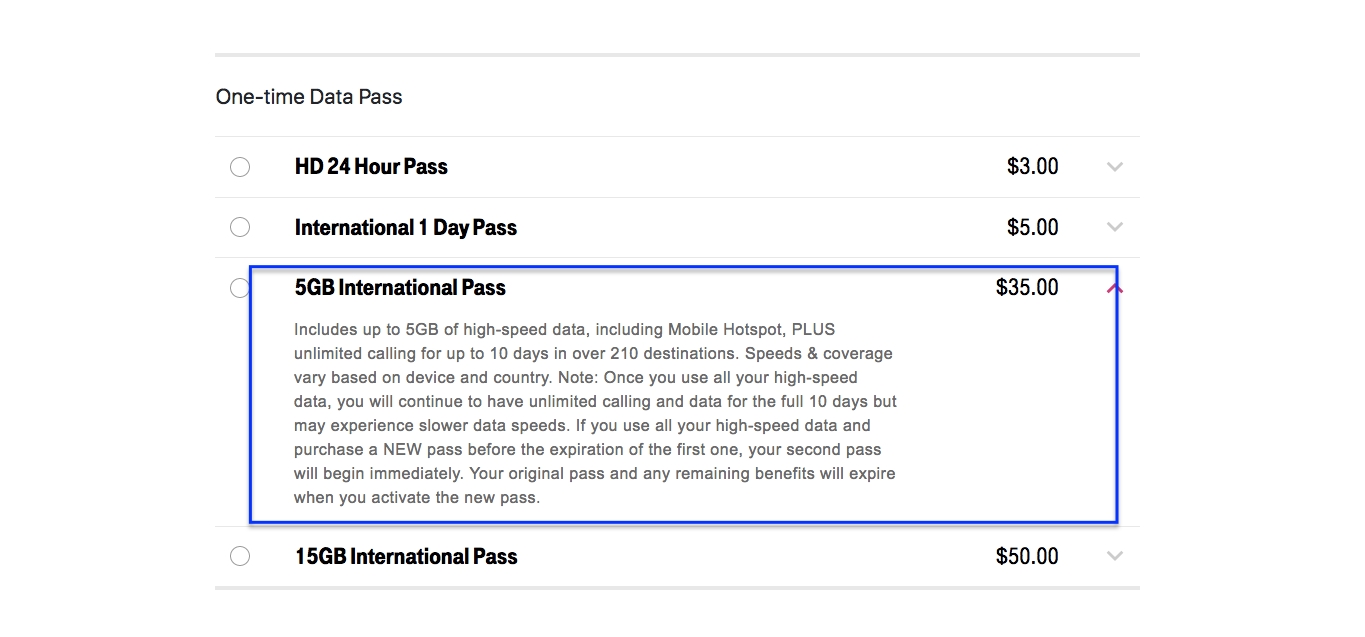
For those sticking with their US line, some carriers make you call in ahead of time. To enable international roaming on Consumer Cellular you must speak with customer service before departure. Similarly, you will want to turn on international roaming on Boost Mobile well in advance. Checking your account early is key. The magenta network offers more self-service options. You can add international plan to T-Mobile through the Manage Add-ons and data section of your account. If you only need a short-term data boost, you can activate T-Mobile international pass by choosing a one-time data option and setting the effective date.
Understanding carrier international plans
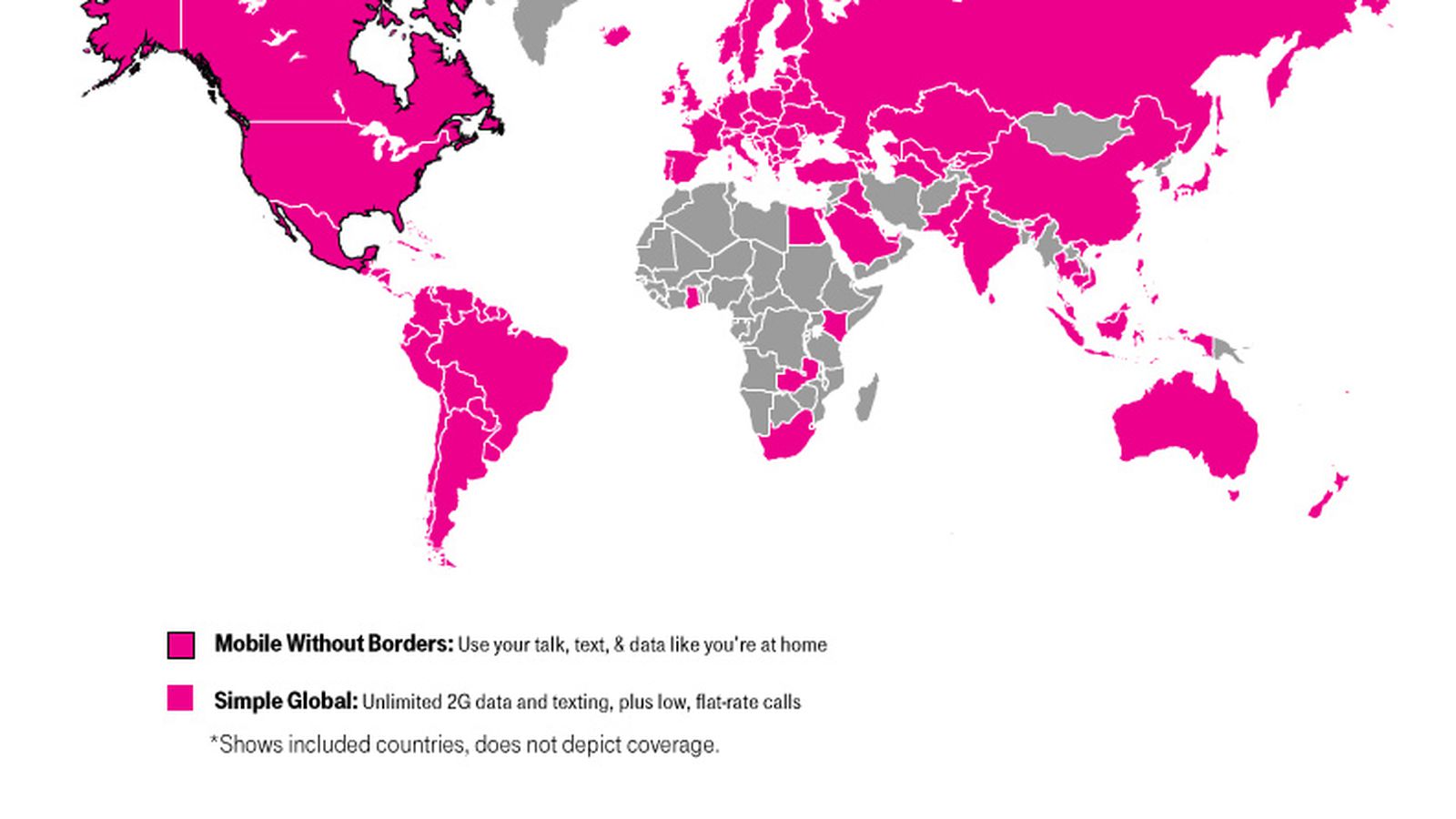
Before relying on your phone abroad, it helps to understand how the major carriers structure their international access. On the T-Mobile side, using T-Mobile's international roaming often starts with the Simple Global benefit already included on qualifying plans. This delivers unlimited texting and data at reduced speeds across the 210 countries covered by T-Mobile. If you need faster data for maps or video calls, you can layer on a high-speed International Pass. This pass applies to the specific countries in T-Mobile Simple Global where you plan to travel. AT&T takes a different approach with its unlimited plans, where AT&T will let you roam in Mexico and Canada for free on eligible domestic unlimited plans. Talk, text, and data are included right on your domestic plan, though data speeds in Mexico may be throttled. For travel beyond North America, AT&T introduces international data roaming pass as a daily option. This pass kicks in only on the days you actually use your phone in over 210 destinations. It lets you tap into your regular plan’s data and calling allowances instead of paying by the megabyte.
Making international calls from the US
Dialing another country from your US cell phone follows a consistent pattern, though the exact keys you press depend on your carrier and the destination. If you need to make international calls on my Verizon cell phone, open your phone app and enter the digits in one of two ways. For nations that use North American Numbering Plan dialing, just tap in the 10-digit sequence and press Call; for everywhere else, start with 011, then add the nation code and the local digits. Before using pay-per-minute rates, check that your line is active for at least 34 days and confirm that International Services are enabled in your My Verizon account, otherwise the call will not complete. You may also need to add a recurring global add-on to lower the per-minute rate significantly, since Canada and many Caribbean islands often route as domestic calls.
Managing costs while calling abroad on the Verizon network requires attention to plan details, as the per-minute charge varies widely by landline or mobile termination.
Other carriers standardize on the plus-sign format. When you make international calls on T-Mobile, press and hold the 0 key until a + appears, then enter the nation code and the local sequence. This is the standard you will use to make international calls on AT&T cell phone as well, since the plus sign replaces the 011 exit prefix automatically and the network routes your connection correctly every time. Many T-Mobile plans include calling to various destinations without a separate feature, but if your plan does not include a specific location, you can add the Stateside International Talk feature for a fixed bucket of minutes and a reduced per-minute rate for any overage.
Prepaid service on the Un-carrier’s network uses a pay-as-you-go credit system instead of a recurring add-on. You load money into your account balance, and each call deducts the appropriate rate from that pool, preventing unexpected overage charges. The plus-sign dialing format remains the required entry method for all destinations outside the North American plan.
For prepaid customers who want to make international calls in Mint Mobile, international calling credits are managed through the app wallet rather than a recurring long-distance add-on, and funds may be managed separately from your monthly plan payment. Open the dialer and hold the 0 key to get the + symbol, then enter the destination code and the local digits. You can add funds and check your balance at any time from the same screen in the Mint Mobile app, and the consistent per-minute rate makes budgeting simple while avoiding the surprise of a large monthly add-on fee.
AT&T handles global connections with a mix of included features and optional add-ons. When you make international calls on AT&T cell phone, many unlimited plans now include calling to various international locations, but if your destination is not on the included list, you can add the International Calling feature for a set number of minutes and a reduced per-minute rate for any overage. Pay-per-use rates still exist for customers who prefer not to add a feature, though calls to mobile phones often cost more than calls to landlines. You can look up the exact rate on AT&T’s website before you dial, and if you make frequent connections, activating the add-on before you need it almost always saves you money.
Dialing a location within the North American Numbering Plan follows a domestic pattern. Canada and many Caribbean nations share the same 10-digit structure as the United States, so you dial from USA to Mexico cell phone by entering the area code and the local digits with no exit code or nation code required. The call routes as if you were connecting to a neighboring state, and your plan’s domestic minute allowance applies, meaning these connections cost nothing extra if you have unlimited talk across carriers.
- make international calls on my Verizon cell phone
- make international calls on AT&T cell phone
- make international calls in Mint Mobile
- make international calls on T-Mobile
- dial from USA to Mexico cell phone
Calling specific countries from the US
Your international call begins with a universal dialing sequence. Start by dialing 011, then the destination’s code, then the local number. For calls to a Mexico mobile number, add a 1 before the 10-digit number, this is exactly why you would want to learn how to call Mexico cell phone from US cell phone, so you get the digits right the first time. UScellular customers should be aware that sign-up is required before international dialing will work on the line, which is why you would want to read about how to call US cellular from my cell phone to ensure your account is ready. The core format remains the same whether you are learning how to call Japan from US cell phone, how to call France from US cell phone, how to call Korea from US cell phone, or how to call Peru from U.S. cell phone. The real variable is simply the two- or three-digit prefix you enter after 011. The same logic applies when you need to call Poland from US cell phone and several other destinations. Pick the destination that matches your target nation to confirm that prefix and see any local-number quirks before you tap the call button.
Using your phone while traveling abroad
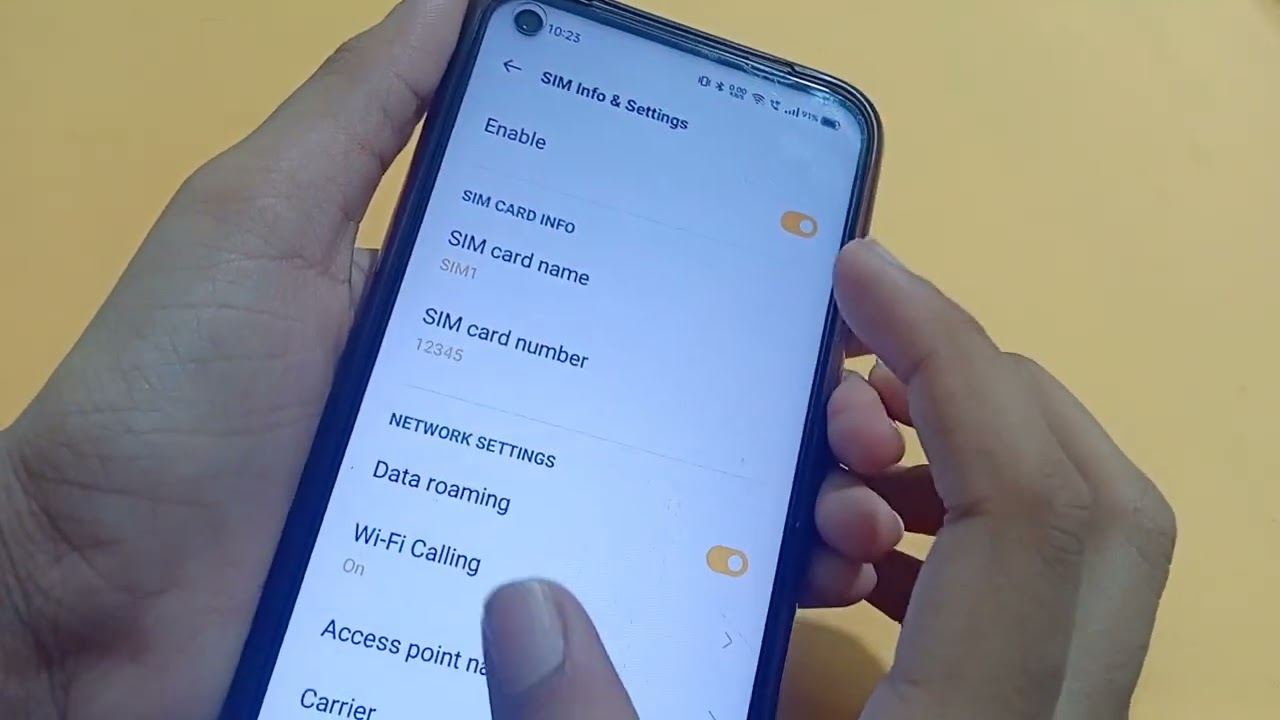
Before you land, confirm whether your carrier already treats your destination like home; otherwise you need to opt into a travel pass to avoid steep per-megabyte charges. Once that is settled, the actual phone setup is straightforward. If you are carrying an iPhone, navigate to Settings > Cellular > Cellular Data Options and toggle Data Roaming on, and on models with dual SIM or dual eSIM remember to select the correct line first because the setting applies per line. For a quick start on slightly older hardware, turn on roaming in iPhone 12 or turn on roaming iPhone 13 by following the same path, so the model year does not change the menu structure. If a family member is unsure where to begin, a simple way to turn on roaming on iPhone is to go to Settings > Cellular > Cellular Data Options and flip that same Data Roaming switch. With Android devices such as a Google Pixel, you would typically open Settings > Network & Internet > Mobile network and turn Roaming to ON, though the exact wording can shift slightly depending on your carrier’s software version.
The real variable is your destination, not your device. When you use phone in Italy, the rule is the same as any other country: if the nation sits outside your carrier’s network. The same logic holds when you use your phone on a cruise, but shipboard cellular networks are a special case, so verify coverage before you set sail rather than assuming the standard international pass will work at sea.
Calling special or non-standard numbers
Reaching a satellite phone works differently from a standard mobile call. Apple's built-in satellite features on iPhone 14 or later are designed for emergency SOS, roadside assistance, messages, and location sharing, not for placing ordinary voice calls to a satellite phone. If you need to call satellite phone from mobile, you dial the satellite number using an international format. US Cellular lines follow standard North American patterns, but confirm international calling is active on your line before attempting the call. The ability to get collect calls on cell phone depends entirely on whether your carrier's billing system accepts third-party charges, and many prepaid and some postpaid plans block these by default, so contact your provider directly to confirm availability before relying on this method.
Using wifi calling and unlocked phones
If your carrier’s roaming rates look steep for your destination, switching your phone to a Wi‑Fi network before you place a call can keep you on a home-area rate. Enabling WiFi calling on T-Mobile takes about a minute on most modern handsets. On an iPhone you go to Settings > Cellular > Wi‑Fi Calling > Wi‑Fi Calling on This iPhone and flip the switch. On a Samsung you open Settings > Connections > Wi‑Fi Calling and turn it on, or on a Pixel open Settings > Network & Internet and turn Wi‑Fi Calling on. Make sure to confirm your E911 address when prompted. Once it is active, you will see a phone-plus-Wi‑Fi icon in the status bar. Your calls and texts will then use the wireless connection instead of a foreign tower.
Carrying your own device gives you more flexibility, but you will want to confirm compatibility before you leave. The magenta-backed network states that the feature works on most phones. Unlocked phones that work with T-Mobile WiFi calling generally include most recent iPhone and Android models. The provider does not publish a single fixed list of every supported model. The safest move is to enable the setting at home while still on the Un‑carrier’s network and place a quick test call over Wi‑Fi. If the icon appears and the call completes, the device is ready to use in another nation.
Troubleshooting and changing phone region
When your phone shows signal bars but calls refuse to connect, exploring the best fixes for cellular network not available for voice calls often starts with a simple restart or toggling Airplane Mode, so you can quickly restore your ability to make calls without waiting for support. On an iPhone, the more thorough path is Settings > General > Transfer or Reset iPhone > Reset > Reset Network Settings. Just be aware this clears saved Wi‑Fi passwords and VPN configurations. If you are trying to get a region-locked app or service to recognize your device, you might look into guides on how to change my Android phone location to USA using developer options or third-party tools, which lets you access content restricted to American users. This approach alters GPS reporting and does not modify your Play Store billing profile. For updating your store and content preferences, the simpler and more permanent adjustment is to change country in Android phone through the Play Store’s account settings, giving you access to region-specific apps and pricing. This process typically requires you to be physically present in the new region and add a local payment method.
Looking up international calling rates via T-Mobile reveals that the standard dialing format is simply “+” followed by the nation code and phone line, helping you avoid unexpected per-minute charges. The per-minute cost varies dramatically unless you have an active add-on. This lets you reach abroad without touching your plan’s international minutes.
Understanding how the major carriers handle global connectivity prevents bill shock. The magenta carrier structures its international options into a few distinct tiers. Simple Global gives you unlimited texting and low-speed data in over 210 destinations. The Magenta and Magenta MAX plans include this feature. For faster data and high-definition streaming, you can purchase an International Pass. These passes last for up to 30 days and offer a set amount of high-speed data. You can make unlimited calls over Wi-Fi back to the States at no extra charge.
The network with the blue globe offers two main international features. You only pay for the days you use. The carrier caps the charge at 10 days per billing cycle. For longer trips, Passport offers a fixed amount of data, unlimited texting, and a per-minute rate for calls. The Passport packages come in 30-day blocks. The blue carrier also includes unlimited talk and text from the U.S. to over 230 destinations on its top-tier unlimited plans. The standard per-minute rate without a package can be steep, so checking your plan before you depart is essential.
The red network operates differently. It relies almost entirely on TravelPass. Like the blue globe’s system, you only pay on days you use the service. The red carrier also offers a few monthly international plans that include a set number of minutes, texts, and data. These plans work well for frequent travelers who prefer a predictable bill. Wi-Fi calling back to the States is free from anywhere.
Roaming charges depend on where you go and what you do. The major networks divide the world into a few rate zones. Mexico and Canada often receive special treatment with inclusive roaming on many plans. Most of Europe, the Caribbean, and parts of Asia and South America fall into a standard rate zone. A smaller set of destinations may have higher per-minute and per-megabyte rates. Cruise ships and in-flight services operate on completely separate pricing models. The most expensive option is always pay-per-use roaming with no package at all. The networks have all moved toward daily pass models to simplify this, but the underlying cost structure remains.
Wi-Fi calling serves as the single most effective tool for avoiding international charges. This feature routes your voice calls and text messages over a wireless internet connection instead of a cellular tower. All three major networks support it. You must enable the feature in your device settings before leaving the States. Once active, any call you make or receive while connected to Wi-Fi is treated as if you were standing on your home soil. Calls to U.S. digits are free. Calls to other nations bill at your plan’s standard long-distance rate. The trick works anywhere in the world. A hotel, a café, or a portable hotspot all provide the same benefit. The call quality depends entirely on the strength and latency of the internet connection.
Dual-SIM phones open up a second strategy. With a physical SIM or eSIM from a local provider, you can keep your home line active for texts and two-factor authentication while using the local line for affordable data and voice. The iPhone 13 and later models can support two active eSIMs. Many Android devices offer a similar setup. You set the local line as your primary for data. You set your home line to use Wi-Fi Calling. When your home line lacks a cellular connection, it can route calls over the data connection of the local line. This feature, called cellular data switching or backup calling, effectively gives you a free path back to your home network. The setup requires some attention in the settings menu, but the savings justify the effort.
Messaging apps offer a third path that bypasses the traditional voice call entirely. WhatsApp, Signal, FaceTime Audio, and Telegram all use data for voice. A call placed through these apps never touches the public switched telephone network. The only cost is the data you consume. A one-hour voice call over a messaging app uses about 30 to 40 megabytes. On a local SIM or a travel eSIM with a few gigabytes of data, this is negligible. The person you are calling needs the same app installed. For calling landlines or businesses abroad, this method does not work. But for staying in touch with friends and family, messaging apps have become the default international calling solution for millions of people.
Calling a foreign nation from your home soil uses a specific format. You must dial the international access code, which is 011 from the States. Then you dial the nation code. Then you dial the city or area code, dropping any
- best fixes for cellular network not available for voice calls
- Rebtel offers unlimited international calls for $1/mo
- international calling rates via T-Mobile
- change my Android phone location to USA
- change country in Android phone
Frequently Asked Questions
How do I turn on data roaming on a Google Pixel 7?
Open Settings, tap Network & Internet, then tap Mobile network and turn Roaming to ON. The exact wording may shift slightly depending on your carrier's software version.
What ID do I need for Globe SIM registration?
You must have one valid, active government-issued ID with a picture of your face. If you are under 18, a parent or guardian must register the SIM instead.
What number do I call to add international roaming on Consumer Cellular?
Call customer service at 888-345-5509 to add international roaming before you leave. You must speak with customer service before departure, as there is no in-app toggle documented for turning international roaming on.