Before you start: is it frozen or just off
Learning how to power on phone correctly starts with figuring out what you are actually dealing with, because a black screen does not always mean the phone is powered down, it could be frozen solid with the screen dark. Learning to know if phone is off instead of crashed saves you from waiting through unnecessary steps.
For a frozen Samsung Galaxy device, Samsung instructs you to press and hold the Side and Volume down buttons simultaneously for more than seven seconds to unfreeze an Android phone. Apple takes a similar route with a specific button sequence for Face ID models: quickly press and release Volume Up, then Volume Down, then hold the side button until the logo appears. While you cannot shut down phone without touching screen using a normal software slider on a frozen device, these physical button escapes will get you back in control.
Once the phone is alive again, check a few options that commonly trip people up. If you are travelling, the path to turn off roaming on iPhone 14 lives under Settings > Cellular > Cellular Data Options, where you toggle Data Roaming off, though some carriers label the menu Mobile Service instead. And if you are ever tempted to research how to jailbreak a Samsung phone to gain more control, know that it falls entirely outside the standard restart and recovery tools.
Basic power on and off for your phone
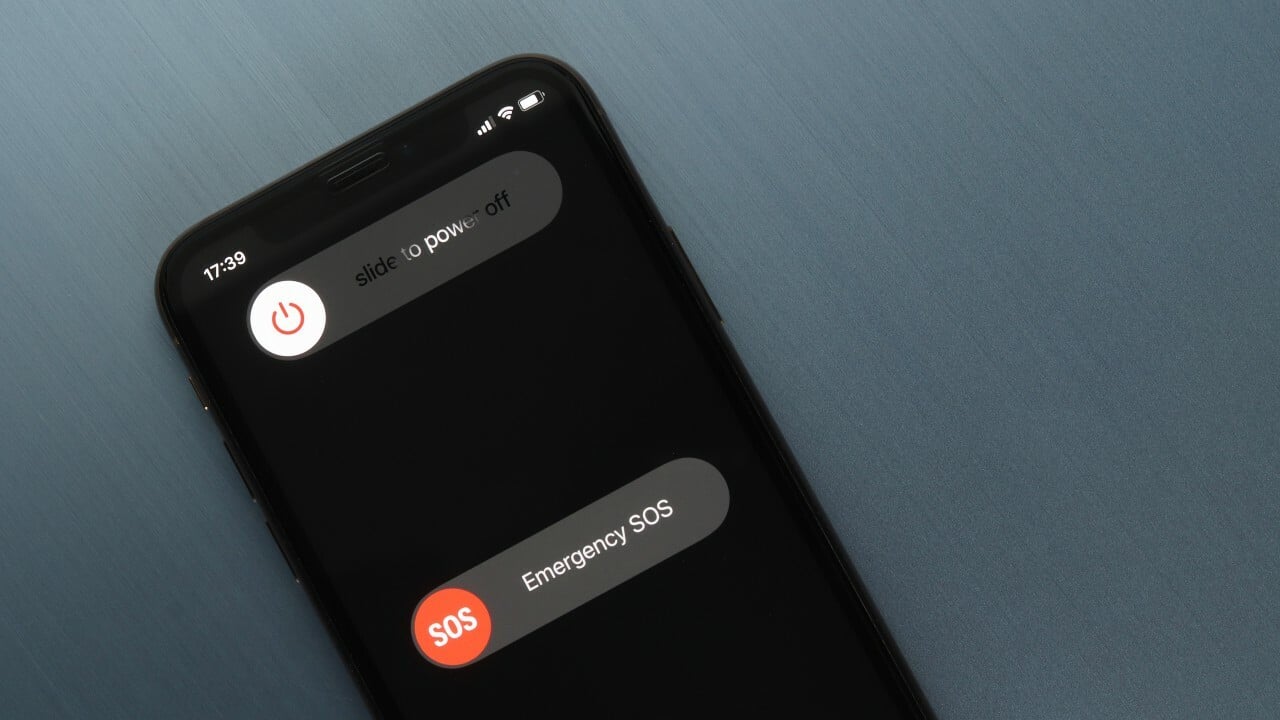
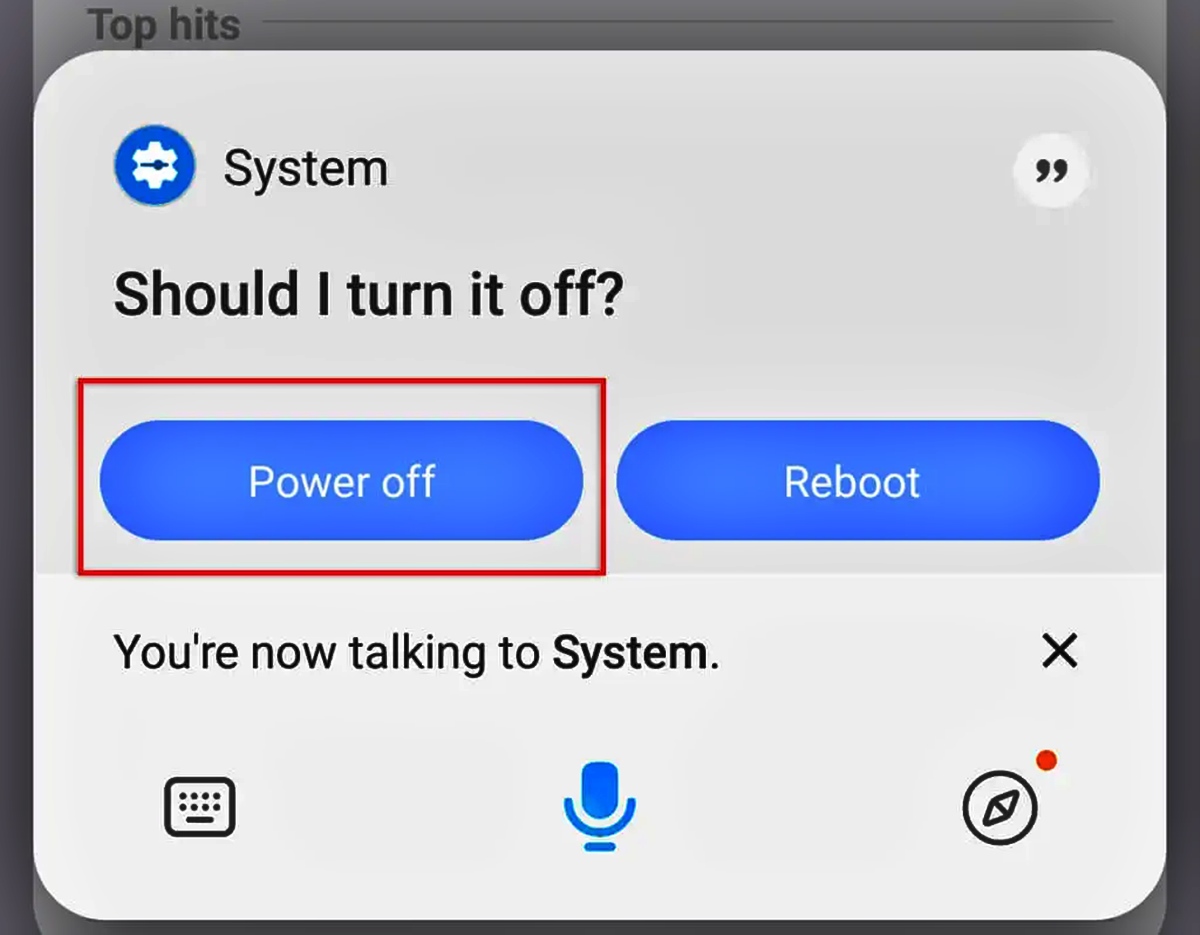
Most phones still respond to a quick press of the side key, but manufacturers have quietly shifted the shutdown command to a two-button combination. On an iPhone with Face ID, you press and hold the side button plus either volume button until the sliders appear, while on models with a Home button, holding just the side button does the job. For anyone who has searched how to power off my Android phone, one Galaxy method is nearly identical: press and hold the Side and Volume down keys together, then tap the on-screen Power off option to confirm. If you would rather not use hardware keys at all, swipe down from the top of the screen using two fingers to open Quick settings and look for the Power icon in the upper right next to the Settings icon. Voice control is another path; once Bixby is set up, holding the Side key and saying a command will shut this phone off without ever touching the screen. You can also cut this phone off from inside the system menus on both platforms. On an iPhone, navigate to the General section and Shut Down, and a Galaxy device offers the same option through Quick settings. When the screen is frozen and none of these software routes respond, the button-based override is one way out.
Turning off specific Android models
Pressing and holding the Side and Volume down keys together for a few seconds, then tapping Power off, is how you turn off Samsung cellphone models that have moved the command away from a long-press. A similar button sequence lets you turn off Galaxy S21 Ultra or any recent flagship from the brand, though the exact key combination may vary by model. A Bixby voice command also works once you have trained the assistant. Motorola keeps a more traditional physical arrangement but shifts the key pairing slightly. You can turn off Motorola Moto G pure by pressing Power and Volume up at the same time, then tapping Power off, which is the standard method for many newer Motorola phones. Swiping down twice from the top of the screen to reach the on-screen power control may be an alternative on that device. OnePlus, Google, and LG handsets may rely on simultaneous button presses as well, though the exact key pair can differ between generations. Checking the physical layout of your particular model is essential. Beyond these manufacturers, the same pattern may repeat across other devices running the Google mobile operating system. Pick the entry that matches your device name, and you will get the precise button combo and menu taps for that handset. For instance, you might need to turn off a Samsung Galaxy phone to restart it after an update, or you could turn off Galaxy Z flip phone to conserve battery overnight. If you use a device for work, you might turn off Walmart work phone to ensure you are not disturbed during off hours, or you may turn off a OnePlus phone to perform a hard reset. You might also turn off Nokia flip phone to save power while traveling, or turn off flip phone models that lack a touchscreen. If you need to turn off Google phone to troubleshoot a frozen app, or turn off my Galaxy phone to prepare it for a factory reset, the linked guide has the steps. On the other hand, you might want to turn on an Android phone after it has been powered down for storage, or turn on a Galaxy phone to set it up for the first time. You could also turn on LG phone to check for system updates, or even turn off Promethean board with phone to end a classroom presentation remotely.
- turn off my Galaxy phone
- turn off a Samsung Galaxy phone
- turn off a OnePlus phone
- turn on an Android phone
- turn off Nokia flip phone
- turn off flip phone
- turn off Promethean board with phone
- turn off Galaxy Z flip phone
- turn on a Galaxy phone
- turn on LG phone
- turn off Google phone
- turn off Walmart work phone
Handling flip and folding phones
To shut off Samsung flip phone hardware such as the Galaxy Z Flip, Galaxy Flip7, or Galaxy Z Flip8, start with the standard Galaxy button sequence by pressing and holding the Side and Volume down buttons together until the power menu appears, then tap Power off. You can also swipe down with two fingers from the top to open Quick settings and tap the Power icon in the upper right to reach the same confirmation prompt. Samsung’s guidance does not list a separate shutdown path unique to the folding form factor, and these steps apply whether the device is open or closed.
When the screen doesn't respond
When the display freezes mid-task and taps go completely ignored, the touchscreen is no longer your way out. On an iPhone 13, press and hold the side button and either volume button together until the power-off slider appears, then drag it to turn the device off normally. This override cuts power to the frozen components and reloads the system, and it works the same way across iPhone X, 11, 12, 13, and later models that use Face ID.
For Android devices, no single button combination applies to every brand. The safest path is to look up the exact key press for your specific model on the manufacturer's support page, because the system software that runs these phones varies widely. A force restart on a Google Pixel may use the power button held for about 30 seconds, while on a Galaxy handset you may hold the side key and volume down together for 7 to 10 seconds. These differences mean that memorizing one method often fails on a borrowed phone, so checking the official documentation for your exact variant prevents frustration when the panel stays dark and unresponsive.
The power menu on modern handsets has evolved beyond a simple off switch and now bundles emergency contacts, medical information, and restart options into a single panel. Accessing this menu requires different gestures depending on your device generation. Newer Galaxy models may open the power menu by pressing the side key and volume down simultaneously, while older Galaxy designs may use a long press of the side key alone, though force restart methods differ and require holding buttons for several seconds. Apple changed the behavior starting with the iPhone X: a long press of the side button now summons Siri by default, and you reach the shutdown slider by holding the side button and a volume key together instead. This shift catches many upgraders off guard during their first week with a new phone.
Emergency features hide inside the same shutdown panel. Medical ID details and emergency contact information appear alongside the power-off slider on iPhones, letting first responders access critical health data without unlocking the device. Galaxy phones may include a similar SOS feature triggered by pressing the side key rapidly, sending a distress message with your location to designated contacts and automatically capturing photos from both cameras. Configuring these emergency options ahead of time turns the power menu into a safety tool, and you adjust them in the phone's configuration app under safety and emergency preferences.
Restarting a frozen phone often resolves temporary glitches without erasing any data. A standard restart closes all running processes and reloads the operating system cleanly, fixing unresponsive apps and minor interface lag. A force restart goes deeper by interrupting power to the hardware components directly, which resolves situations where the panel stays black or completely unresponsive. Neither method deletes your photos, messages, or app data; they simply clear the device's active memory. If problems persist after a restart, you may need to check for software updates, since outdated system files can cause recurring instability that only a patch will fix.
Scheduled power cycling benefits long-term device health. Turning the phone off for five minutes once a week clears temporary caches, resets network connections, and recalibrates battery reporting, preventing the gradual accumulation of background errors. Many users leave their phones running for months without a full shutdown, and while the operating system handles this well most of the time, occasional restarts still improve responsiveness and connectivity. Setting a recurring reminder makes this maintenance effortless, and a quick off-and-on cycle during your weekly routine keeps the system fresh.
Battery optimization settings influence how and when the device powers down. Low power mode reduces background activity and visual effects to extend remaining charge, and the phone prompts you to enable it at twenty percent battery, though you can also activate it manually through the control center. Some phone models include additional battery protection features that limit the maximum charge to a set percentage for overnight charging, preserving long-term battery health by reducing chemical aging. The configuration app houses these options under battery or device care sections, and adjusting them to match your daily charging habits extends the usable life of the battery.
Accessibility alternatives replace physical button presses for users with motor challenges. AssistiveTouch on iPhones creates a persistent on-screen menu with a software-based device lock and restart option that works independently from the physical buttons. Android phones may offer an Assistant Menu with similar functionality, enabled through the accessibility panel within the device configuration. Voice commands provide another hands-free method, and Siri can restart its respective device when given the proper spoken instruction. These alternatives ensure that every user can manage power functions regardless of physical button access, and the configuration area for these features lives under accessibility shortcuts and interaction controls.
Battery removal and disconnection
When the screen is frozen and no button combination brings up the shutdown menu, a force restart using a specific button sequence is the next step, though physically cutting the power remains an option only on phones that still let you do it since most modern handsets seal the battery behind adhesive and security screws. The documented way to remove battery from Android phone models with removable backs is to pop off the rear cover and lift the pack out of its compartment. Before you attempt to remove battery from Motorola phone devices like older Moto E or G series variants, power down the handset first if possible, but if the screen ignores you, skip that step and pull the battery directly to force a cold restart.
On sealed phones, the internal connector serves the same purpose, and repair guides show how to disconnect battery by unplugging the ribbon cable from the mainboard after opening the chassis, a process that demands patience and the right pry tools. This is invasive work, not a quick fix, and it voids any remaining warranty on the spot. A frozen panel that refuses every button override can look like a deeper infection, and some people wonder how to know if my phone has viruses when the only symptom is a locked-up screen. The device maker’s own protection scan runs independently of the UI, and Google flags persistent pop-up ads as a warning sign, though a hard lockup alone is rarely malware.
Scheduling, auto-off, and preventing shutdowns
On an iPhone, you can also shut down via Settings > General > Shut Down. A separate screen-related control is Auto-Lock: open Settings, tap Display & Brightness, and choose Auto-Lock to set the panel to sleep after a set interval, or select Never to stop your phone from turning off automatically while you are reading a recipe or following a map. If your goal is to make phone turn off after certain time completely, no official iPhone setting was found, so you would need a third-party automation or a physical outlet timer. On a Galaxy or other device, scheduled power on and off may not be present on all models, though many Android phones offer the feature in Settings under System Settings or Advanced features. A general way to log out of Android phone at the system level is not available, and signing out is typically handled per app or by removing the Google account from the handset. The setting to turn off dock connector was not found in the official documentation.
Special modes, accessories, and work devices
When a Samsung phone boots into a restricted state, the quickest way to take safe mode off Samsung phone is to restart the device, which usually exits Safe Mode. If that notification is not present, press and hold the Power button and tap Restart, or hold Volume Down and Power together to force a restart. A phone that keeps returning to Safe Mode after rebooting may have a stuck button, so check the buttons before assuming the software is corrupted.
You can turn off raise to wake on iPhone in Settings > Display & Brightness, which stops the panel from lighting up every time you lift the handset. You can turn off flashlight on Motorola Moto G with the same chop gesture that turned it on; if the camera launches instead, you are twisting rather than chopping. The exact menu to disable the gesture sits inside the Moto app under Gestures or Actions, or in Settings under Gestures, depending on your model and software version. Official documentation does not specify the button sequence to turn off Heyday wireless earbuds, so you may need to rely on the charging case to cut the connection.
On an employer-issued phone, logging out is a per-app action typically handled by removing the work profile or the managed Google account from the device. No manufacturer support page documents a special shutdown procedure for managed handsets, and the same physical button overrides apply.
Frequently Asked Questions
How do I force restart an iPhone 8 if the screen is frozen?
Quickly press and release the Volume Up button, then Volume Down, then press and hold the side button until the Apple logo appears. This sequence differs from Face ID models and works specifically for iPhone 8 and iPhone SE models with a physical Home button.
How do I turn off a Motorola phone using the buttons?
Press and hold the Power and Volume Up buttons simultaneously, then tap Power off on the screen. This method works on many newer Motorola phones including the Moto G Pure, though you can also swipe down twice from the top to reach the on-screen power control.
Can Siri turn off my iPhone without pressing any buttons?
Apple does not document a Siri voice command for shutting down an iPhone. The documented hands-free alternative is navigating to Settings, then General, then Shut Down, and dragging the slider, or using AssistiveTouch for an on-screen software button.
How do I set up emergency contacts on a Samsung Galaxy phone?
Open the phone's Settings app and navigate to Safety and emergency preferences to configure your emergency contacts and medical information. Once set up, pressing the side key rapidly triggers an SOS feature that sends your location and photos to those designated contacts.