Before you track: phone location tracking privacy, legality, and false premises
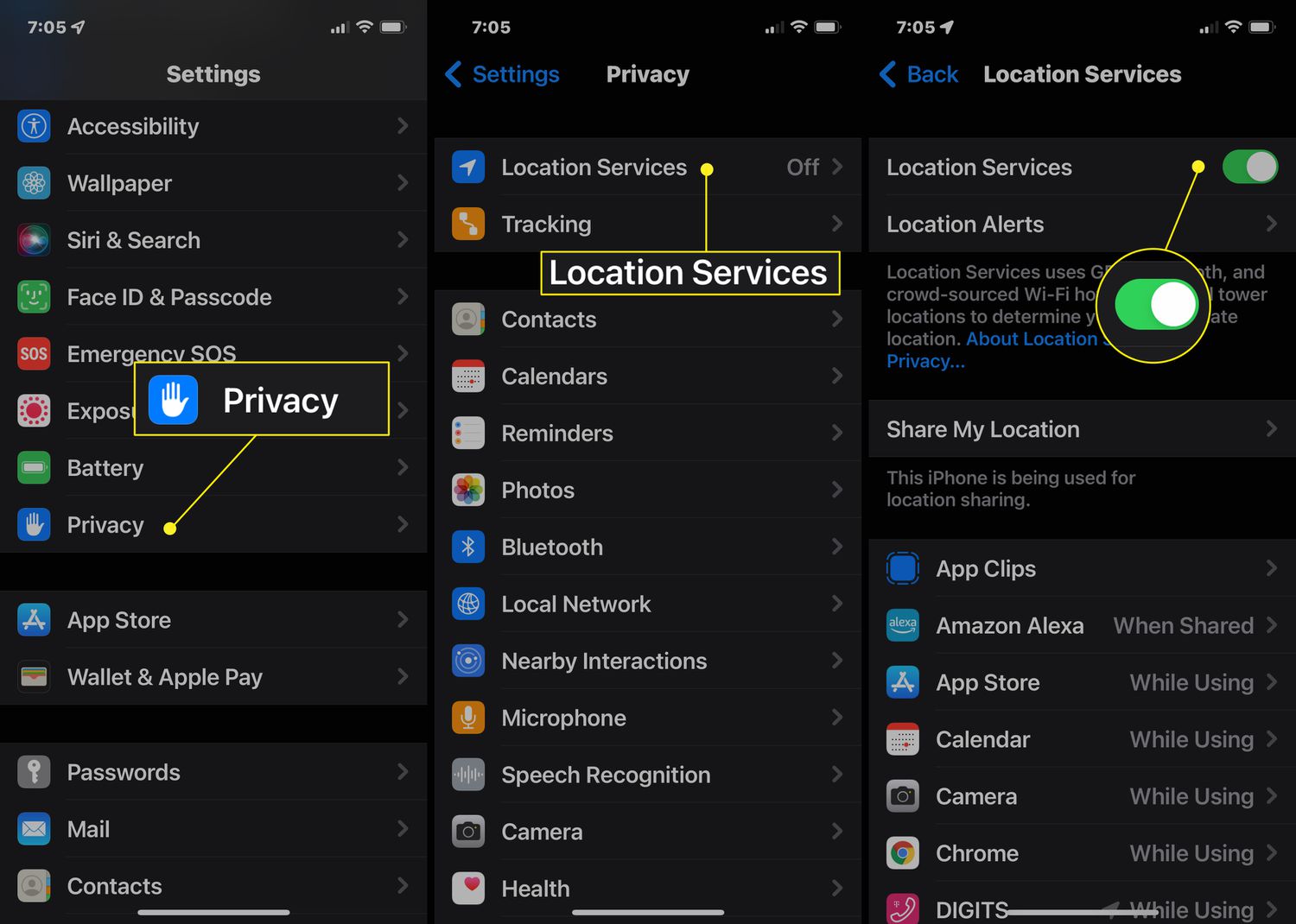
Before you act on any phone location tracking promise, understand that nearly every “free phone number tracker” online is a scam that cannot deliver real-time coordinates without prior consent. Real location sharing almost always requires setup on the target device or account access. If a phone is lost or stolen, your fastest path is through the carrier or built-in find-my-phone services. The way law enforcement works is different: police tracking your phone typically requires lawful access to carrier records, device data, or a warrant, not a consumer lookup tool. You should also recognize that there is no phone setting that will definitively tell if a cell phone jammer is being used, because a jammer blocks signals locally and leaves no system log for you to read. Similarly, Apple provides no user-facing way to tell if someone is faking their location on find my phone. If a contact’s position looks wrong, the platform offers no diagnostic screen to prove it. To see if someone is tracking your iPhone, open Settings, tap Privacy & Security, then Location Services, and review which apps are set to Always. You can also stop broadcasting your position entirely in the Find My app under the People tab. If you want to check if my phone is linked to another device, look in the same People tab in Find My for shared family members. Alternatively, go to Settings, tap your name, and review the device list tied to your Apple ID. For physical surveillance, a dedicated 12 amazing GPS tracker detector for 2024 can help you sweep your vehicle for hidden hardware, but no app reliably replaces that hardware scan.
Finding your own lost or misplaced device nearby
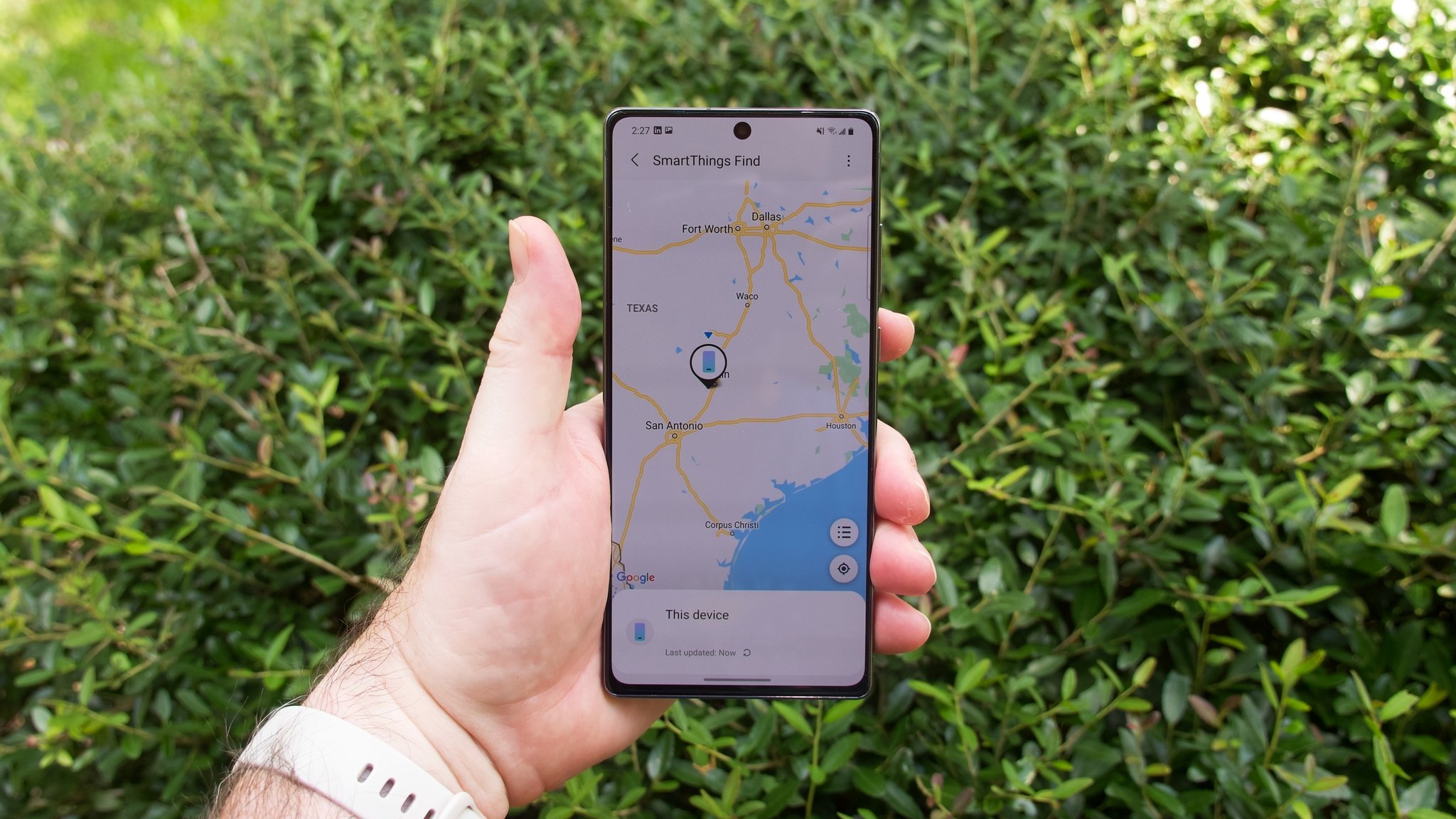
When your phone slips between the couch cushions or disappears inside a bag, the fastest fix is usually making it ring from another device you already own. If you need to find an Android phone on silent, Google’s Find My Device and Samsung’s SmartThings Find both override mute and vibrate configurations, forcing the handset to play a sound at maximum volume for five minutes. The same override works from an Apple Watch, where you can ping my phone from my watch by opening the Find Devices app or pressing the side button to open Control Center and tapping the Ping iPhone button, which triggers an audible alert even when the phone’s ringer is off.
The process is nearly identical when you ping an iPhone from another iPhone; open the Find My app on the second device, select the missing iPhone under the Devices tab, and tap Play Sound. The tone starts after a short delay, gradually gets louder, and plays for about two minutes. You can also send a ping on iPhone via iCloud.com if you are away from your other Apple hardware, as long as the lost phone is online. On the Samsung side, the SmartThings app lets you ping a Samsung phone with a single Ring command that blasts sound regardless of its current volume profile. When the handset has vanished entirely inside your home, you can find a hidden cell phone in my house using the Search nearby feature, which visually indicates signal strength as you move from room to room.
- find a hidden cell phone in my house
- ping an iPhone from another iPhone
- find an Android phone on silent
- ping my phone from my watch
- send a ping on iPhone
- ping a Samsung phone
Locating a lost or stolen phone with built-in tools
When a phone goes missing, the manufacturer’s own find-my-device service is the tool most likely to recover it because it was designed from the start to reach deep into the operating system. For an iPhone, open the Find My app on another Apple device, tap Devices, select the missing phone, and turn on Lost Mode to lock it with a passcode and display a message on the screen; signing into iCloud.com/find and choosing Mark as Lost does the same thing, provided Find My was enabled before the phone disappeared.
Google’s equivalent lets you locate a lost Android phone or tablet through the Find My Device service, which can ring, secure, or erase a handset that is signed into a Google profile and connected to the internet. Samsung owners have a separate path: to find my Samsung phone, you use SmartThings Find or Samsung Find and select the missing Galaxy device from your registered profile, though remote controls and offline finding must have been switched on beforehand in Settings > Security and privacy > Lost device protection. The steps to find an Android differ slightly by brand, but the core requirement never changes, the service must already be set up. If you want to track an Android phone, tablet, or smartwatch from a single dashboard, Find My Device handles all three, while Samsung’s portal remains the correct place to use find my mobile for a Galaxy device.
For a Realme device, the generic Find My Device tool is your starting point. When you need to find Realme phone if lost, check that it was signed into a Google profile with location turned on, a built-in recovery mechanism confirmed to work across the brand’s lineup.
Tracking a phone that's dead or offline
When a phone runs out of battery or drops its network connection, the system marks it as offline, and that is when you need to know how to track a dead phone using the last breadcrumb it left behind. Apple’s Find My service preserves the final location inside the app, while iCloud.com also shows the last known location. If the battery drained too quickly, having turned on Send Last Location beforehand lets the handset automatically report its position when power gets critically low. If you see a GPS tracker showing offline status inside a family sharing group, it often means the target device simply lost its data link, and tapping "Notify me when found" will trigger an alert the moment it reconnects. When you need to track dead iPhone hardware specifically, check that the Find My network toggle is enabled so other nearby Apple devices can detect its Bluetooth signal even after shutdown, though the feature is unavailable in some regions due to local regulations. The same logic lets you find a dead Apple Watch easily by signing into iCloud.com and selecting the watch under Devices, and Lost Mode contact details will surface as soon as the wearable powers back on. Understanding what does no location found mean on iPhone [explained] comes down to a timeout: after a period of silence, Find My shows 'No location found' and the last known spot may no longer be displayed, which is why knowing this distinction helps you decide whether to keep waiting or to assume the device is permanently offline.
- no location found mean on iPhone [explained]
- find a dead Apple Watch easily
- track a dead phone
- track dead iPhone
Using carrier account tools to find a phone
When a phone vanishes and you need to reach beyond the manufacturer tools covered earlier, your carrier profile is the next place to check, but the real options are narrower than most people expect. If you want to track a phone on T-Mobile, the carrier directs you to the same Apple Find My or Google Find My Device services already built into the handset. An extra layer they document is Lookout, where signing into Lookout.com and opening the Find My Device tab lets you trigger a Scream alarm that can cut through the panic when the phone is buried nearby. The documented path for how to find my phone on T-Mobile leads to android.com/find or the Find My app, with the critical requirement that Google-powered devices must be turned on, signed in, connected, and have both Location and Find My Device enabled beforehand. For Verizon subscribers, the account dashboard plays a different role. The retrieved Verizon pages for when you track a phone on my Verizon account do not show a live map pinpointing the device; instead, signing into My Verizon from another device lets you suspend service immediately if the handset cannot be located, protecting your data while you work through the recovery steps outlined in the previous sections.
Sharing your location with friends and family
When you are heading to a crowded park or want a friend to watch your commute home at night, the fastest way to connect is often a static marker. In Google Maps, you can tap and hold the map to drop a pin, then use the share button on the place card to send a location pin on Android through any messaging app, which is exactly what you need if you want to read the article on how to send a location pin on Android. For moving meetups, live tracking bridges the gap between platforms. You initiate it by tapping your profile icon and selecting Location sharing, then New share, and the recipient does not need to switch phones to share location on Android to iPhone because the link opens in the Google Maps app, making the article on how to share location on Android to iPhone your go-to guide for cross-platform coordination. Real-time transmission always expires unless you extend it, which is useful when you forget to turn it off manually.
That built-in transparency is why third-party safety apps require careful setup. Claims that you can make Life360 say phone out of battery through a simple toggle are not backed by any official option, so if you are looking for a way to appear offline, you will want to understand the real limitations of trying to make Life360 say phone out of battery. A more transparent approach is using the tools the operating system already provides. You can temporarily pause location on find my iPhone using options available in the Find My app, and you can learn exactly how to use this feature for privacy in our guide on how to pause location on find my iPhone.
Finding someone else's location with consent
When a family member or friend agrees to share their whereabouts, the most reliable method is the one built directly into the phone they already carry. On an iPhone, the person sharing needs to open the Find My app, go to the People tab, tap the plus sign, choose 'Share My Location,' and send an invitation. They can choose to share for one hour, until the end of the day, or indefinitely. If you are both in an Apple Family Sharing group, you can share locations, but members still must have location sharing enabled. The other person still must enable location sharing in Settings > [your name] > Family > Location Sharing before you can see them. If you need to find someone's location by cell phone number.
Google Maps handles this on the other side of the platform divide. To use the feature, the person sharing must have a Google account and can share with contacts or via a link. They then tap their profile picture, select Location sharing, tap New share, choose a duration, and send a live link. The process is the same whether you later need to find someone's location on Android or view it from a handset running iOS, because the shared link opens in any browser. It always requires the other person to tap Share inside an app first. Similarly, attempts to ping cell phone location via a third-party service almost always fail without that prior consent.
Tracking a phone number or device without direct access
Most websites that promise to track a phone number for free are fronts for survey scams or data-harvesting forms, not functional location tools, because cellular carriers do not expose real-time coordinates to the public and no external service can magically pull a live dot from a string of digits. If your goal is to track a cellphone number that belongs to someone else, you will quickly hit the same wall, as the network will not share that information without a lawful request or the account holder's explicit permission. That same limitation applies to any method claiming to track a cellphone without access to the target phone. The only reliable way to track a cellphone location is still through the device-owner tools, which must be enabled on the handset before it goes missing. Attempts to track a cellphone number location using Google Earth are unfounded in official documentation, as Google Earth displays static satellite imagery and does not interface with carrier networks to plot a phone's live position. Finally, while some search results suggest you can control another phone from your phone without them knowing for free, no official source documents that capability, and any app that delivers it would require bypassing core operating-system protections designed specifically to prevent it.
Tracking a specific phone brand or model
When you need to track a ZTE phone, the documented path runs through Google’s Find My Device, which must have been turned on before the handset went missing. On most ZTE models the toggle lives under Settings > Security or Settings > Google, though the exact path varies by model and carrier customization. The feature is tied entirely to a Google profile, so you cannot enable it or trigger any remote action without signing in first. Once logged in, you can send messages, lock a device remotely, or clear data from the web dashboard, but none of those controls work unless the profile was already linked on the phone. If the Google option was never activated, your next step is contacting the carrier directly.
Setting up GPS trackers and tracking accessories
Dedicated hardware solves a different problem than phone-based tracking.
For cellular trail cameras, the path is more polished. Vehicle owners who want to review security footage remotely often need to view Sentry mode events on phone via the manufacturer's app, though the exact menu path varies by software version, which is why the guide on viewing those events is so helpful. If you are still trying to find a GPS tracker that fits a specific use case like a fleet vehicle or a shipping container, focus on whether the hardware meets your requirements before buying, as activation is always tied to a paid service plan, and the article on where to find a GPS tracker will steer you toward the right device.
Finding someone's location by cell phone number alone never works in real time; it always requires the other party to install an app and approve location access. No carrier or web service offers a legitimate lookup that bypasses consent, and any site promising otherwise is either a scam or a phishing front.
On Google-powered devices, the native Find My Device tool handles lost hardware by having the owner sign into the same Google profile on a browser, which then displays the device on a map and offers options to ring, lock, or erase it. Samsung handsets add a parallel service called Find My Mobile that requires a Samsung user login and provides extra commands like backing up data remotely.
Family location groups operate through a different mechanism. Google Maps integrates a position-sharing feature that lets family members see each other on a single map after each person accepts an invitation and deliberately turns on broadcasting, sending periodic updates and showing battery status. Parents can also manage a child's supervised device with Family Link, letting them set screen time limits and view the child's registered device location from their own phone.
Apple's ecosystem ties everything to the Find My network. An iPhone, iPad, or Mac owner signs into iCloud and enables the Find My toggle, after which the network uses crowd-sourced Bluetooth signals from other Apple products to locate offline devices. Friends and family consent to share positions through the Find My app's People tab, where each participant controls who can see them and for how long, and the same app also manages AirTags and other compatible item trackers.
Third-party solutions add cross-platform flexibility. Life360 builds private circles where members see each other's real-time movement on a shared map, running on both major mobile operating systems with optional driving reports and crash detection. WhatsApp and Telegram offer temporary position sharing within a chat by tapping the attachment icon and choosing a duration, which sends a live pin that updates as they move, useful for coordinating a meetup but not for background tracking.
Carrier-based family locator services pull position data from the network itself using cell tower triangulation and on-device GPS to show a family member's location on basic phones as well as smartphones. These services require the account holder to add a subscription and obtain consent from each line being tracked, and while accuracy is generally lower than a dedicated app, they require no third-party installation on the target device.
Corporate mobile device management takes a more structured approach by enrolling employee phones in a management profile that can report location for security and compliance, disclosed in the organization's acceptable use policy and viewed from an administrative console, though this method is not available for personal use and is strictly tied to enterprise agreements.
Vehicle-integrated telematics provide another layer of tracking without relying on a phone at all. Many modern cars include a built-in cellular modem that connects to the manufacturer's cloud platform, letting owners locate the parked car, check fuel or charge status, and remotely lock the doors through the brand's companion app, functioning independently of any handset once the initial pairing is complete.
- view Sentry mode events on phone
- put a GPS tracker on a phone
- set up GF 07 GPS tracker
- set up Moultrie mobile
Managing location and GPS settings on your phone
Before you try to locate a lost device or share your whereabouts with someone, the single most important control sits right in your phone’s settings. On an iPhone, you manage everything from Settings > Privacy & Security > Location Services, where a master switch lets you disable the function entirely or tap individual apps to set their access to Never. The system enforces a simple rule: unless that top-level service is on, no app can request your coordinates. On Android, the approach is similar but the language differs slightly, with the main control under Settings > Location. You can also add a Location tile to your Quick Settings panel by swiping down twice, tapping Edit, and dragging it into place. If you need to turn on location on Android for a specific app, you must first confirm that location is enabled at the system level, then adjust the app’s permission separately. Owners of Galaxy devices often search for how to turn on GPS on Samsung phone, which Samsung’s support pages document as flipping the Location switch to On inside the Settings app or tapping the Location icon in the Quick panel. Google also documents a Location Accuracy option at Settings > Location > Location Services > Location Accuracy on newer OS versions, while separate toggles for Wi‑Fi scanning and Bluetooth scanning under the location settings also improve precision. You can leave those toggles on without broadcasting your position to every app. The key takeaway is that these built-in switches are the foundation that many tracking methods rely on.
Measuring distance and environment with phone sensors
People searching for a way to find someone's location by cell phone number quickly learn that real-time sharing never works by phone number alone. It always requires the other person to opt in through a linked service. Your phone’s built-in sensors can do more than you might expect for measuring the physical world. Their real capabilities are narrower than many how-to searches suggest. It is intended for nearby objects like a picture frame or a table. LiDAR-equipped Pro models only improve accuracy within that same close range. Some privacy checks are equally unsupported by official tools. Treat any viral steps as unverified. These constraints do not make the phone useless. Its sensor tools serve a specific, close-range purpose. Anything beyond that requires a different approach.
- tell if a mirror is two-way with your phone
- measure 100 meters with your phone
- measure a mile on your phone
- check temperature with phone
Finding hidden apps and bypassing physical restrictions
When you suspect someone installed a monitoring tool without your knowledge, the first place to check is the App Library. On an iPhone running iOS 18 or later, swipe left past your last Home Screen page until you reach the App Library, then look for any unfamiliar apps or folders that may contain hidden apps. You can cross-check by going to Settings and reviewing installed apps for anything unfamiliar, though a blank list does not clear the phone because it only shows apps you downloaded yourself. On Google’s mobile OS version 15 and higher, you need to find hidden Android apps that are hiding in plain sight by looking for the private space feature.
Physical restrictions create a different challenge entirely. If you need to carry cell phone without a pocket, the most reliable approach is a running belt or an armband that sits flat under a shirt, since loose wrapping with fabric or tape tends to shift and draw attention. Getting a device through a controlled entry point is a separate problem, and no documented supported method was found for how to get phone past metal detector because the physics of the scanner means the device will trigger the alarm unless the venue explicitly permits phones and provides a tray for them. A dependable path is declaring the device or leaving it outside the restricted zone.
Frequently Asked Questions
How do I turn on Send Last Location on my iPhone?
Open Settings, tap your name, then Find My, then Find My iPhone, and turn on Send Last Location. When the battery gets critically low, the phone automatically sends its position to Apple so you can still see it in the Find My app after the device dies.
What does Sound Pending mean in the Find My app?
Sound Pending means the device is currently offline and cannot receive the Play Sound command yet. The sound will play the next time the iPhone, iPad, or Mac connects to a Wi‑Fi or cellular network, and you do not need to send the command again.
Can I locate my Samsung phone if Remote controls were off?
No, Samsung requires Remote controls to be enabled beforehand in Settings under Security and privacy and Lost device protection. Without that setting turned on before the phone went missing, the Find My Mobile service cannot ring, lock, or track the device remotely.
How do I stop sharing my location with one person in Google Maps?
Open Google Maps, tap your profile picture or initial, select Location sharing, and tap the person’s name to stop sharing with them. The other person is not notified when you remove their access, and any shared link they had stops updating immediately.
Does Lookout let me find a T-Mobile phone that is turned off?
Lookout can trigger a Scream alarm only when the phone is powered on and connected to the internet. If the device is turned off, the alarm cannot sound, and you must rely on the last known location saved before the phone lost power.